Unable te open sip trunk settings after V20 upgrade

Status
Not open for further replies.

JohandeZwaan2

Premier Customer
Joined
Mar 2, 2020
Messages
7
Reaction score
11
Hello,

On 3cx V18 we've added an belgian SIP trunk called Intellinet, they were an supported provider with an template already added.
After the upgrade to V20 the template seems to be gone and we cannot edit the sip trunk anymore.
We are getting an 404 in the browser (https://xxxxxx.3cx.nl:5001/xapi/v1/TrunkTemplates('intellinet.pv.xml')

How can we fix this?
 
is berone gateway, type e1
 
Maybe you could open the ticket with us, so we could review your issue.
 
  • Like
Reactions: ToniGarcia
You are welcome! Do that and we can take it from there.
 
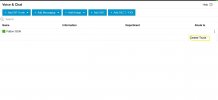
Apparently, I am also facing the same issue after upgrading to version 20. Cannot open sip trunk settings and only delete option is available. Do you have a solution for this error?
 

Attachments

  • 3cx SIP.jpg
    3cx SIP.jpg
    62.8 KB · Views: 20
Apparently, I am also facing the same issue after upgrading to version 20. Cannot open sip trunk settings and only delete option is available. Do you have a solution for this error?
Not at the moment.... the only option I have seen is to recreate a generic trunk, but this is not a practical solution.
 
Not at the moment.... the only option I have seen is to recreate a generic trunk, but this is not a practical solution.
Hope 3cx will release a patch to fix such issues or come up with a proper solution.
 
Hope 3cx will release a patch to fix such issues or come up with a proper solution.
There is a proper solution please use a supported sip trunk and avoid all these issues.

Thank you
 
There is a proper solution please use a supported sip trunk and avoid all these issues.

Thank you
@ Charles thank you for your response. We are using Patton ISDN E1. As far as I understand it was fully compliant with 3cx and working well so far till the last version 18. Appreciate if you could share the proper solution what you have to fix the issue. Thanks in advance.
 
Does it mean that end users who don't have the possibility to use a 3CX supported sip trunk should go away from your solution?

Thank you.
 
Hi shareef007 and Houbara

If you must use unsupported trunks or FXO gateways, which are now all generic templates, then you can use the method outlined by my colleague to replace the templates. This is the solution.
 
  • Like
Reactions: OlegR_3CX
You basically don't have few clicks solution now for the FXO gateway, and you must know what is required by the gateway as well you are doing when modifying the Generic template (as user Toni did). The easiest way will be using supported trunk.
 
Hi shareef007 and Houbara

If you must use unsupported trunks or FXO gateways, which are now all generic templates, then you can use the method outlined by my colleague to replace the templates. This is the solution.
@charles I understand your point. However, I am wondering why the working trunks or FXO gateways has become unsupported only on the new versions20 of 3cx. If it was unsupported and not compliant then it should not have been working at all with 3cx. The issue started after upgrading to version 20. 3cx new release should not be built in a way that it becomes uncompliant or unsupported with the working devices and systems with previous versions.
 
You basically don't have few clicks solution now for the FXO gateway, and you must know what is required by the gateway as well you are doing when modifying the Generic template (as user Toni did). The easiest way will be using supported trunk.
@OlegR_3CX Why suddenly the working trunk on 3cx version 18 and before came unsupported on the new version 20 after the upgrade?
 
Unsupported does not necessary mean it will not work, as we are not limiting and making it unused, is just we don't test them any longer and will provide you with the support. FXO became unsupported in latest V18 updates too even tho the template were there, however we stopped supporting them.
 
  • Like
Reactions: Charles_3CX
Ok, that doesn't help because you are adding an new sip trunk, after fiddling around we found the solution for this.

These are the steps to resolve this:
  • Under Admin, Voice and Chat, locate the trunk with the issue.
  • Click on the dots at the end and select export.
  • Rename the downloaded file to the xml filename located in the xml itself.
    • intellinet.pv.xml in our case.
  • upload the file to /var/lib/3cxpbx/Instance1/Data/Http/Templates/provider.
After this you can view and edit the sip trunk again.
Thanks. I'll try that. This is exactly the problem I am having.
 
Thanks. I'll try that. This is exactly the problem I am having.
In our case we cannot do that, the only option it gives us is to delete the trunk
 
Status
Not open for further replies.

Latest Posts

Forum statistics

Threads
111,990
Messages
590,163
Members
164,926
Latest member
tohoken1