Unable to access management console after AWS restarts

Status
Not open for further replies.

Mulyadi

Forum User
Joined
May 18, 2020
Messages
2
Reaction score
0
Hi, my AWS restarted and it changes IP. Now, I am unable to access the management console and my phones are not working.

In customer.3cx, I see that my FQDN points to what I believe is the old FQDN IP. Should I attempt to release this? What will happen if I do? Am I able to reassign this to a new IP?

Here are details
  • 3CX Version, Standard Annual v16.0 Update 5 (Build 611)
  • Server OS, Debian 9.3
  • Is the 3CX Server Hosted and where? AWS

    Installation was done by another vendor (which is uncontactable) and I think was done via AMI deployment - pbxexpress

    All 3CX services are running. I have restarted nginx.
    Server is on DHCP
    It has been more than 12 hours since my AWS restarted
    When I ping to FQDN, it shows a different IP address
    I am unable to ping to my current EC2 IP address too
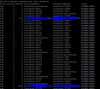
  • Here is my netstat
    nestat.JPG
Thank you!

Regards

Mulyadi
 
Last edited:
Hi,

If you read our AWS Marketplace guide on Step 10 You will see how to find the IP or host name of the machine. https://www.3cx.com/docs/pbx-amazon-aws-marketplace/

If you access the machine from that ip or hostname using https:// and the correct port (5001 or 443) then you can access your management console.

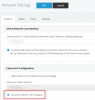
When you log in, change the network setting of 3CX to Dynamic so it will update your FQDN too. May take up to 6 hours so be patient until then.
 
Hi John, yeah managed to use port 413 i.e. https://xx.xx.xxx.xxx:413 ... I actually tried that yesterday but didn't work. Many thanks!

I have changed the IP address to a new one and now can access the management console after I updated the IP.

But now, my incoming (including IVR) and outgoing calls are not working.
I have ran Firewall Checker. SIP ALG not detected.
I have restarted all services.

What else should I check?
 
Since you appear to have a dynamic IP, then just changing it in the management console is not enough.
Set it to Dynamic instead as I have suggested earlier.
1589800546898.png

On a Standard License it may take up to 6 hours for the DNS changes to propagate across the internet.

Your incoming calls to IVR though should not be failing. Can you tell us what SIP provider you use or if you are using an analog phone gateway? Share all the relevant info as per this post please:
https://www.3cx.com/community/threads/information-to-provide-when-requesting-help.67558/
 
Status
Not open for further replies.

Latest Posts

Forum statistics

Threads
111,948
Messages
589,880
Members
164,841
Latest member
erre