- Joined
- Dec 16, 2021
- Messages
- 14
- Reaction score
- 4
I'm attempting to add a new phone but found the "OK button on the form with the model selection + mac address entry seemingly does nothing.
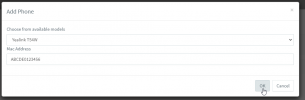
The mac address has been sanitized here. Image is only for illustration of where I am having the issue. After looking in further, I noticed the "save" api call is failing with a status of 522. Here's the body of the response:
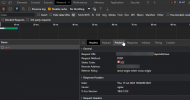
I'm not sure what this weak admin password means here, as I have not yet gotten to the fields to enter/change the phone's admin password. Any help would be appreciated. The system shows no pending updates at the moment. I have not added a phone in quite a while (few months at least) so I'm not sure when it last worked.
The mac address has been sanitized here. Image is only for illustration of where I am having the issue. After looking in further, I noticed the "save" api call is failing with a status of 522. Here's the body of the response:
JSON:
{"ItemId":922,"PropertyPath":[{"Name":"DeskphonePassword","IdInCollection":0}],"PropertyType":"DeskphonePassword","ValidationError":"WrongPassword","Message":"WARNINGS.WEAK_ADMIN_PASSWORD","Arguments":[],"Comment":null,"SubProperty":""}I'm not sure what this weak admin password means here, as I have not yet gotten to the fields to enter/change the phone's admin password. Any help would be appreciated. The system shows no pending updates at the moment. I have not added a phone in quite a while (few months at least) so I'm not sure when it last worked.