- Joined
- Sep 26, 2019
- Messages
- 18
- Reaction score
- 2
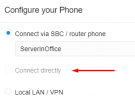
I upgraded the most recent v18 to v20. I created a new user to make sure there are no past phones stuck in config files. I went to the "IP Phone" section of the user. I click the blue button "Configure a Phone". I then select Yealink T54W and its MAC. The phone was factory reset beforehand. Then I get options to Connect via SBC, Connect directly, and Local LAN. The "Connect directly" option is grayed out and I can't select the option. I tried the same on a clean new install of v20 and I was able to add a routing phone there.
Is there a setting somewhere that would disable the option?
Thank you.
Is there a setting somewhere that would disable the option?
Thank you.