Unable to add router phone on v20 that was upgraded from v18

Status
Not open for further replies.

abstractcure

Silver Partner
Basic Certified
Joined
Sep 26, 2019
Messages
18
Reaction score
2
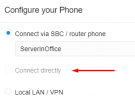
I upgraded the most recent v18 to v20. I created a new user to make sure there are no past phones stuck in config files. I went to the "IP Phone" section of the user. I click the blue button "Configure a Phone". I then select Yealink T54W and its MAC. The phone was factory reset beforehand. Then I get options to Connect via SBC, Connect directly, and Local LAN. The "Connect directly" option is grayed out and I can't select the option. I tried the same on a clean new install of v20 and I was able to add a routing phone there.

Is there a setting somewhere that would disable the option?
Thank you.
 

Attachments

  • Screenshot_9.png
    Screenshot_9.png
    6.7 KB · Views: 32
Have you also ensured that the ip phone is under the latest firmware version?
 
Yes, I did. It is the most recent version 96.86.0.77. I doubt it has any influence on the dialog itself. If the FW was old then it may have operational issues down the road, except here it is the 3CX system not even allowing to use the "Connect directly" feature.
Thank you anyway.
 
This is not correct, as the latest firmwares will allow the phone to also be used as router phone along of course with other fixes.
Adding to another extension allow you to connect directly?
 
At the time of adding the phone to user, the system doesn't know anything about the phone yet. I was able to add T54W with a fake non existent MAC address on a fresh v20 as a routing phone. It proves that firmware has nothing to do with the grayed out option to "Connect directly". None of the existing extensions allows to add a routing phone, just like none of the newly created extensions (users) allows to add a routing phone.
 
So, the problem turned out to be the fact that 3CX doesn't allow custom templates on routing phones. If you want a button to say "Park 1" instead of SP1, or as our clients call it "speakerphone one", you are out of luck. What a genius decision!
 
@abstractcure First of all glad to know this is resolved.
However custom templates are not supported(and this is not a limitation for router phones) and you should always use the default template and latest firmware.
 
Status
Not open for further replies.

Latest Posts

Forum statistics

Threads
111,952
Messages
589,894
Members
164,844
Latest member
abctel2