Solved Unable to 'Barge' Incoming calls from external numbers

Status
Not open for further replies.

RESOLVE-WR

Silver Partner
Basic Certified
Joined
Mar 28, 2023
Messages
25
Reaction score
2
Morning all,

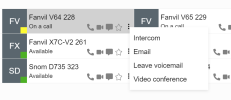
Internally we're using the 3CX Web App throughout the business, and when users have been given the 'Barge' function, they click the 3 dots to choose to 'Barge' another user, and no options appear. If we test an internal call Barge, the options appear and this works fine. Any ideas?
 
Hi,

Are you trying to barge into the calls of users belonging to another group?
 
Hi John - All users we're trying to Barge into are part of the same Queue and Group.
 
Hello,

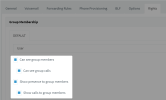
And can we also confirm please that all the users (including the ones already in a call, and also the person that wants to barge) have these options enabled?

1681996542828.png

Without those, if you click the 3 dots you will not see the barge option because you either aren't showing the calls to the barge function, or you aren't seeing them if they are there (even if the Status is Yellow and shows "On a call"

1681996675605.png
 
1682064273709.png
Morning John,

Did what was requested, please find what we get when we try to barge in. No options still.
 
Oh sorry, is the pop up menu completely empty?

This is a cache issue that can be resolved by emptying the browser cache.

Please log out of the webclient and log back in. Reload your page with Ctrl-Shift-R.
 
Hello John, done the above on all machines effected and we're still getting the same. Any thoughts? We can see the pop menu for others when not on calls, and internal calls also. It's only when outbound calls are answered, and we need to Barge in. :)
 
Thanks, please tell me your PBX version number and what browser you were using and I will get back to you.
 
Morning John,

We're all using Microsoft Edge (Version 112.0.1722.48) and have installed 3CX as a web-app from the browser.
 
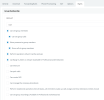
Thank you very much, I have checked and you will need one additional right for barge in:

1682068464174.png

So the minimum set of rights needed in total will look like this:

1682068500369.png

Give it a go and let me know if everything works now as intended!
 
  • Like
Reactions: RESOLVE-WR
Thanks John,

Now up and running - Appreciate your help on this. :)
 
  • Like
Reactions: JohnS_3CX
Status
Not open for further replies.

Forum statistics

Threads
111,974
Messages
590,081
Members
164,899
Latest member
mazet