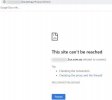
Unable to connect at xxxxxx.3cx.com.au

Status
Not open for further replies.

Nazrul

Free User
Joined
Jul 20, 2021
Messages
17
Reaction score
1
Hi 3cx Support,

Please check xxxxx.3cx.com.au FQDN connection issue.
Just 2 weeks old this system and now gone.
2021-07-27_14h55_18.jpg

what is email that can be use for 3CX Support ?

Thanks
Naz
 
Hi Have the same problem.. Cant get to my 3cx FQDN..
 
Are you both Hosted by 3CX?
 
Are you both Hosted by 3CX?
No I use on-promise. But I did get a free FQDN from 3cx. Its all working inside of my local pbx, but i can not get to the xxxxx.3cx.se an login.
 
@Nazrul
First thing I'd recommend is making sure your FQDN is resolving to the correct IP. Check what the public IP of your 3CX PBX is against what the FQDN resolves. To check what it resolves to I'd recommend running nslookup from the same machine you are trying to access the Management Console from. Are they the same?

If not and this is a on premise machine, check to see if you can reach the Management Console from the same LAN using the local IP: https://LOCAL_IP:443
Is it up and running?

@MasterAdde
No I use on-promise. But I did get a free FQDN from 3cx. Its all working inside of my local pbx, but i can not get to the xxxxx.3cx.se an login.
If you can reach the Management Console from the same LAN as the PBX it is very likely something to do with the firewall configuration. As mentioned above, firstly make sure that the FQDN resolves to the correct public IP, and if it does, you should then proceed with reviewing your firewall configuration.

The default HTTPS port used for on prem deployments is TCP port 5001 so if you did not change this during installation I suggest you make sure that it is configured correctly on the firewall. If you did change it check the corresponding TCP port.
 
Hi Chris,

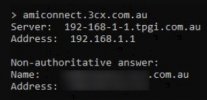
Plz trace your end regards to my 3cx System.
2021-07-28_10h27_49.jpg
this is not working any more.
Thanks.
 
Last edited by a moderator:
You should delete the above post, as you have posted private info.

Is the above IP address your wan IP address, if so then 3CX is updating your FQDN.

Using an online open port test https://www.yougetsignal.com/tools/open-ports/ , ports 5001 and 443 are not open

I would say it is a network issue somewhere - firewall, internal routing.

Have you been playing around with console restrictions ?
 
Hi , i have done nothing in console and it was working, out of sudden this disaster happen.
i believe ,its not paid version and it has no guarantee .
i have received an email from 3CX saying,3CX has detected that your Public IP Address has changed to 203.59.229.xxx.
its hosted in AWS EC2 Instance.
is any 3cx support email for basic support?
appreciate for further advise.
Thanks
 
@Nazrul
First thing I'd recommend is making sure your FQDN is resolving to the correct IP. Check what the public IP of your 3CX PBX is against what the FQDN resolves. To check what it resolves to I'd recommend running nslookup from the same machine you are trying to access the Management Console from. Are they the same?

If not and this is a on premise machine, check to see if you can reach the Management Console from the same LAN using the local IP: https://LOCAL_IP:443
Is it up and running?

@MasterAdde

If you can reach the Management Console from the same LAN as the PBX it is very likely something to do with the firewall configuration. As mentioned above, firstly make sure that the FQDN resolves to the correct public IP, and if it does, you should then proceed with reviewing your firewall configuration.

The default HTTPS port used for on prem deployments is TCP port 5001 so if you did not change this during installation I suggest you make sure that it is configured correctly on the firewall. If you did change it check the corresponding TCP port.
Hi.Thx for answer:) I check dnslookup and it resolves to my Public IP. Looked in fw settings and they seem to be correct....port 5001 is open and forward to my local ip of PBX.

Its Strange.... I can reach xx.3cx.se from computer outside our office. But not inside? I know that fw settings are OK but I will look into it again... VERY STRANGE ?!?!?
 
Last edited:
When you say that it resolves to your Public IP do you mean the Amazon's instance public IP?

Is there any chance you've installed 3CX using the same License Key in a different location (e.g on premise) as well?
 
I am battling with `1st installation and no time for 2nd installation.
 
@Nazrul
I'll PM you shortly regarding this.
 
Hi.Thx for answer:) I check dnslookup and it resolves to my Public IP. Looked in fw settings and they seem to be correct....port 5001 is open and forward to my local ip of PBX.

Its Strange.... I can reach xx.3cx.se from computer outside our office. But not inside? I know that fw settings are OK but I will look into it again... VERY STRANGE ?!?!?
I can get to myFQDN from another computer but not from this one. So mine is working Just need to see whats wrong.
 
I can get to myFQDN from another computer but not from this one. So mine is working Just need to see whats wrong.
When you try to access the MC from a PC in the same LAN as where the 3CX Server is located, how are you trying to do so?
  • https://<FQDN>:<HTTPS port>/
or
  • http://<Local LAN IP Address of Server>:<HTTP Port>
If you are trying the first, the reason you might not be able to get it is because the internet router/firewall is not allowing loopback traffic (very common btw). This would also justify when trying to access from the outside you can reach it fine.
 
Hi 3CX Support,
is any way i can delete 3CX System and start all over again ?
How to retrieve installed 3CX using the same License Key ?

Thanks
Nazrul
 
The easiest way to retrieve your License Key if you don't have it in an email, would be to log into the Customer Portal with the email you signed up with.

From there on, if you have installed 3CX on a Virtual machine, you can just delete it, deploy a new one from the 3CX ISO and use the same key.

A word of advice, if you have made multiple installations with the same key while testing out the software (e.g. you may have created on in the cloud AND on premise), remove all of them before starting fresh.
 
Hi Nick,
I have terminated AWS Instance for fresh start.
further more, i was unable to log into the Customer Portal with the email i signed up with.
Please advise License Key that i can use to register again for 3cx system.
otherwise , you can assist to delete ( xxxxxxxxx.3cx.com.au ) in your record and i can re register same account.

Thanks
Nazrul
 
Last edited by a moderator:
Hi Nazrul,

We can't release the FQDN from your License Key, you need to do that yourself from the Customer Portal.

If you can't access the customer portal or don't remember your credentials, you will need to contact the 3CX Customer Support team to see if they can help you somehow.
To contact them you can use the Live Chat on www.3cx.com .
 
Status
Not open for further replies.

Forum statistics

Threads
112,005
Messages
590,245
Members
164,947
Latest member
JamesAMB