Unable to do attended transfer from Yealink T54Ws on SBC

ML_digital

Silver Partner
Basic Certified
Joined
Mar 25, 2021
Messages
10
Reaction score
1
Hi,

We've got an issue with one of our clients where they are unable to do attended transfers from their Yealink SIP-T54W phones after upgrading to v20.0 Update 5 (Build 551). Attended transfers via the 3CX softphone work fine for the people affected but they would prefer to use their desk phones.

The phone are configured with SBC and were working fine on v18.

We've tried the following troubleshooting steps to resolve this issue:
  1. Reboot affected phones
  2. Restart the 3CX server
  3. Restart all services on the 3CX server
  4. Reprovision the phones
  5. Review the event and activity logs but nothing stands out as causing the issue
    1. We've enabled verbose logging on the activity logs in the hopes that this helped but no luck
      1. Verbose logging is still enabled whilst we are troubleshooting this issue
  6. Reviewed the config for the phones via the 3CX console and ensured that the settings are correct
  7. Ensured that the phones are on the latest firmware that 3CX detects and supports
  8. Ensured that the SipTrunks have "IsSupportReinvite" and "IsSupportReplaces" set to 0
    1. https://www.3cx.com/community/threads/attended-transfer-not-working.128108/
    2. https://www.3cx.com/community/threads/attended-transfer-not-working-as-expected.127848/
    3. This was set to 0 already
Can you please advise on how we go about resolving this issue and get attended transfer working again?

Regards,
ML_digital
 
Hi,

I can confirm this works fine (Using V20 SP5, V20 SBC, and 96.87.0.16 firmware) so something else is happening in your case.

You've told us everything above except the most critical parts:

- How do you actually perform the attended transfer (steps the actual customer used)
- What actually happens when you try to do it
- Whether it affects internal/external calls
 
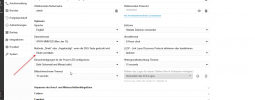
Did you check this option on your phone? 1746172384962.png
 
Hi,

I can confirm this works fine (Using V20 SP5, V20 SBC, and 96.87.0.16 firmware) so something else is happening in your case.

You've told us everything above except the most critical parts:

- How do you actually perform the attended transfer (steps the actual customer used)
- What actually happens when you try to do it
- Whether it affects internal/external calls
Apologies. This is what I get for having multiple things going at once. Answers below:
  1. Whilst on a call, the customer attempts to do a transfer by pressing the transfer button that shows on their phone to do an attended transfer to another extension. Once they've pressed the button, then they enter the extension and press call.
  2. The transfer is then a blind transfer and goes straight through to the destination extension without any announcement.
  3. It affects all internal and external calls.

Did you check this option on your phone? View attachment 47688

Thanks for this. Rather annoyingly, we discovered that after I raised this post and noticed it was on the "Blind transfer" option. We've changed it to be "Attended transfer" and have send the provision command to the phones to make sure that they get the config applied.

We're now waiting on the affected people to confirm it is working (they don't work on Fridays, so it'll likely be next week now when we hear back). I'll let you know the outcome of that before doing any more troubleshooting on it.
 
  • Like
Reactions: bitn2
Once they've pressed the button, then they enter the extension and press call.

Hmm this does not match with the expected behavior, were you able to replicate this yourself?

Try to factory reset and reprovision at least one of the phones and see if it behaves as intended.

Note: Do not manually configure or use custom templates.
 
Think we've sorted this now.

It was the transfer option against the IP phone within the admin console that was the cause.
Did you check this option on your phone? View attachment 47688

Once we changed that to be attended transfer and reprovisioned the phones, then it works as expected.

I think that this can be closed now. Thanks for all your help on this.
 
So then there is missing information here, they were using the BLF to transfer and not actually dialling a number.
 

Members Online Now

No members online now.

Forum statistics

Threads
111,831
Messages
589,277
Members
164,660
Latest member
RJenkinsROCK