Unable to get CRM popping up

Status
Not open for further replies.

greychain

Gold Partner
Advanced Certified
Joined
Jul 13, 2018
Messages
779
Reaction score
122
When I receive an incoming call the CRM fails to popup.

I can open the CRM page by clicking on the CRM button in the webclient so I know the system has the information required.

The webclient is configured for Webclient , I've also tried browser extension.

I've checked the chrome popup blocker is not stopping this. I have even added it manually as an allowed site.

Any thought on where to look next?
 
  • Like
Reactions: rbovenkamp
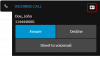
Do you see the Open Contact button when you receive an inbound call as in the following screenshot?
1598893058898.png

Please check the Web Client > Settings > Integration, and ensure that you have selected the option to automatically popup the contact record when CRM is enabled.
 
Hi Edossantos,

I do not see that popup, only the 3cx Windows client notification.
 
You need to use the Web Client to get popups. The Windows client will not launch them.
 
I am using the webclient.

I have exited out of the 3CX phone client and notice my presence/status information disappears from the webclient people list.

I logged out of the webclient and logged back in again to ensure I'm using the correct credentials. I am.

I can see other peoples status. In the contact list I can use the CRM button.

In the admin console I can see the extension is not registered.

When trying to make a call from webclient/extension I get. Failed to Call.

When making an incoming call I get routed direct to leave a voicemail.

I have tested this on a different computer with a different extension. Same results
 
Then please post another question in the general forum, as you need to fix that first before working on CRM integration.
 
Ok i solved the issue of the webclient not being able to make/receive calls. Did this by reinstalling 3CX from scratch, the only common item being the CRM.xml file I am using.

So webclient will popup now but does not have the CRM icon available. If I use the Custom CRM link option and the ContactURL from the CRM test, it will pop up the page
 
If you don't see the CRM Contact button, then it's because there is no matched contact. You will need to enable verbose logs in 3CX, and then make a call to reproduce the issue and check the 3cxSystemService.log file. There you will see any error while interacting with the CRM.
 
I have deleted all contacts in the 3CX contact section. No contacts show in the webclient.

When I place a call to 3CX the contact is created in the 3CX contacts section and now shows in the webclient contact area. This contact shows a CRM button, if I click on that button it opens the contact page in the CRM.

Looking at the 3cxsystemservice log I can not see any errors relating to CRM lookup.

When I call in I do not see the CRM button in the pop up , only the contact details
 
Last edited:
I am having same issues as greychain, contacts populate in 3cx, but no contact button on the call and no window pop-ups. at the same time I lost my call journaling also.
 
We have the same problem here.. I also put 3cx server in verbose logging mode but no error found there..

Regards,
 
Any update regarding this problem? Is it a known issue or are we made a mistake which can be fixed?


Regards,
 
We have the same error at our customer (Using Salesforce Server Side Integration)
Call is logged in Salesforce but no Popup in Saleforce and no CRM Contact button when i receive an inbound call
I can open the CRM page by clicking on the CRM button
 
Last edited:
Here are the result from a test CRM lookup. Does this look correct?

[
{
"UnparsedOutputs": {
"ContactID": "85ec9ee1-3802-3b4e-15fa-5f3e67f64ce6",
"FirstName": "Firstname",
"LastName": "Lastname",
"PhoneBusiness": "012620441",
"ContactUrl": "https://mycrm.site.net/index.php?mo...w&record=85ec9ee1-3802-3b4e-15fa-5f3e67f64ce6",
"AccountID": "85f6da75-5b14-ab2c-3ede-5f3e67922eab"
},
"FirstName": "Barry",
"LastName": "OShaughnessy",
"Email": null,
"ContactUrl": "https://mycrm.site.net/index.php?mo...w&record=85ec9ee1-3802-3b4e-15fa-5f3e67f64ce6",
"CompanyName": null,
"PhotoUrl": null,
"ContactType": 0,
"PhoneBusiness": "012620441",
"PhoneBusiness2": null,
"PhoneHome": null,
"PhoneHome2": null,
"PhoneMobile": null,
"PhoneMobile2": null,
"PhoneOther": null,
"FaxBusiness": null,
"FaxHome": null,
"Pager": null
}
]
 
Hello everyone,

We're investigating the issue. So far, we know that this happens when the number in the CRM is not exactly the caller number, probably bacause of having different prefixes. So if you need a quick fix, you can change your CRM contacts to have the same number format that you receive from your SIP Trunk, or apply caller ID reformatting techniques to adjust the caller number to what you have in the CRM.

We will let you know when we release a fix for this.

Thanks for your patience.
 
Thank you for the response! I was able to fix the issue with your help. We do not store the +1 for US calls in our database. I was able to fix it with this inbound reformat of the CID.

1600099149550.png

The employees in my call center thank you also!
 
With the help of Andreas Psyllos the problem has been identified for me.

If you have your mobile number listed in 3CX for your extension (or any extension) and you are using it for testing in your CRM then it will not pop up. Change your mobile number in your 3CX extension and it does.
 
With the help of Andreas Psyllos the problem has been identified for me.

If you have your mobile number listed in 3CX for your extension (or any extension) and you are using it for testing in your CRM then it will not pop up. Change your mobile number in your 3CX extension and it does.


Thank you greychain, That was my issue too. was testing with my own cell number.
 
Status
Not open for further replies.

Latest Posts

Forum statistics

Threads
112,325
Messages
591,898
Members
165,477
Latest member
Mueller