Solved Unable to install Windows SBC 16

Status
Not open for further replies.

ajmiranda

New User
Joined
Feb 14, 2021
Messages
4
Reaction score
2
Hello,
I'm unable to install the latest version of SBC - 3cxsbc16.msi - downloaded directly from 3cx's website.
When I double click the file nothing happens.
I've tried troubleshooting a lot of things related to windows installer service, but I don't think this is the issue.
I just downloaded the version 15 msi also from 3cx's website and the installer works ok.
Does anyone is having the same issue? Is the file corrupted?
Tks
 
Have you tried right-clicking and running as administrator? Have you tried rebooting? Tried running it on another computer?
 
  • Like
Reactions: ajmiranda
What version of Windows are you trying to install on?
 
Have you tried right-clicking and running as administrator? Have you tried rebooting? Tried running it on another computer?
It does not have a option to run as administrator. I did reboot several times when troubleshooting. Unfortunately I don’t have another computer now to test, but that’s a good idea and tomorrow I’ll try


What version of Windows are you trying to install on?
Windows 10 Enterprise 1909.

I’m pretty sure is some issue related to the installer service. There’re a lot of reports of similar issues on the internet. I just can’t figure out what’s going on. I guess I’ll sleep on it and maybe tomorrow something comes up.
 
Well the latest WIndows 10 version is 2009/20H2 so I'd look at upgrading to that and then trying to install again.
 
  • Like
Reactions: ajmiranda and N_G
We have thousands of installations of the SBC, so I am also thinking something with the PC.

Trying on another PC is a very good idea. I'd also check if there are any Group Policies that could be causing this, or maybe the Windows UAC settings, and even A/V software can sometimes cause strange things like this so maybe try removing it.
 
Thanks for all the responses. Just a quick update, I've both updated to the latest version of windows and tested on a different PC without success. The error is still the same: double click the msi file and nothing happens. No error pop up on the screen also.

I've also done a windows repair (reinstall OS but keeping user files and apps) and the error persist. I'll try a little more troubleshooting but next step is doing a clean install.

But I'm scratching my head since it didn't work on two different PCs.

If someone could download and open the latest msi file and see if you can get into the first screens of the install would be extremely helpful. I'm positive it's something on my end, but just want to get this off my head.

Thanks again and have a good day everyone
 
Right click the file > properties > check the box to unblock i think its called
 
Are the accounts you're running the installer under 'Administrator' accounts rather than normal users?

Also, you should be able to check the Windows application logs to see if they return any error info when you trigger the installer - this could give you a big clue as to what is going on.
 
  • Like
Reactions: ajmiranda
If someone could download and open the latest msi file and see if you can get into the first screens of the install would be extremely helpful. I'm positive it's something on my end, but just want to get this off my head.
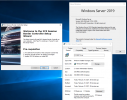
I didn't quite have a Win10 on your version, but I had a fully updated Win2019 that I tried on:
1613655074116.png
 
  • Like
Reactions: ajmiranda
You may have a group policy or some local policy (software restriction) whish is preventing MSI files running in locations like appdata and such.

Try running it from C: root
 
Are these both company computers that you tried installing to? There may indeed be some policies controlling what those machines are allowed to run/install.

You should also consider upgrading your Windows since build 1909 is a bit old now.
 
You may have a group policy or some local policy (software restriction) whish is preventing MSI files running in locations like appdata and such.

Try running it from C: root

Running from C: root worked! Good catch @kieferschild , thanks a lot!

Also, thanks to everyone who replied. This is my first foray into 3CX (and PBXs in general) and first support request and I'm already impressed by the product and this community.

Edit: not impressed by Windows though.
 
Glad to hear you got it running, we will mark this as solved.

If you need any additional help, start a new thread and we can assist ;)
 
  • Like
Reactions: ajmiranda
Status
Not open for further replies.

Forum statistics

Threads
111,974
Messages
590,081
Members
164,899
Latest member
mazet