Unable to login after upgrade to v20

Status
Not open for further replies.

romkus

Customer
Joined
Nov 26, 2021
Messages
10
Reaction score
1
After a successful upgrade to V20, having previously checked all pre-requisites and created a system owner I am now faced with this when trying to login to the console:

Screenshot 2024-06-11 160626.jpg

What I tried so far:
  • tried to use a wrong password for a check, and it then does say the password is wrong.
  • tried to user a "forgot password" link, I than changed the password, but the same error occurs when I try to use it.
  • sniffed the network while hitting login: I see HTTP error 500 coming back from the server.

What else can be done? The telephony itself seems to work fine.
 
Did some more research into the logs. Here is what I see:

Code:
2024/06/11 17:02:34.412|53993|0052|Trac|[Microsoft.AspNetCore.Hosting.Diagnostics] Request starting HTTP/1.1 POST http://<HOST>:443/webclient/api/Login/GetAccessToken - application/json 84
2024/06/11 17:02:34.413|53993|0052|Trac|[Microsoft.AspNetCore.Cors.Infrastructure.CorsService] CORS policy execution failed.
2024/06/11 17:02:34.413|53993|0052|Trac|[Microsoft.AspNetCore.Cors.Infrastructure.CorsService] Request origin https://<HOST> does not have permission to access the resource.
2024/06/11 17:02:34.413|53993|0052|Trac|[Microsoft.AspNetCore.Routing.EndpointMiddleware] Executing endpoint 'ManagementConsoleJS.Controllers.LoginController.GetAccessToken (3CXManagementConsole)'
2024/06/11 17:02:34.413|53993|0052|Trac|[Microsoft.AspNetCore.Mvc.Infrastructure.ControllerActionInvoker] Route matched with {action = "GetAccessToken", controller = "Login"}. Executing controller action with signature System.Threading.Tasks.Task`1[Microsoft.AspNetCor>
2024/06/11 17:02:35.749|53993|0052|Warn|[ManagementConsoleJS.Controllers.LoginController] Is not possible to determine which folder are the protection keys. NetDevPack.Security.JwtSigningCredentials.Store.FileSystem or NetDevPack.Security.JwtSigningCredentials.Store.E>
2024/06/11 17:02:35.750|53993|0052|Trac|[Microsoft.AspNetCore.Mvc.StatusCodeResult] Executing StatusCodeResult, setting HTTP status code 500
2024/06/11 17:02:35.750|53993|0052|Trac|[Microsoft.AspNetCore.Mvc.Infrastructure.ControllerActionInvoker] Executed action ManagementConsoleJS.Controllers.LoginController.GetAccessToken (3CXManagementConsole) in 1336.6096ms
2024/06/11 17:02:35.750|53993|0052|Trac|[Microsoft.AspNetCore.Routing.EndpointMiddleware] Executed endpoint 'ManagementConsoleJS.Controllers.LoginController.GetAccessToken (3CXManagementConsole)'
2024/06/11 17:02:35.750|53993|0052|Trac|[Microsoft.AspNetCore.Hosting.Diagnostics] Request finished HTTP/1.1 POST https://<HOST>:443/webclient/api/Login/GetAccessToken - 500 0 - 1337.6130ms

Is this, Is not possible to determine which folder are the protection keys, the crux? If yes, then how do we go about it?
 
This will require some further investigation.
Can you please create a support ticket to check?
 
I have the same issue only that I don't see any error message. Is there a conclusion on what the problem is?
 
@MatsW If you are unable to login to the management console, normally you should see an error.
What is your exact issue?
Note that this is a specific case that need some further investigation.
 
If you try to login normally in the PBX, what is the error?
 
"login normally" ? If you mean the management console at https://xxx.3cx.se:5001 then it works fine. It's when I try to login to https://xxx.3cx.se:5001/webclient that login doesn't work. And this prohibits me from upgrading from v18 to v20 as I already have done this a couple of times, and the webclient still doesn't work
 
If it does not allow you to the webclient this means that you are using wrong credentials.
This apply to all extensions?
 
Nope. Because if I use the wrong credentials then I get a red error message saying this. Have not tried on other extension. Can do it tonight

Update: Tested to login with webclient to another extension and the same problem occured
 
Last edited:
If i understand you correctly, you have the problems AFTER upgrade to v20? Than its correct, there is no /webclient link anymore.
 
No, I've tried to migrate from a Win-10 3CX v18 installation (where /webclient doesn't work) to a Debian v18 installation (where /webclient doesn't work), and finally upgraded the installation to v20 where /webclient also doesn't work.
So I finaaly found no reason to continue trying to upgrade to v20 since webclient was the only management interface available in v20. First I need to resolve the issue in v18 where there is a management inteface avaiable that I can use.
I've tried with Edge, Firefox, Crome with incognito windows on all but always the same result, so finally I decoded the https traffic to see what was going on. And it seems like there is something in my system owner extension that the webclient gets upset of. But what?
 
and finally upgraded the installation to v20 where /webclient also doesn't work.
There is no /webclient link on v20. You just have the fqdn to login and nothing more. But what i dont understand, why you upgrade an broken installation... I would start from the scratch and configure everything new. Its nearly impossible to find the problem with an broken installation like this.
 
Ok, I was perhaps a bit unclear. My point in v20 is that the management login points you to an extension for login, and this doesn't work just as in Windows v18 and Debian v18.
And the whole point of upgrading is that I don't have to go thru the complete learning of every teeny wheeny configuration detail to set up groups, voicemail, extensions and so forth. And what's the guarantee that it works then? I've seen other people who has the same problem as I have, so why not try to get to the bottom to what the heck is going on?
And regarding "broken" installation. This is a clean install of Debian that pulls in a backup file from a working installation. Why not look at the server http code that parses the "/webclient/api/MyPhone/session" post, and replies with "403 Forbidden". Can't so much code to look at (I've written a few web-servers, and that wasn't so much). I can provide decoded https traffic if needed. Then it can be seen exactly what is going on
 
There must be something in your backup that broke your installation. Ive never seen this failure on any ouer installations. In v20 you only have the webclient and no management anymore. Thats the diffents to v18. You could try the login on your v18 before upgrade to v20. If it doesnt work on v18, why should it work on v20.
 
webclient login didn't work on my Win-10 v18 installation on which the backup was created. Other than webclient, this installation worked fine. So I don't agree that it was "broke".
AndI've tried 5 times to create a Debian v18 and update it to v20. And none of the times webclient login works on v20.
So I need some 3CX programmer to open up the source file that handles the "/webclient/api/MyPhone/session" post, to see what the reason is that it returns http error code 403.
And I've gone thru the configuration for the system owner config page, and there are no indication that there is something wrong. So the question on what is broke is a sematic definition.

And btw, I tried to login to another extension and the same problem occurred.

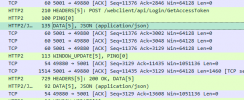
Just to clarify: Credentials given to webclient is correct which below Wireshark trace show when I press "Login" where server responds with "200 OK" to browsers "POST /webclient/api/Login/GetAccessToken"

1718822803739.png

Also, then next "POST /connect/token" by browser is accepted by server.

Problems occur when browser sends "POST /webclient/api/MyPhone/session" with the following JSON {"name":"Webclient","version":"18.0.9.31","isHuman":true} where server responds with HTTP status 403 "Forbidden" and the following data "User is not allowed to log-in"

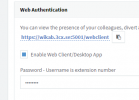
How come when extension config says
1718823645444.png

Is there some other setting somewhere which could block access?
 
Last edited:
No Webclient, installation is broke... Sorry, but that's a really bad idea to restore an backup from an broken installation.
 
How can you conclude that the installation is broken? The backup was accepted by the installer. The webserver parsing /webclient/api/MyPhone/session post, is deciding based on some setting that "User is not allowed to log-in".
This could just as well be a bug in the server! Some setting that isn't restored properly when the backup is read back. And if this is the case then 3CX may face some serious problems because if someone tries to restore a backup to v20 it may cause the only means of logging in to system to be blocked.
So please, I've provided 3CX with debug information on a sliver plate. It's a piece of cake to search thru the webserver sources for the string "User is not allowed to log-in" since this is data provided by the webserver app.
 
There is something in your Server that is already broken and if you restore a backup with this broken stuff it remains broken. If you want to find a solution what is broken in v18, open a ticket with 3cx to get some help. The easier way would be to start from scratch with an clean install without backup/restore.
 
No. It was not something in my server that was broken. It was the v18 which had default settings which explicitly blocked webclient access. And the config was hidden deep down where it was not obvious to search for webclient settings.
In the System Owner extension setting, select the Phone Provisioning tab. The click on the Your Phones dropdown list and select 3CX App. This will change tab content and reveal a new section Access where there is a checkbox Block Access to 3CX App / Web Client which is by default set.
One can really question why 3CX has combined access to 3CX App to Web Client. Those are two different things. And if this config for some reason get set then you're locked out from your v20 system forever!!
It took 3CX Support to figure this out, so it is definitely not obvious for a user to find it there.
 
Status
Not open for further replies.

Latest Posts

Forum statistics

Threads
111,951
Messages
589,886
Members
164,843
Latest member
sambannoura