Solved Unable to reach 3CX Updates server. Check your internet connection and try again.

Status
Not open for further replies.

jakorsme

Customer
Joined
Jun 11, 2020
Messages
46
Reaction score
2
https://downloads-us.3cx.com/downloads/v160

Can't access downloads/update server from within 3cx console.

"Unable to reach 3CX Updates server. Check your internet connection and try again."

If I enter the URL in the web browser directly I get a 404 response.
 
I ran into this after running into a dead-end with 3CX off-and-on refusing management console socket connections and then after awhile coming back online. Same with incoming calls going offline. The firewall management console check passes. When it works it works getting calls. Our topology is our perimeter firewall and 3cx running locally on internal 192.168.1 subnet. No other VMs on the hardware are affected. Nor do other boxes on subnet have issues. We are on a new install of 3CX 16. We had been running 3CX 15 for a couple years with no issue on a different VM on same h/w, but 15 blew up with Debian 9 upgrade, so we had to start with a new 3CX 16 install on a new VM (no customization or hacking).

So, I thought I'd try making sure 3CX was current and ran into this additional issue.
 
So that thread says https://downloads.3cx.com should say 'I am here' which it does for me (page title, not content). But the URL you are using gives me a 404 which I would expect. But the issues you describe sound like a network issue, not a 3CX issue. What hypervisor are you using?
 
I get the same tonight as you when I strip the trailing structure off the URL Although I could have sworn I did that also as a test today - may have been the title versus content thing.

I'm using the VMWare ESXi raw iron Hypervisor version 6.5

I've eliminated a lot of general network issues by some observations and tests.

Hardware flakiness/failure: Nothing else on the network is exhibiting this behavior, including other VMs on the same hypervisor (using same h/w nics).

Perimeter firewall: Nothing else affected and 3cx 5 was running through its rules unchanged (except added ports 10k+ for 3cx 6 to satisfy the 3cx firewall tester) for two years very stable.

It's almost behaving as if some DOS mechanism has kicked in, denying socket connections and often ping packets not moving.
 
Hi @jakorsme

If you ssh into your machine, and do "sudo apt update" can you tell me if it produces any errors or simply paste the output here?
 
No errors.
sdout results at the end is:

43 packages can be upgraded. Run 'apt list --upgradable' to see them.
 
After seeing your other thread in conjunction with this one...

Do you have a core/network firewall/router in front of this server, and if so, what kind is it, Brand, Model, Firmware, etc.

Because that is an awful lot of gremlins to have in one network without some common denominator.

I just confirmed my test server updated to the new beta without incident, and i also updated our in office 3CX server just to make sure it is good right this minute, and it also updates without incident. And both of these servers are 30 miles from each other at different sites, on different ISPs, but both on VMware ESXi 6.7 hosts.
 
Yes our perimeter firewall. It is a two-nic'd virtualbox VM running Ubuntu in "router", pass-through mode.
It's using iptables.

This firewall has been fine for years, including running 3CX version 5.x through it for about two years.

With 3CX version 6, I did have to add NAT rules for the ten-thousand ports (10600-10998) which allowed it to pass 3CX's firewall checks/tester.
I mimicked the rules that had been in place for the nine-thousand ports (9000-9500).

We don't have issues with our network other than these (seem to be) network issues with 3CX. So no gremlins.
 
SSL/TLS inspection running, or some other packet filter and inspection services other than the basic NAT via IPTables?

If you have it can you also drop the firewall checker results, might be relevant at least slightly.
 
Not within the path of this I don't think - of course our website vm has server-side http mod_
security - but that's not in the path here.

I'll try to post the firewall checker screen - I'll have to photoshop out identifying info though b4 posting what google will pickup.
 
ummm, as long as you do not capture the address bar, there is no identifying information on the firewall checker.....

1595356981484.png
 
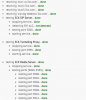
Oh - I was thinking of the screen that shows it as passed. You're referring to the tests as they are run. I'll re-run and post that as soon as I can get back into the 3CX console - down right now again.
 
  • resolving 'stun-us.3cx.com'... done
  • resolving 'stun2.3cx.com'... done
  • resolving 'stun3.3cx.com'... done
  • resolving 'sip-alg-detector.3cx.com'... done
  • testing 3CX SIP Server... done
    • stopping service... done
    • detecting SIP ALG... not detected
    • testing port 5060... done
    • starting service... done
  • testing 3CX Tunneling Proxy... done
    • stopping service... done
    • testing port 5090... done
    • starting service... done
  • testing 3CX Media Server... done
    • stopping service... done
    • testing ports [9000..9398]... done
      • testing port 9000... done
      • testing port 9002... done
      • testing port 9004... done
      • >>> Done on all ports
      • testing port 9398... done
    • testing ports [10600..10998]... done
      • testing port 10600... done
      • testing port 10602... done
      • testing port 10604... done
      • testing port 10606... done
      • testing port 10608... done
      • testing port 10610... done
      • >>> Done on all ports
      • testing port 10992... done
      • testing port 10994... done
      • testing port 10996... done
      • testing port 10998... done
    • starting service... done
 
If I happen to be running firewall tester in the middle of the flakeout however, it will fail on most including begining stuns.
 
When it "flakes" out does your PC still have internet access? And what do you do to un-flake it?
 
Yep - issues seem to be isolated to the single VM running 3CX.
 
So you said it's a new VM. I'm not a VMWare guy but I've seen threads where using the E1000 vs the VMNETx interface (or maybe it's the other way around) resolved things. What NIC emulation are you using?
 
So you said it's a new VM. I'm not a VMWare guy but I've seen threads where using the E1000 vs the VMNETx interface (or maybe it's the other way around) resolved things. What NIC emulation are you using?

Hey buddy, He actually has another seperate thread where he has tried all different virtual nics, at our suggestion, but it sounds like he has some sort of evil or compatibility woes going on inside the box somewhere.

This seems to be one of numerous network issues he is having with it.
3CX Console impossible to log in

Without knowing more about that box, the VM, etc, and his network, i am pretty much out of idea, although he seems to want to blame 3CX itself.
 
Last edited:
Status
Not open for further replies.

Forum statistics

Threads
111,954
Messages
589,924
Members
164,852
Latest member
priya