- Joined
- Apr 18, 2017
- Messages
- 54
- Reaction score
- 4
I seem to be in a catch 22 situation here.
We have quite a few Snom d765 phones. Through 3CX v15 I provision the extensions and enter the MAC addresses. This should then autoprovision the phones using the Snom redirection service. However the URL that appears in the telephone settings is incorrect.
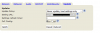
In the greyed out box it appears as:
https://XXXXXXXX.3cx.co.uk:5001/rps/cfg{mac}
But in 3cx v15 on the provisioning tab for the extension it says it should be:
https://XXXXXXXX.3cx.co.uk:5001/provisioning/5nihurlp0jqn6a/cfg{mac}
I contacted Snom directly and they removed one of the MAC addresses from the redirection service. This made me able to enter the correct Setting URL on one of the phones and everything then worked as it should.
Snom will not remove any more MAC addresses for me. They say I have to contact 3CX to do this.
I emailed the [email protected] email address yesterday explaining this and including the email chain with Snom. I am yet to receive a reply.
This morning I contacted the telephone number for the UK office and spoke to Winston. He says 3CX are unable to help unless I pay a support contract or contact my reseller who will then send it on to the technical department. They will not transfer me through. I have contacted my reseller this morning and am waiting a response.
It looks like I can't go any further without paying additional money, which is unacceptable when the licence for 3CX costs so much.
It looks to me like 3CX is sending the URLs to the redirection service formatted incorrectly.
I think 3cx and Snom should make it easier to get your MAC address removed from this service. What if we sell the phones on, etc.? The next person is going to have the same difficulty.
We have quite a few Snom d765 phones. Through 3CX v15 I provision the extensions and enter the MAC addresses. This should then autoprovision the phones using the Snom redirection service. However the URL that appears in the telephone settings is incorrect.
In the greyed out box it appears as:
https://XXXXXXXX.3cx.co.uk:5001/rps/cfg{mac}
But in 3cx v15 on the provisioning tab for the extension it says it should be:
https://XXXXXXXX.3cx.co.uk:5001/provisioning/5nihurlp0jqn6a/cfg{mac}
I contacted Snom directly and they removed one of the MAC addresses from the redirection service. This made me able to enter the correct Setting URL on one of the phones and everything then worked as it should.
Snom will not remove any more MAC addresses for me. They say I have to contact 3CX to do this.
I emailed the [email protected] email address yesterday explaining this and including the email chain with Snom. I am yet to receive a reply.
This morning I contacted the telephone number for the UK office and spoke to Winston. He says 3CX are unable to help unless I pay a support contract or contact my reseller who will then send it on to the technical department. They will not transfer me through. I have contacted my reseller this morning and am waiting a response.
It looks like I can't go any further without paying additional money, which is unacceptable when the licence for 3CX costs so much.
It looks to me like 3CX is sending the URLs to the redirection service formatted incorrectly.
I think 3cx and Snom should make it easier to get your MAC address removed from this service. What if we sell the phones on, etc.? The next person is going to have the same difficulty.