Unable to remove orphan SBC entry

Status
Not open for further replies.

iit

Customer
Joined
Apr 5, 2024
Messages
9
Reaction score
1
Hello everyone,

I am currently using v20 (update 2). I initially added a router phone for an EXT.
After a few hours, I have removed the phone from the EXT but the SBC entry under "Voice & Chat" is still visible.
I am not able to use that phone again;
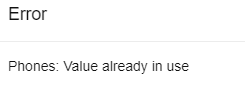
1722407720298.png

I have factory reset that phone, deleted that specific EXT and created a new one but the issue is still the same.

Restarted the PBX (hosted on the Cloud) but the SBC entry is still visible.

Can you please advise?

Thanks.
 
Last edited:
Hi,

Restarting the services will automatically remove any leftover orphaned SBCs.
 
Hello John,

I rebooted the PBX and the issue was the same.

Is there any other troubleshooting I need to do?
 
Does the MAC exist on any extension currently?
 
No the MAC is not present on any EXT
 
Can you share some more info, for example what role was the user who created the routerphone originally, and what role was the user that deleted it?

Also, have you modified any system parameters that we should be aware of or is this a clean install update 2?
 
Yes sure.

Originally the EXT was created using the role "User" and I created a new EXT with the same role.

No system parameters were modified and it is a clean install of update 2
 
Could you set verbose mode, restart System service and collect support info please? Then share via DM.
 
Hello, the issue has been fixed.

I have realised that I have renamed the SBC while trying to sort this out.
That could be why the SBC was not automatically removed after the PBX restarted.

I fixed it by connecting to the PostgreSQL removing the SBC and MAC entry followed by a PBX reboot.
 
In fact, it should not - changing display name for SBC is supported operation. Fixing directly in DB is a hack, I would like to know how this situation happened in the first place. We had a couple of such problems reported but never got to the root cause.
 
In fact, it should not - changing display name for SBC is supported operation. Fixing directly in DB is a hack, I would like to know how this situation happened in the first place. We had a couple of such problems reported but never got to the root cause.
Yes, I know. I tried several methods previously.

A few days ago, I even changed the log to verbose mode and reviewed it but got no hint as to why the SBC was still there.

Since I have to get this PBX up and running by tomorrow I had to remove it from the DB.
 
That's only in V18 (and the reason I asked if this was a clean install V20).

For V20 you cannot delete the SBC of a router phone, unless you delete the phone itself which auto-removes the SBC
Ah I see, I was probably remembering the new admin panel in v18 then. I ran into it but it was a while ago.
 
Status
Not open for further replies.

Forum statistics

Threads
111,953
Messages
589,910
Members
164,845
Latest member
tdzski5