Unable to restore back up for FQDN change

Status
Not open for further replies.

itoutsider

Customer
Joined
Jun 19, 2024
Messages
10
Reaction score
3
I followed the steps necessary to export a backup without license or FQDN information. When initially trying to import the backup via the web interface, I first received an error that indicated the license was invalid (even though there was no license).

Next I tried a backup that just had the FQDN excluded and it got to the next apparent step but errored with HasLocalDns invalid input even though I wasn't prompted to put in anything.

At a loss via that config option I went to the command line config option. With this method I was able to use the no license/no fqdn backup to start which allowed me to identify:

- The backup file location (uploaded to the vm via scp)
- The license (already released from the portal
But when it gets to the HasLocalDns option, It again says invalid input option and returns to the prompt to identify the backup file.3cx_redacted.png
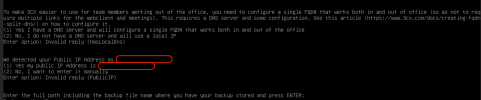
I'm assuming it might be picking up these options from the backup file, but I don't know where those are located if that is the case. There is an xml file in the root of the zip folder that has lots of parameters, etc, but none of which match any of the options presented.

I've gone as far as trying to use a truncated setupconfig.xml file as indicated in that relevant support article, however that also errors out with reference to the selection method for 'WebOrConsole'. I don't find that documented anywhere so I just used the <option>/<answer> format like so:
Code:
<code>WebOrConsole</code>
<answer>console</answer>
<!-- Also tried this -->
<code>WebOrConsole</code>
<answer>2</answer>

But with either of these options or with it missing, get the following error:

webOrConsole.png

For what should have been a painless process has turned out to be anything but. For now, I just restored a full backup and using the old 3CX FQDN.

Any input would be greatly appreciated.

Using the latest available debian iso, 3CX version 20.0.1.731
 
Last edited:
On v20 there is no option to get an Backup without licence and fqdn... You need to take it from v18. Than you need to install the v20 with the new fqdn und license and restore the backup without this stuff.
 
Yeah i know, but no official way to do it. But anyway, what are your trying to archive with your Backup without licence and fqdn?
 
Official? This is straight from the existing documentation.

The whole purpose of this exercise is to change the FQDN. It does not appear there is any way to do that other than:

1. Release the FQDN from the portal
2. Take a backup of existing deployment without license and FQDN ( I think without the license doesn't matter as you have to re-input anyway)
3. Redeploy new VM and use restore from backup option

The problem is that either the web-based or the command line config tools are auto selecting options based on something and whatever it is selecting as input is invalid, hence the errors and process restart.
 
That is what i said, on v20 there is no way to get a working backup without licence and fqdn. This docu is from v18.
 
Ah, so not that you can't do these backups they are just useless, that's cool....

So, what is the current official/current method to change FQDN?
 
Reinstall from scratch...
 
That is unfortunate indeed. I do have a pre 20 backup, but it is complete and not the partial backups as indicated. I don't have a whole lot that can't be recreated, but it seems this could be resolved without too much trouble either through the backup mechanism or the restore wizard. I did try to break out the zip file and change the FQDN and certs in xml file and rezip, but obviously there is some kind of checksum operation that invalidates the newly zipped file.
 
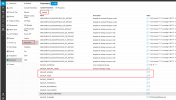
Does anyboday try the option here to create the backup file without FQDN and License?
schedule backup.png
After enabling schedule backup, many parameters related to this function will be taken affect. We can change the parameters(BACKUP_LICENSE and BACKUP_FQDN) as 0, and we will get the schedule backup file without FQDN and License.
 
Last edited:
  • Like
Reactions: bitn2
Does anyboday try the option here to create the backup file without FQDN and License?
View attachment 42199
After enabling schedule backup, many new parameters related to this function will be generated. We can change the parameters(BACKUP_LICENSE and BACKUP_FQDN) as 0, and we will get the schedule backup file without FQDN and License.
For me it doesnt work... If i set it to 0 its the same like 1. Backup is always with fqdn und licence.

EDIT: if i edit this parameters before i schedule the backup it switched the parameters back to 1

EDIT 2: you need to set the parameters after you schedule the backup, than it works
 
Last edited:
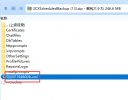
It seems that it works in our side, because I make a comparasion between two .xml files(enable or disable two parameters).
xml file.png
Please make sure two parameters are 0 before 3CX server generates the schedule backup file.
 
It seems that it works in our side, because I make a comparasion between two .xml files(enable or disable two parameters).
View attachment 42202
Please make sure two parameters are 0 before 3CX server generates the schedule backup file.
Yes it works, but you need to schedule the backup before you edit the parameters. The other way it switches the parameters back to 1 and it only works for scheduled backup no manual
 
Yes it works, but you need to schedule the backup before you edit the parameters. The other way it switches the parameters back to 1 and it only works for scheduled backup no manual
OK, I get it.
 
  • Like
Reactions: bitn2
I've got it scheduled and the parameters updated. Waiting on the schedule to kickoff and then will see how the config wizard likes the backup.
 
These parameters changes do work to get the backups with or without license or FQDN, but still unusable for a restore to create a new fQDN. These backups appear to be the same as those done from the command line with options.
 
With that said, can this be setup as a new server from scratch to use the existing license and the new FQDN and then use this backup without those items to restore the remaining configuration?
 
With that said, can this be setup as a new server from scratch to use the existing license and the new FQDN and then use this backup without those items to restore the remaining configuration?
I hope this would work, cant test it at the moment.
 
With that said, can this be setup as a new server from scratch to use the existing license and the new FQDN and then use this backup without those items to restore the remaining configuration?
Yes, you can try it, and it seems that it can work in our side.
After that, you can check if all the settings is OK.
 

Attachments

  • configfile.png
    configfile.png
    12.7 KB · Views: 52
  • Like
Reactions: bitn2
I'll be giving this a shot this weekend. Will report.
 
  • Like
Reactions: bitn2
Status
Not open for further replies.

Forum statistics

Threads
112,276
Messages
591,635
Members
165,393
Latest member
Carlos - EC Mates