


- Joined
- Jun 19, 2024
- Messages
- 10
- Reaction score
- 3
I followed the steps necessary to export a backup without license or FQDN information. When initially trying to import the backup via the web interface, I first received an error that indicated the license was invalid (even though there was no license).
Next I tried a backup that just had the FQDN excluded and it got to the next apparent step but errored with HasLocalDns invalid input even though I wasn't prompted to put in anything.
At a loss via that config option I went to the command line config option. With this method I was able to use the no license/no fqdn backup to start which allowed me to identify:
- The backup file location (uploaded to the vm via scp)
- The license (already released from the portal
But when it gets to the HasLocalDns option, It again says invalid input option and returns to the prompt to identify the backup file.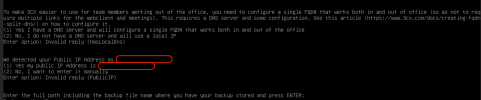
I'm assuming it might be picking up these options from the backup file, but I don't know where those are located if that is the case. There is an xml file in the root of the zip folder that has lots of parameters, etc, but none of which match any of the options presented.
I've gone as far as trying to use a truncated setupconfig.xml file as indicated in that relevant support article, however that also errors out with reference to the selection method for 'WebOrConsole'. I don't find that documented anywhere so I just used the <option>/<answer> format like so:
But with either of these options or with it missing, get the following error:

For what should have been a painless process has turned out to be anything but. For now, I just restored a full backup and using the old 3CX FQDN.
Any input would be greatly appreciated.
Using the latest available debian iso, 3CX version 20.0.1.731
Next I tried a backup that just had the FQDN excluded and it got to the next apparent step but errored with HasLocalDns invalid input even though I wasn't prompted to put in anything.
At a loss via that config option I went to the command line config option. With this method I was able to use the no license/no fqdn backup to start which allowed me to identify:
- The backup file location (uploaded to the vm via scp)
- The license (already released from the portal
But when it gets to the HasLocalDns option, It again says invalid input option and returns to the prompt to identify the backup file.
I'm assuming it might be picking up these options from the backup file, but I don't know where those are located if that is the case. There is an xml file in the root of the zip folder that has lots of parameters, etc, but none of which match any of the options presented.
I've gone as far as trying to use a truncated setupconfig.xml file as indicated in that relevant support article, however that also errors out with reference to the selection method for 'WebOrConsole'. I don't find that documented anywhere so I just used the <option>/<answer> format like so:
Code:
<code>WebOrConsole</code>
<answer>console</answer>
<!-- Also tried this -->
<code>WebOrConsole</code>
<answer>2</answer>
But with either of these options or with it missing, get the following error:
For what should have been a painless process has turned out to be anything but. For now, I just restored a full backup and using the old 3CX FQDN.
Any input would be greatly appreciated.
Using the latest available debian iso, 3CX version 20.0.1.731
Last edited:


