- Joined
- Sep 24, 2024
- Messages
- 1
- Reaction score
- 0
Hi!
Since we've updated to v20 all Users with the role "Department Administrator" cannot change settings in the "Users" Settings page of any user.
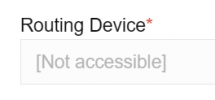
It is always jumps back to the "IP Phone" Tab where the setting "Routing device" ist missing - and because this is a required setting changes won't be saved.
There is no entry in the dropdown to select any routing device - the list is empty.
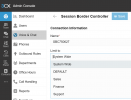
When we log in as "System Administrator" the setting "Routing device" in the "User Settings / IP Phone" of this user is set to the SBC (Sessing boarder controller)- which is correct.
Seems to be an issue with the user rights.
How can I solve this issue?
Regards,
Rainer
Since we've updated to v20 all Users with the role "Department Administrator" cannot change settings in the "Users" Settings page of any user.
It is always jumps back to the "IP Phone" Tab where the setting "Routing device" ist missing - and because this is a required setting changes won't be saved.
There is no entry in the dropdown to select any routing device - the list is empty.
When we log in as "System Administrator" the setting "Routing device" in the "User Settings / IP Phone" of this user is set to the SBC (Sessing boarder controller)- which is correct.
Seems to be an issue with the user rights.
How can I solve this issue?
Regards,
Rainer