Unable to uninstall 3cx Desktop App

Status
Not open for further replies.

russnat8

Bronze Partner
Basic Certified
Joined
Mar 2, 2022
Messages
3
Reaction score
0
Hello,

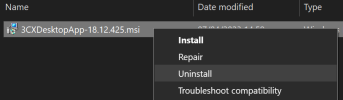
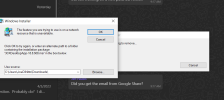
I've been trying to uninstall the 3cx desktop app from my machine, but it appears that the MSI to do so is gone and despite my best efforts I cannot locate it, or find a download location to get it again.
It looks like according to the Windows Add/Remove programs my app was updated to 18.12.422 yesterday, but when I try to uninstall it, it's looking for the 18.8.508 MSI.

Anyone have any suggestions on where to go from here?
 

Attachments

  • 3xc.PNG
    3xc.PNG
    108.3 KB · Views: 26
The problem is that it keeps looking for the old MSI
 
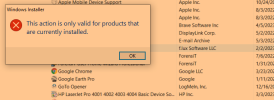
This action is only for products installed
I am in an endless loop of I cant install and I cant uninstall because the system shows I have version 416 still installed and when I try to remove version 18.12.416 it says is not a valid installation package
 
1. Run the new installer and complete the install (so it can overwrite everything)
2. Then uninstall it
3. Go to %appdata%\3CXDesktopApp and you can empty this folder of anything remaining
4. Now would be a good time to run your virus scan if you want to ensure everything is clean

After this is done, you can install the new app again and provision it as you normally would.
 
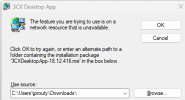
Step 1 Fails. As I am installing it refers back to the 3CXDesktopApp-18.12.416.msi, I am using 3CXDesktopApp-18.12.245.msi that I downloaded.

3cx error1.png
 
Not sure if this "trick" will work, but worth a try :confused:

- Make a copy of the new installer and give it the same name as the old one.

- Then point the dialog box to the path where the this installer sits and see if it will accept it.
 
that fails
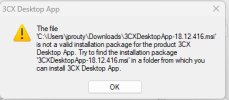
3cx error2.png
That fails it complains that the msi is not valid
 
Thank you that did clear up the issue
 
  • Like
Reactions: JohnS_3CX
I'm unfortunately still unable to get this to uninstall correctly. Tried everything suggested so far.
I'm now getting the attached error when I try to uninstall. It does show that I have the newest version installed according to Add/Remove Programs
 

Attachments

  • not valid.PNG
    not valid.PNG
    66.4 KB · Views: 12
Last edited:
So did you download the microsoft troubleshooter linked above, and what did it return when you select the 3CX app from it?
 
Status
Not open for further replies.

Latest Posts

Forum statistics

Threads
112,018
Messages
590,316
Members
164,963
Latest member
DenisK