- Joined
- Nov 7, 2022
- Messages
- 4
- Reaction score
- 1
As per the title, I'm struggling to get call recordings to display for a user.
This morning my customer asked to start recording their calls. I turned on "Call Recording" on all IP phones.
I quickly found the recordings in the Admin console.
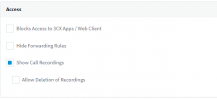
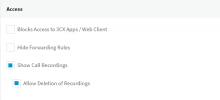
Then, on my own User extension, I went to >> Phone Provisioning >> Show Call Recordings
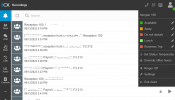
Then I logged into the Web client and found the recordings.
Next, I went to the User who needs to view the recordings, went to Phone Provisioning >> Show Call Recordings
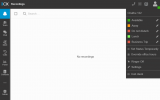
Now when I log into the web client for that user, I cannot see any recordings.
All User permissions are the same for my own User and theirs.
Does anyone have any ideas? Thanks
Screenshots show the issue:
This morning my customer asked to start recording their calls. I turned on "Call Recording" on all IP phones.
I quickly found the recordings in the Admin console.
Then, on my own User extension, I went to >> Phone Provisioning >> Show Call Recordings
Then I logged into the Web client and found the recordings.
Next, I went to the User who needs to view the recordings, went to Phone Provisioning >> Show Call Recordings
Now when I log into the web client for that user, I cannot see any recordings.
All User permissions are the same for my own User and theirs.
Does anyone have any ideas? Thanks
Screenshots show the issue: