Solved "Unknown Host" error on Windows App

Status
Not open for further replies.

Northdegree

Trial User
Joined
Oct 11, 2024
Messages
4
Reaction score
0
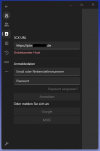
Whenever we try to connect to the Phone System using a custom FQDN (On-Prem Installation) inside the windows app it claims it's an "Unknown Host".
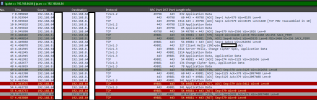
However using Wireshark you can clearly see that the 3cx Windows app is trying to contact the Phone System.

In the WireShark trace the IP starting with "192.168.8" is the computer running the app and the IP starting with "192.168.64" is the phone system.

Am i missing something here?

Note: Using the same FQDN in the android app works fine.
 

Attachments

  • unknownhost.png
    unknownhost.png
    24.7 KB · Views: 33
  • pcap.png
    pcap.png
    114.9 KB · Views: 29
You have 2 interfaces active on your server.

Disable the unused interface(s) on the server and just keep your main ethernet card active.
 
  • Like
Reactions: Evolute IT
You have 2 interfaces active on your server.

Disable the unused interface(s) on the server and just keep your main ethernet card active.
We require both interfaces as we nneed to differenciate between internal requests and external requests. Also using the FQDN provided by 3cx works fine, it just claims its a unknown host if we use our own FQDN

Edit:

Works:
- Using the 3CX provided FQDN via internet
- Using any FQDN using android app

Doesn't work:
- Using our own FQDN via Internet
- Using our own FQDN via Lan
- Using the 3CX provided FQDN via Lan
 
Last edited:
If you have multiple interfaces, you will need to remove the default gateway from the internal interface. Any additional routing through this interface can be done with static routes

https://www.3cx.com/blog/docs/network-configurations-supported-3cx-phone-system/
The "internal" Interface doesnt have a default gateway configured. If you wish i could send you a pm with our current network settings.

In short:
Ethernet1 -> Has a static ip address from our DMZ Network and doesn't have a default gateway
Ethernet 2 -> Has a static ip address which is reachable from WAN and has a default gateway configured
Ethernet 3 -> Has a statis ip address from out TZone Network and has a default gateway configured
 
Okay, i got it resolved. The problem didn't have anything to do with the network settings whatsoever. It's actually is a problem with the SSL Certificate. Apparently the windows app demands a trusted certificate on the PBX.

The Phone System was still using it's "xxxxxx.my3cx.de" certificate while we were using a custom domain name. After I've replaced the default certificate with our own certificate it started working.

A suggestion however: Could you inplement a checkbox in the windows app "Trust Server Certificate"?
 
Okay, i got it resolved. The problem didn't have anything to do with the network settings whatsoever. It's actually is a problem with the SSL Certificate. Apparently the windows app demands a trusted certificate on the PBX.

The Phone System was still using it's "xxxxxx.my3cx.de" certificate while we were using a custom domain name. After I've replaced the default certificate with our own certificate it started working.

A suggestion however: Could you inplement a checkbox in the windows app "Trust Server Certificate"?
If the certificate is valid and on the proper FQDN the app will trust it. The apps now require oa PROPER secure connection.
 
Status
Not open for further replies.