Hello,
I am developing a custom service that makes use of the CRM integration, which now works, so I don't need basic help to get it running in general.
But I think, the 3CX CRM Template Generator has some bugs, since my custom template I built with it didn't work straight away. I will try to summarize my experience as good as possible using number for every bug / flaw:
I start creating a new template using the CRM Template Wizard. Authentication Basic, API key.
1) This is later being refered to as [APIkey]:X, I don't know, where the :X comes from, but I don't need that. When the admin is asked to enter the API key later while setting up the CRM, it's a complete string, no need for an extra :X. So I remove it, my service expects the API key as is.
2) When configuring the API URL (GET) we
have to enter a valid URL, but in real life, we want the admin to enter this, when setting up the CRM in 3CX. This value might not belong into the template hard coded. So for now I have to enter some valid dummy URL and later replace it with my parameter I create after the Wizard finished. This applies to every field the Wizard need a URL. A little bit annoying.
Later in the Wizard I enable Call Journaling, using JSON encoding. Now for all 4 fields I create my JSON strings with all the data I want (e.g: { CallType: [CallType], Number: [Number] }).
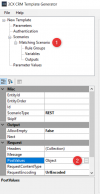
3) These JSON strings cannot be accessed in the Template Generator after the Wizard has finished. They are written magically into the .XML, also when loading and saving again, but I cannot see or modify them, because in the .XML they are converted into this structure:
XML:
<PostValues Key="">
  <Value Key="CallType" Passes="1" Type="Integer">[CallType]</Value>
  <Value Key="Number" Passes="1" Type="Integer">[Number]</Value>
</PostValues>
The "Reqest Content" field of each Scenario is empty.
4) The Type attribute in the PostValues - Value tags is always "Integer", which leads to a non-working Call Journaling. Using this template as is
will work for GET requests, i.e. looking up contacts by number, but
no ReportCall scenario will work! You have to manually change the Integer to String in the final .XML yourself.
Can you reproduce and understand my problems and will you have a solution for them in the future?
Regards;
S. Sudewo