Unsupported CRM? Not a problem with the 3CX CRM Template Generator

  • Thread starter Thread starter Constantinos Constantinou
  • Start date Start date
Hi, everybody. I'm trying to use CRM API integration with an XML file. During testing, requests are received. And so when the server is running, nothing comes. What could be the problem?
The tool you use to create the template lets you debug the template, emulating the contact lookup and call reporting. You should check the request and the response shown by the tool during a debug session, so you understand what's going on.

If you can't spot the issue by checking this, please create a new thread in the CRM forum, so we can properly help you.
 
Have a doubt on API calls being triggered from 3CX to CRM.

All incoming calls to agent vide DID should trigger a API to CRM so pop up of client info can come. Agents will be using Alcatel Lucent 8001G Open SIP Phones.
In the CRM integration page, i see there's contact look up but i can not see if a API can be sent to my CRM for all incoming calls (so my CRM can show a pop up).

Please guide.
 
Have a doubt on API calls being triggered from 3CX to CRM.

All incoming calls to agent vide DID should trigger a API to CRM so pop up of client info can come. Agents will be using Alcatel Lucent 8001G Open SIP Phones.
In the CRM integration page, i see there's contact look up but i can not see if a API can be sent to my CRM for all incoming calls (so my CRM can show a pop up).

Please guide.
3CX will query the CRM for every call (except when the cache has the details), get the contact details, and pass this information to the Web Client, so the Web Client can popup the Contact URL on the agent's PC.

When the same number calls you, or you call the same number more than once in less than 10 minutes, the contact details are taken from cache. So you can't use this mechanism to notify all the call, as some of them will not be notified.

If you need to notify all inbound calls, maybe you should use a different approach. For example, you can route inbound calls to a CFD app, which can invoke a web service to notify the CRM, and then transfer the call to a queue for further processing.

Please if you need more details, open a separate thread in the CRM forum, so we can properly handle it.
 
Goodmorning everyone
I activated the CRM integration to a customer's switchboard with SQL mode, and as far as the contact search function is concerned, it works perfectly.

However, I have encountered errors or maybe things that could be improved.

I need the information relating to a particular customer to be updated directly from the connected SQL database.

In fact, I tried to relate the surname column of the address book with a composite SQL field that shows the complete name.

Then in the name instead I related the email address and the last sales contact.

However, it often happens that this info is not updated from the original database.

How often is the query created to update the address book queried?

It also occurred that, since there is no unique ID for the customer (it is automatically generated in an SQL view), duplicate contacts appear

Also the CRM link feature provides a popup to an existing CRM, can you disable this feature since I only have a SQL database without CRM?

Solutions in this regard? also the id must necessarily be unique?
 
Hello @Aliasson,

In fact, I tried to relate the surname column of the address book with a composite SQL field that shows the complete name.

Then in the name instead I related the email address and the last sales contact.

However, it often happens that this info is not updated from the original database.

How often is the query created to update the address book queried?
The database is queried for every external call you make or receive, as long as you didn't have another call in the previous 10 minutes. In the case you had another call in the previous 10 minutes, the information obtained during the previous call is returned (taken from an internal cache).

It also occurred that, since there is no unique ID for the customer (it is automatically generated in an SQL view), duplicate contacts appear
The ID must be unique, otherwise you will get duplicated contacts. This is the information we use to determine if we're dealing with the same contact or not. So if the query returns a different ID, we assume it's a different contact, and we add it again to 3CX Contacts. You can use a different field to ensure that it's unique, for example you can return the contact's email address as the ID, and you would avoid this contact duplication.

Also the CRM link feature provides a popup to an existing CRM, can you disable this feature since I only have a SQL database without CRM?
The Contact URL is part of the integration, and it is automatically generated as the concatenation of the prefix you configure, the returned contact ID and the suffix you configure. The Web Client and the Chrome Extension will popup this URL by default, but you can disable this behaviour from the Web Client / Chrome Extension > Settings > Integration > Off. When you configure them like this, the caller's name will be shown, but the popup will not be launched on the client's PC.

Kind regards.
 
  • Like
Reactions: N_G
Thank you very much edossantos for your exhaustive reply. :)
 
  • Like
Reactions: edossantos
goodmorning everyone,
I have another question, I would like to import all the contacts of the sql database to have them available for outgoing calls, with the integration in case of updating of info relating to a contact, will the 3cx address book be updated with the new info? thank you in advance.
 
@Aliasson - no this is not the purpose of the CRM API. You must trigger the call from your CRM, not export all the records from 3CX
 
  • Like
Reactions: edossantos
Thank you for reply,
Excuse me but I did not express myself correctly, to immediately have an updated address book for outgoing calls, can I import from sql to 3cx and receive updates from the database?
 
Thank you for reply,
Excuse me but I did not express myself correctly, to immediately have an updated address book for outgoing calls, can I import from sql to 3cx and receive updates from the database?
The CRM integration can communicate with a database. You will have to configure it depending on your DB type and structure. The contacts are pulled on calls tho, not on a schedule or anything like that.
 
Thank you for reply,
Excuse me but I did not express myself correctly, to immediately have an updated address book for outgoing calls, can I import from sql to 3cx and receive updates from the database?
Its not the correct way if you dont mind me saying. You should have your CRM open and trigger calls from there. If you load up the phone system with lots of customer records you slow down the system. SO best way is to use the CRM as your address book - launch and log calls there - and 3CX will complete the call.

The 3CX phonebook is not meant to be a company wide phonebook. I believe CRM systems, however compact and simple, are the correct place to manage customer records.
 
We're trying to integrate SAGE CRM on Premise 2020R2 with 3CX. Is this possible to do?
 
We're trying to integrate SAGE CRM on Premise 2020R2 with 3CX. Is this possible to do?
Yes and no, it has limitations. The REST API should work tho.
 
What sort of limitations would we have with it?
It all depends on your setup. On-premise softwares can't usually be accessed from outside, so you'd either need to open a port for the API or run the PBX locally.
 
We're trying to integrate SAGE CRM on Premise 2020R2 with 3CX. Is this possible to do?
If your CRM has a REST API, then it should be possible to integrate. Please check the guide. If you have issues please start a new thread in the CRM Integrations forum.
 
  • Like
Reactions: Evolute IT
Hello,

I am developing a custom service that makes use of the CRM integration, which now works, so I don't need basic help to get it running in general.

But I think, the 3CX CRM Template Generator has some bugs, since my custom template I built with it didn't work straight away. I will try to summarize my experience as good as possible using number for every bug / flaw:

I start creating a new template using the CRM Template Wizard. Authentication Basic, API key.

1) This is later being refered to as [APIkey]:X, I don't know, where the :X comes from, but I don't need that. When the admin is asked to enter the API key later while setting up the CRM, it's a complete string, no need for an extra :X. So I remove it, my service expects the API key as is.

2) When configuring the API URL (GET) we have to enter a valid URL, but in real life, we want the admin to enter this, when setting up the CRM in 3CX. This value might not belong into the template hard coded. So for now I have to enter some valid dummy URL and later replace it with my parameter I create after the Wizard finished. This applies to every field the Wizard need a URL. A little bit annoying.

Later in the Wizard I enable Call Journaling, using JSON encoding. Now for all 4 fields I create my JSON strings with all the data I want (e.g: { CallType: [CallType], Number: [Number] }).
3) These JSON strings cannot be accessed in the Template Generator after the Wizard has finished. They are written magically into the .XML, also when loading and saving again, but I cannot see or modify them, because in the .XML they are converted into this structure:
XML:
<PostValues Key="">
  <Value Key="CallType" Passes="1" Type="Integer">[CallType]</Value>
  <Value Key="Number" Passes="1" Type="Integer">[Number]</Value>
</PostValues>
The "Reqest Content" field of each Scenario is empty.

4) The Type attribute in the PostValues - Value tags is always "Integer", which leads to a non-working Call Journaling. Using this template as is will work for GET requests, i.e. looking up contacts by number, but no ReportCall scenario will work! You have to manually change the Integer to String in the final .XML yourself.

Can you reproduce and understand my problems and will you have a solution for them in the future?

Regards;
S. Sudewo
 
Hello @S. Sudewo,

Answering each of your points:
1) This is later being refered to as [APIkey]:X, I don't know, where the :X comes from, but I don't need that. When the admin is asked to enter the API key later while setting up the CRM, it's a complete string, no need for an extra :X. So I remove it, my service expects the API key as is.
This is how the Authorization header is build in Basic Authentication:
https://en.wikipedia.org/wiki/Basic_access_authentication#Client_side

Usually, you provide a username and a password, which are combined with a colon (:) and then encoded. However, in order to avoid using the user's password, some systems use an API key instead. The most common case is using the APIKey as the user name, and an X character as the password, and that's what the tool generates by default. Other systems use the X:APIKey, or just the APIKey (as in your case). You can always change this if your system uses a different approach.

2) When configuring the API URL (GET) we have to enter a valid URL, but in real life, we want the admin to enter this, when setting up the CRM in 3CX. This value might not belong into the template hard coded. So for now I have to enter some valid dummy URL and later replace it with my parameter I create after the Wizard finished. This applies to every field the Wizard need a URL. A little bit annoying.
The wizard is designed to be easy to use for starters. Adding the ability to specify the URL as a parameter at this stage would make things a bit more complicated for users that don't have much background on this. This is a design decision we made. You can always add the parameter after the wizard completes. Or you can even start working on your template without the wizard if you think it overcomplicates things for you.

Later in the Wizard I enable Call Journaling, using JSON encoding. Now for all 4 fields I create my JSON strings with all the data I want (e.g: { CallType: [CallType], Number: [Number] }).
3) These JSON strings cannot be accessed in the Template Generator after the Wizard has finished. They are written magically into the .XML, also when loading and saving again, but I cannot see or modify them, because in the .XML they are converted into this structure:
XML:
<PostValues Key="">
<Value Key="CallType" Passes="1" Type="Integer">[CallType]</Value>
<Value Key="Number" Passes="1" Type="Integer">[Number]</Value>
</PostValues>
The "Reqest Content" field of each Scenario is empty.
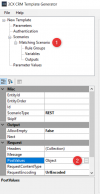
Actually you can edit this from the tool. Just select the scenario, and then from the Properties window select "Post Values":
1624026301071.png

4) The Type attribute in the PostValues - Value tags is always "Integer", which leads to a non-working Call Journaling. Using this template as is will work for GET requests, i.e. looking up contacts by number, but no ReportCall scenario will work! You have to manually change the Integer to String in the final .XML yourself.
This looks like a bug, we will look into this and provide a fix in the next version of the tool.


Thank you very much for all your input!

Regards.
 
  • Like
Reactions: Evolute IT
Thank you so much for your quick and precise answer! I understand your points and I wasn't realizing the "PostValues" field in the properties list. This is helpful, unless you want to edit the .XML directly, which of course works well, as soon as you understood, which tags are important and how they interact together :)
 
4) The Type attribute in the PostValues - Value tags is always "Integer", which leads to a non-working Call Journaling. Using this template as is will work for GET requests, i.e. looking up contacts by number, but no ReportCall scenario will work! You have to manually change the Integer to String in the final .XML yourself.
After checking this, the issue is the JSON that you're specifying:
JSON:
{ CallType: [CallType], Number: [Number] }

As you can see, you're not adding quotation marks surrounding the variables [CallType] and [Number]. As a consequence, the tool thinks that an integer goes there. In order to generate the proper JSON with strings, you need to use:
JSON:
{ "CallType": "[CallType]", "Number": "[Number]" }
 
  • Like
Reactions: accentlogic

Forum statistics

Threads
111,993
Messages
590,175
Members
164,931
Latest member
admintest