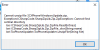
Update 2018-03-28 fails - cannot unzip file

Status
Not open for further replies.

Fritz Reinhardt

Free User
Joined
Jan 30, 2018
Messages
14
Reaction score
0
upload_2018-3-28_13-27-28.png

This error shows up on 2 of 3 clients when trying to start the 3CX Client Updater...?!
 
Hello @Fritz Reinhardt,

What version are you currently running and what version are going to update?


Thank you
 
Hello Marios, thanks for your reply.

I have "3cx Client for 3cx Phone System Version 15.5.8801.3" running on WIN 10 / 64, but I don't know what it is updating to, I just downloaded the recommended updates on the pbx server. After that, all clients posted "there is a new update from your 3cx-pbx available". "OK/Cancel?". when clicking OK the download starts and at 100% the error message appears...
 
This means that there is something locking the update OR a culture problem causing the update package to seem corrupt (Or the zip is corrupted). I just double checked now and it works..

Do the following:

Login to the server
Click on Updates and check if you have updates for the client. (If you did this already it could be that the update is downloaded but corrupted and is currently on disk in an UNZIPPABLE state. (Actually I would locate the file and try and unzip it. If you do not manage, then neither the library in the 3CX Client (ic#) will be able to do this.

If pbx is windows go here C:\ProgramData\3CX\Instance1\Data\Http\Interface\MyPhone
If pbx is Linux go here /var/lib/3cxpbx/Instance1/Data/Http/Interface/Myphone

Delete this zip file name "3CXPhoneWindowsUpdate.zip"

Go to 3CX Management console > Settings > Parameters and locate this parameter "MYPHONEVERSION"

Decrease the version of this parameter - do what you want as long as it is smaller

Go to updates and check for updates. You should be presented with the 3CX client update.
Download it again (For paranoia purposes go to the location and see if you can unzip it. - if you can proceed to update the clients by restarting them. If you cannot contact me again)
 
  • Like
Reactions: Fritz Reinhardt
Hello Nicky!

Thank you, your idea was correct - the downloaded .zip file on the server was corrupted, could not be unzipped. I followed your instructions and now it works perfectly well!!

Thank you for your help!
Maybe you also have a solution for the other problem I've posted? - It's about the disk overflow problem caused by endless files in the Instance1-Data-Logs-Backup folder:

https://www.3cx.com/community/threa...systemservice-log-files-within-9-hours.55060/

Thank you again!
Best wishes to you from Germany!
Fritz
 
Danke sehr Fritz!!! Thanks for reporting..
 
Status
Not open for further replies.

Members Online Now

No members online now.

Forum statistics

Threads
111,832
Messages
589,286
Members
164,662
Latest member
DejanMDS