Update 3 Beta Now with Improved “Always Awake” PWA

Status
Not open for further replies.

N_G

Founder
Joined
Jun 6, 2006
Messages
4,857
Reaction score
9,290
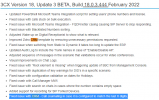
Version 18 Update 3 Beta is now available for download via the management console. It brings PUSH support to the recently launched Web App (PWA) and introduces the Desktop application for macOS.

Shows incoming call even with webclient closed​

Newly added PUSH notification support for the Web Client and PWA, wakes up the browser ...
Continue reading the Original Blog Post.
 
Last edited by a moderator:

"Added support to accept numbers from Click2Call in case that user is in transfer or conference input screens."

I literally had a customer ask for this yesterday. That's nice!
 
Lets gooooo black theme and mac support Desktop App !
 
Still no news about the ability to set the internal number using Microsoft365 to provision extensions :(
 
  • Like
Reactions: Noik
Will this 'Focus' also makes it possible to NOT steal the headset from Teams?
When a user is in a teams meeting, and a 3cx call comes in, the teams meeting loses audio due to the 3cx headset integration... User is not using the 3cx-teams integration due to license costs...
 
Will this 'Focus' also makes it possible to NOT steal the headset from Teams?
When a user is in a teams meeting, and a 3cx call comes in, the teams meeting loses audio due to the 3cx headset integration... User is not using the 3cx-teams integration due to license costs...
I actually tried to reproduce what you're describing but couldn't. Here's what I did:
• Used a supported headset with 3CX Desktop app integration.
• Used the same headset for a Teams Call.
• While the Teams call was ongoing, and received a Call on my 3CX Desktop App.
• Answered that call too and still had audio on both Teams and 3CX.

Are you saying that you lose audio in Teams for the above scenario?

Also, what headset are you using? Make absolutely sure you a re running the latest firmware version, especially if it's a yealink.

If the issue persists after doing so, please start a new thread here so that we can take a closer look:
https://www.3cx.com/community/forums/teams-365/
 
Last edited:
Hi,

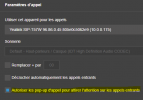
Can pop-up dialer can be enable by default like it was on previous versions of Desktop App. (and one by one the customers can disable it)

1645102667614.png

I think that customers can used to see the dialer for contacts and/or number checking, if this will be disable for "no reason" I guess I will have some calls about it.

Thank you.
 
Can pop-up dialer can be enable by default like it was on previous versions of Desktop App. (and one by one the customers can disable it)
I'm afraid not, it cannot be set via 3CX at all let a lone a default setting.
 
I'm afraid not, it cannot be set via 3CX at all let a lone a default setting.
Could that be revert then ? (Enable by default and let the option to disable?)
This was like this since webclient V16 (chrome extension), first off I was thinking that was a bug of the new version.

Or maybe I'm 22yo and I'm just getting old to be that much trigger about that haha...
 
  • Like
Reactions: Gasha
Could that be revert then ? (Enable by default and let the option to disable?)
This was like this since webclient V16 (chrome extension), first off I was thinking that was a bug of the new version.

Or maybe I'm 22yo and I'm just getting old to be that much trigger about that haha...
That setting is actually "allow popup to steal focus" so that it becomes the focused window. The french translation is not superbe lol

This should not be enabled by default since most people don't want the dialer to steal focus on incoming calls since you're usually working on something else at the same time.
 
That setting is actually "allow popup to steal focus" so that it becomes the focused window. The french translation is not superbe lol

This should not be enabled by default since most people don't want the dialer to steal focus on incoming calls since you're usually working on something else at the same time.
No, I'm talking about the option I screenshoted in my previous post, that make the dialer pop-up in front when your phone ringing.
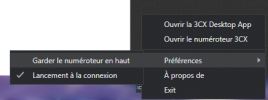
You talking me about this one, that you find by right clicking and go parameters :

1645108514082.png

I don't have any issue with that one, it still disable by default and this will be ridiculous if it was :p
 
Could that be revert then ? (Enable by default and let the option to disable?)
Since there is no implemented way of achieving this all I can provide is information on where this setting is stored. I don't know if this can be used to get the behavior you're looking for and that it will prove useful to you in any way but here it is:

The setting for this is stored in the apps local storage and specifically this file:
C:\Users\%USERNAME%\AppData\Roaming\3CXDesktopApp\Local Storage\leveldb\000003.log

Note: The filename may differ slightly for you.

There should be a parameter in there named "wc.focusonincomingcall". When set to "True" the option is on and "False" turns it off.

Hope this helps.
 
  • Like
Reactions: Evolute IT
No, I'm talking about the option I screenshoted in my previous post, that make the dialer pop-up in front when your phone ringing.
You talking me about this one, that you find by right clicking and go parameters :

View attachment 27994

I don't have any issue with that one, it still disable by default and this will be ridiculous if it was :p
I am actually talking about the setting you're talking about.

"Keep dialer on top" and "Allow to steal focus" is NOT the same thing.
 
This should not be enabled by default since most people don't want the dialer to steal focus on incoming calls since you're usually working on something else at the same time.
Yeah, but in V18 the dialer pop-up but it's interrupt anything, it's just showing it if you click somewhere else the dialer go away behind windows.
So, imo there is no problem about that.

Disable it make the dialer becoming orange after get the call.

1645110015296.png That kinda disturbing tbh.

But no problem, as @ChrisC_3CX reply, the Desktop App can't enable checkbox by default, so there is no solution about this.
 
Yeah, but in V18 the dialer pop-up but it's interrupt anything, it's just showing it if you click somewhere else the dialer go away behind windows.
So, imo there is no problem about that.

Disable it make the dialer becoming orange after get the call.

View attachment 27998 That kinda disturbing tbh.

But no problem, as @ChrisC_3CX reply, the Desktop App can't enable checkbox by default, so there is no solution about this.
Yeah there's no default but when enabled it should bring the dialer into focus. If disabled then yes it does the orange notify of Windows instead.
 
enabled it should bring the dialer into focus
Into focus is for me the "always on top" and as I said is not I'm talking about lol

But anyways XD
 
Into focus is for me the "always on top" and as I said is not I'm talking about lol

But anyways XD
And as I said, you don't understand what I'm saying: they are different.

"Steal focus" will bring the dialer to front and focused on incoming call, but you can still go back to your stuff and it will go behind the active windows.

"Always on top" simply keeps it on top (but not necessarily focused) of even the active windows.

Both are can work together or separately.
 
  • Like
Reactions: Gasha
Sorry, maybe my english isn't enough to understand it earlier, but this way I understood ^^
 
  • Like
Reactions: Evolute IT
Status
Not open for further replies.

Forum statistics

Threads
111,974
Messages
590,083
Members
164,901
Latest member
Silent_Guru