Update 6 Alpha - The Next Generation 3CX!

Status
Not open for further replies.
No - this is not possible. What that means is if you have a lot of phones, don't put the burden on a single Router Phone and get a proper PC-based SBC that can handle larger amounts of traffic.

If you want high-availability SBC then check this instead which can be done with 2 PCs (you won't be using router phone mode at all though): https://www.3cx.com/docs/sbc-high-availability-cluster/

Got it, thanks for the link. Btw, do you include idle phones in your calculation of traffic/how much a router phone can endure? While I do have 11 phones on the network, only ~5 are active simultaneously at any one time, still too much? Never thought I'd want to overclock a phone just to take advantage of a new feature set :]. Thanks
 
Got it, thanks for the link. Btw, do you include idle phones in your calculation of traffic/how much a router phone can endure? While I do have 11 phones on the network, only ~5 are active simultaneously at any one time, still too much? Never thought I'd want to overclock a phone just to take advantage of a new feature set :]. Thanks
Yes, idle phones count. One of the primary loads are BLF keys. If you are using a lot of them, even if the phone is idle each key must constantly poll the current status of the BLF. This is the reason 3CX recommends keeping the use of BLF keys behind an SBC to a minimum. If you follow their sizing recommendations I have never seen an issue with performance. Using basic SIP phones with no BLF keys will certainly help.
 
It is enabled.
Then the issue must be elsewhere. You might have to contact Yealink for that so they can look into it further as this is not the default expected behavior of that model, and on my device tested in our lab I cannot replicate this behavior.

Support for those models is returning soon. To me it still sounds like a misconfiguration somewhere, so when Update 6 is released, go ahead and upgrade and then factory reset and reprovision yout devices and see if the problem goes away running the new firmware.
 
Hello, that is not allowed and the extension starting ranges will be from 1xENL going forward. So in this case since the system is using 3 digits 1XX onwards and accordingly for the other digit lengths.

Could we have this block of the 0xx range reverted?
Since many 3CX versions this is no problem inside the extension range so what changed to add this limitation?

The need to bring everything to one extension length inside a numbering plan is using the 0-range for old extensions that have be shorter. Some things like the main number with only a 0 as digit, beeing the 000. I dont get the big advantage of restricting this. It's only reducing the solution space for the customer.

Regards
 
Oh no, is that true?
We will no longer be able to use extensions with 0xxxx?
This is a disaster for us, we define our different companies with the first 3 digits and then the last two digits are the employees. 001xx, 002xx, 003xx

New employees must of course be integrated into the structure. Otherwise, there will be an absolute chaos in the extension numbers.

Is there a solution for this problem?
 
So what about offices that use the FXS/DECT setup like a fax machine using an ATA? Will I be able to setup phone routing and faxes without having to create a sbc? Trying to avoid having to use a sbc.
 
  • Like
Reactions: syadnom
Could we have this block of the 0xx range reverted?
Since many 3CX versions this is no problem inside the extension range so what changed to add this limitation?

The need to bring everything to one extension length inside a numbering plan is using the 0-range for old extensions that have be shorter. Some things like the main number with only a 0 as digit, beeing the 000. I dont get the big advantage of restricting this. It's only reducing the solution space for the customer.

Regards
My guess is that many admins complained about the 0xxx numbering scheme. It seems to me a better solution would be to allow each 3CX instance to define a "Starting Extension Number". When 3CX creates new extensions, this is used to automatically create new extensions with the next available extension number.

We normally use 1xxx for user extensions. Defaulting to 0xxx was an issue for us, because we had to remember to change it EVERY time. However, on systems where we used the last 4 of the DID as the Extension Number, we often do need to use 0xxx as the extension number to match it.
 
I agree, it would be fantastic to get FXS/DECT to work via SBC at all. Right now I'm provisioning grandstream HT8xx via gdms and not using the 3CX functionality at all... primarily because of not being able to use the SBC.
We have our HT802 setup to use the main SBC in 3cx
 
So I just got my fanvil x5u-v2 to work as a sbc instead of a PI and I made a call just fine. At the client's place though they will need to use a grandstream HT801 for outbound fax, however when I go to set it up in the pbx under fxs/dect it wants me to select a remote sbc..back to my question earlier, will I not be able to bypass using a sbc at this client? Can I not use the router phone now as the sbc for the HT801?
 
Been testing U6 and have been very excited about the on-phone SBC (router phone) feature. I find there are two limitations and wondering if there is any workaround or plans to expand functionality here.

First, a router phone must be assigned to a user and cannot be used as a hotdesk phone. It would be nice to be able to setup a hotdesk phone as a router phone for a variety of reasons and use cases and this would also add a layer of security on these devices being sent largely to user homes. The main challenge for us comes into play that we have hybrid work users, working from both home and office, and in the office there is shift work and shared stations, hence hotdesking is needed in the office. So now when a user goes from home to the office they are still logged into their phone at home and cannot log out like they could if the phone were hotdesk capable. It is confusing to them and hard for them to remember to unplug the phone before coming to the office.

Second, is that when using a router phone as the SBC, you cannot select that SBC as the SBC for a hotdesk phone in the same network. I would think that if the router phone were a true SBC we could select that SBC when adding a hotdesk phone but that is not the case, the only available selections for hotdesk SBC selection are true SBC and not the router phone. So that makes using router phones useless if hotdesking is in play, since in current U6 build hotdesk phones must be on local LAN or attach to an BSC other than a router phone.

Any plans to do one or both items? We are in the deployment stage and have about 150 phones to purchase, given the new ability for router phones we are considering using that but without one or both of the above it looks to be a problem (though if it were future roadmapped that would help us determine the best model phones that we need to deploy to end users).

Thank you.
 
First, a router phone must be assigned to a user and cannot be used as a hotdesk phone. It would be nice to be able to setup a hotdesk phone as a router phone for a variety of reasons and use cases and this would also add a layer of security on these devices being sent largely to user homes. The main challenge for us comes into play that we have hybrid work users, working from both home and office, and in the office there is shift work and shared stations, hence hotdesking is needed in the office. So now when a user goes from home to the office they are still logged into their phone at home and cannot log out like they could if the phone were hotdesk capable. It is confusing to them and hard for them to remember to unplug the phone before coming to the office.
Doesn't the hot desk phones reboot when you change the users? That would drop all calls for phones that use it as an sbc!
 
Keep in mind that it says for <=10 phones so maybe they aren't considering it for medium or large installations with hotdesking.
I'm not arguing the utility of it, but I see this more ofr the small 3-8 phone sites where adding an SBC is cumbersome.
Yes, I understand. What I am saying is consider the use case where you have a main office with lots of phones. That would use either local provisioning/PBX or a dedicated SBC. That main office is not a good candidate for the router phone. But now, the user that works in that office (and is used to using hotdesking since that is the entire setup of the hospital setting where phones dont below to people they belong to stations and people move between stations) now goes home and we want to give that single person a phone to take home with them. It would be terrific to use that router phone for that person but the challenge is that I have to assign that phone to that person versus just making it another hotdesking router phone which then means that that person wouldnt be dealing with multiple devices (the one at their house that they are assigned to and the ones in the office that they are used to hotdesking login and logout) and the home phone will work much differently than their typical setup, and now the user can be logged into more than one place which does not happen with hotdesking. There are also use cases for a single phone in a remote location (like remote datacenters) where having a self contained router phone would be great, but it wouldn't be the same user each time. Basically, if you dont use or see the benefit of hotdesking perhaps you "dont get" the request here, but if you rely heavily on hotdesking then the desire to have a router phone be able to register as a hotdesk phone versus a user phone is pretty apparent. Im asking if 3CX has considered this and decided against it or if that feature might be coming soon or on the roadmap. Further, if you read the other part of my post, evne if you are using a router phone assigned to the user, the other phones at that location that use the router phone as the SBC cannot use that SBC for hotdesking for the phones that are not the router phone. In current build, if you try to add a hotdesking phone and go to select the SBC, the router phones are not listed as SBC's in this list, only 'true' SBC are so again I ask whether that was a decision made for a reason or perhaps an oversight.
 
No this is not a good use case of a router phone. Carrying around a deskphone. If people want to work remote during their shift, they should use the mobile apps so they can answer from anywhere within their schedule.
 
No this is not a good use case of a router phone. Carrying around a deskphone. If people want to work remote during their shift, they should use the mobile apps so they can answer from anywhere within their schedule.
That is not what I am saying. I am saying that on Monday someone works from the hospital. Since the hospital is a 24x7x365 facility it is not practical to assign a phone to a person since the phone is used by up to 3 shifts in a single day. Staff moves around from floor to floor, hotdesking is the only solution here. They are not permitted to use mobile phones in this environment at all.

Now, on Tuesday the nurse works from home. Sure, a mobile app could work but there is not feature parity when it comes to call queues and a hard phone is preferred. So, today, the option (if you want security and to only expose tunneling ports not SIP) is to send a phone with a hardware SBC but that two equipment assignment is clunky and hard to support. A better option would be to hand someone their router phone which enables SBC tunneling without extra hardware. But if that user is used to hotdesking, and you only want that user to have the ability to have one station in use (and not a mobile phone preferable for security and compliance reasons) then you are stuck with either a phone and hardware SBC or not using hotdeking at their remote location. All I am saying that if it were possible to use hotdesking with this on phone SBC, that would be great. And I dont understand the limitation of the router phone SBC not being able to support other phones using hotdesking, but in U6 current build you cannot select the router phone SBC when setting up a hotdesk phone, you mus select either LAN or a non-router phone SBC.

A single remote phone doesn't need an SBC though.
A single phone that you want to use tunnelling and be fully secure does. Hotdesking adds to the complexity here. A single phone that hotdesks requires a SBC because a router phone cannot hotdesk. It seems like the 3CX future plan is to move as much as possible to the already designed SBC tunnel path to improve security (and the undelrying voice and registraiton traffic that in healthcare is likely considered PHI and cannot pass through the public internet). It would be nice to be able to build in the tunnelling protocol (similar to the router phone concept) so that I could just use a single phone remotely using the tunnel protocol. I understand there are other solutions (OpenVPN comes to mind, or trying to get SecureSIP and SRTLS to work) but now you are having to modify the template to get those add ons to work in a mass deployment but you, alas, cannot use custom templates with hotdeskting either. So hotdesking adds complexity, yes, but to those places that rely on it (anywhere that has shift work and shared stations which is a lot of places) there should be a clear path of how that fearture fits into the other enhancements here (like router phones). If you have another easier solution to handing someone a secure phone (not using unencrypted traffic for anything) withotu extra hardware and have that phone be able to hotdesk, I am all ears. I can do this with Avaya but it comes with a cost of around $300k/year so trying to migrate as much as possible from there.
 
So in our view the best way to support remote workers is to use the softphone. There is feature parity - the soft phone has all the features, security and also compliance. I believe its much more comfortable to use for staff. It will also be easier to support over time for you. A customer often does not understand the support implications and less so wants to pay for them.

If you must use a hotdesk phone it must run behind an SBC, not on the router phone. Hotdesking requires modified templates so it would require more work for a router phone to also be a hot desk phone. We are not against it, and we will do it, but not something on our priority list. Same for ATAs, although on paper it should work more easily since its just a manual configuration and you just enter the IP of the SBC in the proxy field on the ATA config.

In terms of DECT, this is something that we will support in the web client behind an SBC in an upcoming update.....
 
Last edited:
So in our view the best way to support remote workers is to use the softphone. There is feature parity - the soft phone has all the features, security and also compliance. I believe its much more comfortable to use for staff. It will also be easier to support over time for you. A customer often does not understand the support implications and less so wants to pay for them.
If you must use a hotdesk phone it must run behind an SBC, not on the router phone. Hotdesking requires modified templates so it would require more work for a router phone to also be a hot desk phone. We are not against it, and we will do it, but not something on our priority list. Same for ATAs, although on paper it should work more easily since its just a manual configuration and you just enter the IP of the SBC in the proxy field on the ATA config.

Understood, but in this use case there is a requirement to use only hard phones. No mobile clients. No softphones. So hotdesking is the install and that is how the users interact with the system. They know their extension and 'PIN' and can work from any phone in the environment. The have to log off (by deskgn in hotdesking and when other users are coming into their shift). When they have to work from home they are handed a hotdeskded phone and a related SBC to plug into their home network. Sometimes they forget to plug the SBC in or they do it wrong or thye use the wrong network. It is hassle, overhead. There is a security need to disallow the mobile and softphones. So when I saw the concept of a router phone I got excited -- as it would fit this specific use case to a T. But alas, the router phone cannot be hotdesked (yet). But then you also dont allow a hotdesked phone to be used when the SBC is a router phone. I fully understand why a router phone cannot be a hotdesk phone, but why cant the router phone SBC support a hotdesk phone downstream (on a different hardware phone connected to the SBC on the router phone)?

I think what you are saying is you have not closed the door to a router phone being a hotdesked phone but it is not on the front burner or the top 10 list. Hopefully the ask can stay on the backlog and eventually bubble up. IT is also reassuring to know that your plan seems to be to maybe eventually support hotdesking in router phones, meaning and reading between the lines that you are not planning on killing hotdesking, and we will see that feature get better and better with time.

Congrats on such a big release going beta!
 
Following the deployment of Update 6 one major change we saw was the provisioning URL changed from a fixed to a random url for each phone. This is causing lots of issues with DHCP whereby we need to get the right provisioning URL for each MAC address.
Is there a way to get the correct URL for specific MAC address via an API?
In all previous version the provisioning URL used to be a fixed one and this eased the deployment of DHCP and Config.

Any suggestions would be most welcome.
 
Following the deployment of Update 6 one major change we saw was the provisioning URL changed from a fixed to a random url for each phone. This is causing lots of issues with DHCP whereby we need to get the right provisioning URL for each MAC address.
Is there a way to get the correct URL for specific MAC address via an API?
In all previous version the provisioning URL used to be a fixed one and this eased the deployment of DHCP and Config.

Any suggestions would be most welcome.
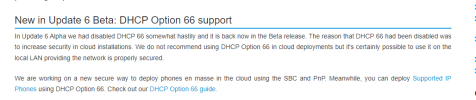
Beta version released this week has this back
https://www.3cx.com/blog/releases/v18-update-6-beta/
1671601925337.png
 
Status
Not open for further replies.

Latest Posts

Forum statistics

Threads
111,973
Messages
590,075
Members
164,895
Latest member
jasonkkrause