Update 6 Beta Available Now

Status
Not open for further replies.
You need to delete the trunk and recreate if you are planning to edit from the webclient. The template included in the build is updated and reads the SIP header that is sent with the + sign. Once you recreate it with the new template everything will work fine.
Yes that worked - deleting the trunk and re-adding it.
 
  • Like
Reactions: YiannisH_3CX
Another issue I had was that SMS integration with Flowroute was all of a sudden gone after the upgrade.
I re-added but it is not working inbound.
Outbound SMS will be send. Inbound will not
I updated the call back URL on Flowroute witht he new call back URL after re-creating the trunk ...

Any pointers?
 
Another issue I had was that SMS integration with Flowroute was all of a sudden gone after the upgrade.
I re-added but it is not working inbound.
Outbound SMS will be send. Inbound will not
I updated the call back URL on Flowroute witht he new call back URL after re-creating the trunk ...

Any pointers?
Resolved that myself - callback URL has to be set via REST API on flowroute when it changes and was set initially on the phone number and not he account level ...
Did that now it works
 
Yes, it will always force the "+" in front of the DID .
It's called E.164 international (or E.123) format and it's recommended.
If it is not configured by your carrier, if you have access carrier portal, look for format InboundCalls and you will undoubtedly find the choice E.164 international (or E.123) .


E.164 is an international standard (ITU-T Recommendation), titled The international public telecommunication numbering plan, that defines a numbering plan for the worldwide public switched telephone network (PSTN) and some other data networks.
As described by the ITU, in E.123: "+" is the "International Prefix Symbol" used in a "Telephone number, E.123 international notation".
Ref.:

https://en.m.wikipedia.org/wiki/E.164
https://en.m.wikipedia.org/wiki/E.123
I'm afraid you misunderstood the conversation that is happening here.

I didn't ask what E.164 format is or why it's used. Additionally, your statement about + always being forced in front of the DID is incorrect, at least in all production versions of 3CX.

If the + is being forced in the latest beta of 3CX, that's good to know. This would be a new change in U6 that hasn't existed in the past.

I was replying to someone else about the issues they had - advised to delete/re-create the trunk as this can be needed with template updates as well as advising them to contact Flowroute if INVITES are being sent without the +.
 
I'm afraid you misunderstood the conversation that is happening here.

I didn't ask what E.164 format is or why it's used. Additionally, your statement about + always being forced in front of the DID is incorrect, at least in all production versions of 3CX.

If the + is being forced in the latest beta of 3CX, that's good to know. This would be a new change in U6 that hasn't existed in the past.

I was replying to someone else about the issues they had - advised to delete/re-create the trunk as this can be needed with template updates as well as advising them to contact Flowroute if INVITES are being sent without the +.


I was mentioning that the Beta 18.6 version, in the WebClient, when creating a new trunk .. the + is always forced when trying to write DID. Unless you have managed to do otherwise, via the WebClient.
 
The ne SMS setup is honestly very confusing to me.
After I re-setup SMS for my Flowroute trunk I cannot see where to route the messages
or how to enable an extension to message.

We are on the PRO version and use the MC.
according the documentation there should be this in the MC

Dedicated (PRO & ENT)​

  1. In the management console, go to “Users”.
  2. Select the desired extension(s).
  3. “Enable SMS” in the “General” Tab
But there isn't anything like that ...
 
  • Like
Reactions: mattbratt
The ne SMS setup is honestly very confusing to me.
After I re-setup SMS for my Flowroute trunk I cannot see where to route the messages
or how to enable an extension to message.

We are on the PRO version and use the MC.
according the documentation there should be this in the MC

Dedicated (PRO & ENT)​

  1. In the management console, go to “Users”.
  2. Select the desired extension(s).
  3. “Enable SMS” in the “General” Tab
But there isn't anything like that ...


After I re-setup SMS for my Flowroute trunk I cannot see where to route the messages
It goes to the same place as the calls, route the calls and they will be routed to the same destination.
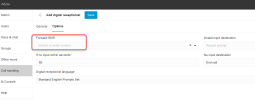
If you point the DID to an IVR, look in the IVR settings (in the WebClient > admin > Call handling > new IVR ( or Edit existing ) > Options > Forward SMS ).

1673824359134.png

We are on the PRO version and use the MC.
according the documentation there should be this in the MC

Dedicated (PRO & ENT)​

  1. In the management console, go to “Users”.
  2. Select the desired extension(s).
  3. “Enable SMS” in the “General” Tab

It is no longer necessary to activate. As soon as a DID of a Trunk with SMS capabilities points to a user or a Queue where the user is a member .. it is automatically activated and allows him to be able to send SMS.
If the user can receive SMS from several destinations (DID), when he tries to create a new conversation, after write destination number, the list will be displayed and he will be offered to choose which DID he wants to use for this conversation.

Me, I find it good, before, it was not possible to choose from which DID we wanted to send the SMS ... it was only one possible DID to create a new conversation (It was possible to answer a conversation to another DID but not initiate ). Now it is possible to choose the DID to use, individually, for each conversation.

1673824280359.png


The guide you seem to be following is for version 18.5, I believe.
 
  • Like
Reactions: N_G and Evolute IT
I keep getting this email from the PBX

Trunk SBC 'Yealink T53W (206)' (PUBLIC IP/PRIVATE IP) has changed status to Up

I am not getting down emails
 
It goes to the same place as the calls, route the calls and they will be routed to the same destination.
If you point the DID to an IVR, look in the IVR settings (in the WebClient > admin > Call handling > new IVR ( or Edit existing ) > Options > Forward SMS ).

View attachment 33587


It is no longer necessary to activate. As soon as a DID of a Trunk with SMS capabilities points to a user or a Queue where the user is a member .. it is automatically activated and allows him to be able to send SMS.
If the user can receive SMS from several destinations (DID), when he tries to create a new conversation, after write destination number, the list will be displayed and he will be offered to choose which DID he wants to use for this conversation.

Me, I find it good, before, it was not possible to choose from which DID we wanted to send the SMS ... it was only one possible DID to create a new conversation (It was possible to answer a conversation to another DID but not initiate ). Now it is possible to choose the DID to use, individually, for each conversation.

View attachment 33586


The guide you seem to be following is for version 18.5, I believe.

Thank you for that - I found the setting however I think there is a catch to this:
If the office is closed no calls are routed to the IVR but go directly to voicemail in our case.
It seems to me that even messages arem when they are outside those office hours, not routed anywhere because they never hit the IVR during out of office.
those message are basically lost ...
 
I keep getting this email from the PBX

Trunk SBC 'Yealink T53W (206)' (PUBLIC IP/PRIVATE IP) has changed status to Up

I am not getting down emails
Down emails get triggered after 5 minutes of downtime.

SBC goes down for 30 seconds:
No down email
Yes Up Email.
 
  • Like
Reactions: Guillaume Bourgeois
Hi.

In the Webclient i don't see a Generic, so there i can use only supported Provider?

Bye
Timm
 
@timmbo - In update 7 generic will be in the new web admin interface yes. With the usual warnings....
 
Hi Nick.

Thanks for this good information.
At this time i'll use a Provider Template for our Partner-Provider, so i import this and fill out the requested fields. Would this be possible also in the Webclient to use a Provider-Template then?

Bye
Timm
 
Hi.

In the Webclient i don't see a Generic, so there i can use only supported Provider?

Bye
Timm
It is still possible in the MC (Classic) admin portal

This feels more like a soft launch for the WebClient admin
The only thing I use the WebClient admin portal for atm is provisioning router phones.

I hope there will be a webinar covering all the changes? @Nick Galea nudge nudge ;) ;)
 
We already did several webinars, very well attended actually, on 3CX Meet!
 
@gbourgeois is right but I am very confident in this beta, it will be rtm soon... And any minor fixes posted fast
I agree Beta has been very good, instance specific webhook for sms working well.
Tomorrow is 30 days since beta was announced, hope that date is a good sign we are almost ready for RTM. :cool:
 
  • Like
Reactions: N_G and Evolute IT
Thanks for the heads up... any moment now :)
 
  • Like
Reactions: Evolute IT
You can provision a DECT phone or ATA just have to give the routerphone IP as the proxy.... Right now you have to do it manual, soon the webclient will allow you to configure DECT phones as well.
Hi Nick, I am on V18/6(889) testing provisioning Yealink W60B with SBC on Yealink T54W, but dropdown list to select SBC for W60B is empty and cannot type in anything - where do you assign routerphone IP address manually? Thanks
 
Status
Not open for further replies.

Forum statistics

Threads
111,973
Messages
590,079
Members
164,898
Latest member
grahamaskew