Update 6 Beta Available Now

Status
Not open for further replies.
Thanks John...I already read post #38 which states "You can provision a DECT phone or ATA just have to give the routerphone IP as the proxy.... Right now you have to do it manual, soon the webclient will allow you to configure DECT phones as well." - unless I missed the explanation, my question is how do you "do it manual"?

Follow this guide here, it explains how to configure your W60 manually with an SBC:
https://www.3cx.com/sip-phones/yealink-dect-w52p/#h.dj8kxtpzsixe
..and the SBC IP is of course the IP of your router phone.
 
  • Like
Reactions: Evolute IT
Follow this guide here, it explains how to configure your W60 manually with an SBC:
https://www.3cx.com/sip-phones/yealink-dect-w52p/#h.dj8kxtpzsixe
..and the SBC IP is of course the IP of your router phone.
Hi John...thanks again...yes, I have used this guide for many many W60B configs :-) - the problem is that when you try to select the routerphone in the dropdown it is not populated - when you select the dropdown for a T43U phone the dropdown is populated with the routerphone SBC (so you can select it) - see attached screenshots. But I have just read post #64 which tends to suggest that routerphone "SBC" may not yet support DECT, so for now we will continue to use RPi as full SBC. The routerphone "SBC" will be very useful for small implementations (less than 10 phones) when we do not have a DECT requirement. Thanks for your help..Cheers
 

Attachments

First of all, thanks for update 6 beta. Lots of very nice things!

One suggestion though, and excuse if it has been brought up - I did search this thread and didn't find anything about it.

I noticed that when editing a user, the Auth ID and Password on the tab Phone Provisioning now must both be 10 characters (and a digit, lower case etc.)
While I perfectly understand why this is pretty good idea, it wasn't like that before (the earlier 3CX'ses set-up the Auth ID as the extension number and on Gigaset handsets this is still required because otherwise they just won't work. Not a bug with 3CX both something strange in Gigasets). And the passwords 3CX generated by default where also a lot shorter before in previous releases. So a lot of users still have a short Auth ID or short Password set-up there.

But long story short: I am now unable to make any kind of change to any user that still has a (now) invalid Auth ID or Password set-up.
Can this perhaps be changed, that when creating a new account, this policy is enforced but when editing an existing account, it is not? Because I can't really re-provision a phone when someone calls me and asks me to disable their voicemail or something like that. Other than that, it is an excellent idea of course to generate longer passwords by default and have that as a requirement for new users.

Edit: same goes for the password under 'web authentication': all default generated passwords from previous versions of 3CX are now also invalid :)

Edit2: just tried this with a supported phone: went to the user in 3CX and change the Auth ID and Password as 3CX required me to do. Then went to 'Phones' and selected the phone and click 'reprovision'. But that didn't work. It seems the phone can't fetch the provisioning data-url anymore once you changed the AuthID/Password in 3CX (in this case). Only way to get the phone working properly again was via factory reset. This was a Yealink device and via the Yealink RPS server and everything, I could get the phone working properly.
Edit3: Tried it with another phone, same type just a different one, and there the 'reprovision'-button did work. So it's seems a bit hit-and-miss maybe. In the mean time, would be great if the requirement for better usernames/passwords could be relaxed a bit for existing users. Also the Web Authentication passwords need to be changed as well. Of course, it's a great idea but we need to plan this and would like to make account changes in the mean time :)
 
Last edited:
@noord - thanks for the feedback we will check it out. But basically the number of hacking attacks are on the rise and we are finding ourselves to have to make things more and more secure and sometimes old insecure hardware falls prey to this but there is little we can do about it.
 
  • Like
Reactions: Evolute IT
But long story short: I am now unable to make any kind of change to any user that still has a (now) invalid Auth ID or Password set-up.
Can this perhaps be changed, that when creating a new account, this policy is enforced but when editing an existing account, it is not? Because I can't really re-provision a phone when someone calls me and asks me to disable their voicemail or something like that. Other than that, it is an excellent idea of course to generate longer passwords by default and have that as a requirement for new users.
Hi noord,

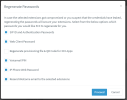
We have a feature that can easily fix all of this for you:

1. Go to Users, select desired extensions
2. Click the regenerate button on the very top
3. Click Proceed
1674139803317.png
This will now re-generate secure passwords, and also notify all your phones to reprovision themselves automatically.

NB: If you use any FXS/DECT devices, you simply need to reboot them once and they will also reprovision.
 
Hi noord,

We have a feature that can easily fix all of this for you:

1. Go to Users, select desired extensions
2. Click the regenerate button on the very top

Thanks @JohnS_3CX , that is a really useful feature! I hadn't noticed that button yet!
It will certainly help but I did notice in a very limited test with n=2, that not all phones *really* reprovision after hitting the reprovision button. So we would need to do this when we are on-site with the clients, to make sure all phones do this properly.
I totally understand why this change is required, but I kindly request that it be delayed to Update 7 for existing extensions. That way, we have a little more time to go to each client and do this. So that would mean setting the random-password-generator (and SIP ID) to generate new, stronger passwords and ID's by default, but leaving the checking mechanism (that checks the input boxes in the form for correct/valid/strong input I mean) at the same level as Update 5. I hope you understand what I mean.

Since all our 3CX's are on auto-update, they will all update to update 6 very soon (I expect U6 to be released soon), leaving us with little time to do this.

But this feature you mentioned can be really useful indeed, we can do all phones at a site at once then and also re-send the welcome messages and everything. I think that also means the Windows App (.exe) need to be reprovisoned? And also the Android/iPhone apps? I can of course check this myself as well, but if you know the answer... :)
 
I think that also means the Windows App (.exe) need to be reprovisoned? And also the Android/iPhone apps? I can of course check this myself as well, but if you know the answer... :)
The mobile apps and the DesktopApps (not to be confused with the 3CX for Windows app) use the 1 box that is unchecked in the screenshot John. If you leave that unchecked they will not need to be reprovisioned.
 
It will certainly help but I did notice in a very limited test with n=2, that not all phones *really* reprovision after hitting the reprovision button.
You do not need to press the reprovision button, the method I mentioned will automatically send the phones a reprovision command right after it generates the new passwords.

Supported phones will reprovision within a few seconds, but if some phones do not reprovision you will have to review them manually in case:

  1. your firmware is too old and is missing critical TLS ciphers
  2. or the phone is EOL and cannot reprovision either way (has to be manually configured)
  3. or the phone had manual changes done at some point that may have broken the ability to reprovision
  4. or if you were using custom templates on some specific phones that need to be reviewed and updated

The rest should reprovision automatically or, if they are offline at the time of the operation, they will reprovision as soon as they are restarted.
 
  • Like
Reactions: noord
Hello, apologies if these have been asked previously:

From the first V18U6 blog post:
- Revamped IP Phone configuration & management: the blog post mentioned requiring split server DNS in the future. Does this matter if we only query public DNS?
- To confirm, local LAN provisioning will still work as it does now for modern phones that support the RPS server? The only major change for local LAN provisioning will be that older phones that do not support the RPS server will need to have the provisioning link manually copied into their web GUI?
- I saw several posts about DHCP Option 66. Is it going to be possible to use it for on-prem installs after this update?
 
- Revamped IP Phone configuration & management: the blog post mentioned requiring split server DNS in the future. Does this matter if we only query public DNS?
This is for local installations, it doesn't matter if your PBX is in the cloud.

To confirm, local LAN provisioning will still work as it does now for modern phones that support the RPS server? The only major change for local LAN provisioning will be that older phones that do not support the RPS server will need to have the provisioning link manually copied into their web GUI?
It works for all modern phones. Some EOL models that were deleted will have to be provisioned by hand if you want to add them as new phones. Existing ones will still work since they are already provisioned.

- I saw several posts about DHCP Option 66. Is it going to be possible to use it for on-prem installs after this update?
Yes it will be possible.
 
  • Like
Reactions: Evolute IT
This is for local installations, it doesn't matter if your PBX is in the cloud.


It works for all modern phones. Some EOL models that were deleted will have to be provisioned by hand if you want to add them as new phones. Existing ones will still work since they are already provisioned.


Yes it will be possible.
Thank you John, I appreciate the quick response. So on-prem installs' server hosts will need split DNS implemented even if they're only querying public DNS? Do you have an estimated date this requirement will be implemented?
 
This is fine as some phones have hard-coded sequence of files they try to get, even those which are not present on the PBX. It's been always like this but now more evident because of the new type of event.
I now have thousands of these in my Dashboard. My logs are just flooded with these messages. I would like to see Warmings but if I leave that box checked each Yealink phone generates 5-10 of these every so often. I tried deleting and adding the extension and changing Yealink Phones like T58A to T58W.

Also noticed this provision warning shows two "//" in the link not sure if thats relevant or not but didn't think // was a valid file path.

I know this behavior is intended with the update but if all Yealink phones do this it just spams the logs & dashboard, and I can't see any relevant information without digging.
 
Status
Not open for further replies.

Forum statistics

Threads
111,973
Messages
590,079
Members
164,898
Latest member
grahamaskew