Update 6 BETA - Grafana Reporting Is Finally Here!

Still getting no traffic hitting my postgreSQL server from my multi-company 3CX instance when selecting "transfer now" in the data connection dash. TCPDUMP on the pg server, i get traffic when I click "test", but nothing when I click transfer. still no tables created in the DB.

I initially thought it was something strange with my pgsql deployment since I deployed via a docker, but I have just redeployed to a dedicated ubuntu VM, configured using your script, opened firewall port, and same behavior. I also dont see any activity in the 3cx dashboard server/event log when testing or triggering a transfer now.

anything else I can check?
I did mine on a Windows PostGres following the same instructions, except using on-prem VM on Windows. Any firewalls, anti-virus, or anything else in play?
 
I did mine on a Windows PostGres following the same instructions, except using on-prem VM on Windows. Any firewalls, anti-virus, or anything else in play?
Fresh/clean Ubuntu Server 24.04 instance, on-prem (also tried a cloud VM with PG in docker). No anti-malware installed. No software firewall enabled. Edge firewall configured to allow 5432 inbound (no traffic showing here either when manual transfer is initiated from 3cx). I assume that's working, since the db connection "test" from 3cx succeeds and i see that traffic on the postgres server via tcpdump. No idea why I get no activity at all when i press the "Transfer CDR Data Now" button. I haven't fount any log data on the 3CX server to point me in the right direction. I have other 3CX instances, but they are not Enterprise. Will be willing to upgrade some of our other instances to Enterprise if I can make this work...
 
Last edited:
@Nikolas
HI Team

Ring group Dashboard for PostgreSQL included.
Guys - Templates for Postgres do not need a URL - So the Variable is hidden. They will all default to public.cdroutput.
Ensure that you configure the plugin correctly.

Queues Dashboard somewhat close - Queue filter giving me some trouble.. Needs more testing so I did not include it yet..
I have been testing the Overview template. I do 1 call in and it increments Total Calls by 3. The call is hitting a CFD. You see this on your side as well? Thanks.
 
  • Like
Reactions: Evolute IT
Hi,
We have customers who have on-premise data storage using MSSQL, MySQL, and PostgreSQL that cannot/won't use cloud solutions to store the data. Today they replicate/convert the entire 3CX postgresql database to (mostly MSSQL) their preferred engine om-premise and then <process the data>.

Are you planning on supporting exporting to non-cloud solutions?
We have the reporting setup and already built reports for it. That being said, You DO NOT have to use a cloud service for the Database or Grafana. Inside the setup, you point to the database you are wanting to store the data. So either an internal IP or if you have internal DNS resolving to the database you can use this.

The Grafana system has a self hosted version which is usable for the reporting. Or you could build your own reporting off this.
 
Fresh/clean Ubuntu Server 24.04 instance, on-prem (also tried a cloud VM with PG in docker). No anti-malware installed. No software firewall enabled. Edge firewall configured to allow 5432 inbound (no traffic showing here either when manual transfer is initiated from 3cx). I assume that's working, since the db connection "test" from 3cx succeeds and i see that traffic on the postgres server via tcpdump. No idea why I get no activity at all when i press the "Transfer CDR Data Now" button. I haven't fount any log data on the 3CX server to point me in the right direction. I have other 3CX instances, but they are not Enterprise. Will be willing to upgrade some of our other instances to Enterprise if I can make this work...
It means there is an issue with your postgress setup its not just a matter of installing postgress, some more things need to be configured correctly and setup. For example rights, network access. So you have to study the Amazon guide although we are working on a postgress only guide as well. Here are some of the things you will need to do

1. Install PostgreSQL:
sudo apt update
sudo apt install -y postgresql
2. Ensure Cluster Exists:
pg_lsclusters
# If 'main' does not exist:
pg_createcluster <major-version> main --start
Get Postgres Version
psql --version | awk '{print $3}' | cut -d '.' -f1
3. Create User and Database:
sudo -u postgres createuser <username> -P # You'll be prompted for a password
sudo -u postgres createdb <dbname> -O <username>
4. Configure Network Access:
- Edit postgresql.conf: /etc/postgresql/<version>/main/postgresql.conf
port = <your_port> # e.g., 5432
listen_addresses = '*'
- Edit pg_hba.conf: /etc/postgresql/<version>/main/pg_hba.conf
Add at the bottom
host <dbname> <username> <allowed_ip>/<cidr> md5
Example
host mydb myuser 0.0.0.0/0 md5
5. Restart PostgreSQL:
sudo systemctl restart postgresql
6. Grant Privileges:
sudo -u postgres psql
# Then inside psql:
GRANT ALL PRIVILEGES ON DATABASE <dbname> TO <username>;
\q
 
Last edited:
Hi.

I followed the attached tutorial, and I get this error when I try to send the CDRs.
https://www.3cx.com/docs/postgresql-configuration/

However, the test works fine.

Additionally, my server crashes when I try to send the information.
It’s running on Ubuntu 24.04.

1748877343844.png

i don't understand...
thank
 
Bonjour cher Orlan

You have a permissions error

Npgsql.PostgresException (0x80004005): 42501: droit refusé pour le schéma public
POSITION: 14 at Npgsql.Internal.NpgsqlConnector.ReadMessageLong(...)
...
Exception data: Severity: ERREUR SqlState: 42501
MessageText: droit refusé pour le schéma public
Position: 14
File: aclchk.c
Line: 2843
Routine: aclcheck_error

Can you make sure you do this?

GRANT USAGE, CREATE ON SCHEMA public TO your_user;

It's explained in the document in point 5

  1. Grant Database Privileges
  • Windows & Linux: Open psql (Windows) or sudo -u postgres psql (Linux) and run SQL :
    GRANT ALL PRIVILEGES ON DATABASE your_db TO your_user;
Merci beacoup!
 
Hello,
Indeed, it was a GRANT PRIVILEGE error.

However, the server crash during the CDR push is still occurring.
A few minutes after clicking the "Push" button in 3CX, I get the following error on the server:

"Data Transferring to Postgre failed due to the following reason: Failed to connect to XX"

Even though I'm running on an ESXi host with an Ubuntu 24.04 VM, 6GB of RAM, 8 vCPUs, and 500GB of storage.
It seems like the system can't handle the load sent by the 3CX server, strange
 
Hi Cher orlan
Can you post the entire reason here? copy and paste it.
Copy and paste the whole text. Thanks so much
 
Well, I simply solved my problem by creating a new database. No more crashes and I'm receiving the data properly. Perfect!

thank you
 
  • Like
Reactions: accentlogic
Which means that when you created the schema, something went very wrong..
The granting of permissions did not work and probably other things were not created correctly.
Actually that was going to me my original suggestion - drop the db and run it again. But the previous error was specifically a rights related issue.

Anyway, glad you have it sorted.
Now use the grafana dashboards for postgress https://www.3cx.com/blog/releases/u6-rc-grafana-support/ and enjoy your new visualisations. ;)

Stay tuned, more dashboards are on the way soon. :cool::cool::cool:
 
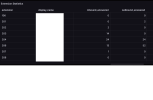
I've just been playing around with the extension statistics board you have posted on here (many thanks for these by the way !) ... and the numbers just don't seem to add up at all ... it's almost as if they are multiplying the numbers on the statistics ... For instance today It is showing I have answered 24 when I have answered 8 ... plus I have made 14 outbound not 24 ? ... my ext is 204 on this attachment
 

Attachments

  • Untitled.png
    Untitled.png
    13.5 KB · Views: 20
extension statistics board
Hi,

Which version of that are you using? I recall in the discussion this was given as a test/example and then some fixes were done.
 
I believe I have used the latest one that was posted in this thread , is there somewhere else I can find a more up to date version from
 
What 3CX Version are you using? RC2 had some fixes that relate to these counts.
 

Forum statistics

Threads
111,992
Messages
590,171
Members
164,929
Latest member
Cloudstar