Update 6 Release Candidate 2: Last Tweaks Before Final Launch

Because the SBC is a RouterPhone (t54W) and it's nope yet supported to be SBC w70b !
 
I see what you mean. You'll have to get on the DECT GUI and stick the IP there.
 
Hello. Some brief feedback about U6 (905) from my testing:

1) All extensions now must require an email address, is that correct, even if voicemail-to-email and webclient is disabled. This looks to be a hassle. Maybe there's a workaround?
EDIT: The reason this is a hassle is there are countless extensions that aren't associated with a person. Examples: break room, work room, copy room, warehouse, front door, etc.
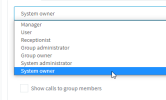
2) Why does the System Owner extension have to have his/her information displayed to all other extensions? In the Rights tab, we can't un-check Show Presence or Show Calls, and I have several cases where the System Owner role holder would want these disabled (un-checked).
 
Last edited:
Hello. Some brief feedback about U6 (905) from my testing:

1) All extensions now must require an email address, is that correct, even if voicemail-to-email and webclient is disabled. This looks to be a hassle. Maybe there's a workaround?
2) Why does the System Owner extension have to have his/her information displayed to all other extensions? In the Rights tab, we can't un-check Show Presence or Show Calls, and I have several cases where the System Owner role holder would want these disabled (un-checked).
Just put system owners in their own group. Theres no need for them to have system owner role in all groups.
 
  • Like
Reactions: accentlogic and jed
  • Like
Reactions: N_G and accentlogic
I believe what Nick is saying is you do not configure the W70B in the FXS/DECT in 3CX MC but rather manually configure the W70B on its webgui and for proxy address and use the ip of the router phone or sbc no need to use stun. We can confirm this is a working solution for now but looking forward to the configuration from 3CX Admin.
 
  • Like
Reactions: N_G
Currently, we cannot change the group membership of sip line, ring groups, queues etc.
We'd like to move these to a different group, so that a group admin cannot see these. Do I miss something?
 
@Bolz IT A group admin can not see system wide trunks. However you can move those items to a group in update 6 from the options tab
 
  • Like
Reactions: Evolute IT
All extensions now must require an email address, is that correct, even if voicemail-to-email and webclient is disabled. This looks to be a hassle. Maybe there's a workaround?
Also disable "Send email notification on missed call" and it will allow you to save without adding an email.
 
Hello,

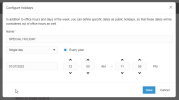
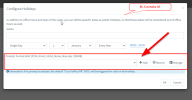
Do you plan on adding a recording for the "Configure holidays" of the Desktop App, Admin section? Similar to the Admin Web Interface?

3cx1.png
Above, Desktop App UI

3cx2.png
Above, Admin Console WEB UI

Thank you
 
Hello,

Do you plan on adding a recording for the "Configure holidays" of the Desktop App, Admin section? Similar to the Admin Web Interface?

View attachment 33762
Above, Desktop App UI


Above, Admin Console WEB UI

Thank you

Hi,

but what i see, here you can onlt set for Groups, not for the hole System.
I have set a lot of holidays for 2023, but on the Webclient-Admin i don't see them.

Bye
Timm
 
  • Like
Reactions: Connexium Partner
Hi,

but what i see, here you can onlt set for Groups, not for the hole System.
I have set a lot of holidays for 2023, but on the Webclient-Admin i don't see them.

Bye
Timm

Good point.

My screenshots above were made with the SYSTEM OWNER permission
1674829434560.png

But even for groups, I should still be able to have announcements like the routing rules above? (Open office, closed, break)
1674829650839.png

But I believe system owner or system administrator should have the permission to set the HOL holiday (global holiday) for the whole system and DIDs that have this feature checked:
1674829851378.png

Thank you for your consideration
 
@timmbo - Group holidays are only valid for calls routed to the group. From there you can then forward to IVR or whatever. Group holidays also apply to the group members for available away etc.

If you setup a new system we set the default group holidays and the old global holidays are simply not used at all.

Current systems will continue to use global holidays until you forward calls to a group. new systems dont have global holidays and use the holidays of the default group.
 
@nick - Ah OK, that's good to know.

Thanks
Timm
 
  • Like
Reactions: MarkNAS
I noticed this morning on our NFR key that SMS outbound has stopped flowing. when i go to the console and general tab of users, the enable SMS box is missing from the bottom of the general tab.

View attachment 33769

any idea how we can get that back? inbound SMS works just fine. Just can't respond to anyone.
u6 doesn't have that box anymore, it's automatic based on inbound DIDs.

So if you have an inbound DID that points to that user somehow (either direct, a q that the user is a member of, etc) then they can send a SMS.
 
  • Like
Reactions: N_G
@timmbo - Group holidays are only valid for calls routed to the group. From there you can then forward to IVR or whatever. Group holidays also apply to the group members for available away etc.

If you setup a new system we set the default group holidays and the old global holidays are simply not used at all.

Current systems will continue to use global holidays until you forward calls to a group. new systems dont have global holidays and use the holidays of the default group.
Hi @Nick Galea , as @timmbo said good to know we will have to be explicit for each group.

My assumption about how it would work had been that global holidays would take effect and then group holidays were an implicit additive override (so in effect you could put national days or xmas in global for all branches/depts once, and only any regional/local holidays in the group).

But as per your description, we just have to make sure to be explicit about all relevant holidays per group; so for example make sure to enter a date range for christmas holidays in each group along with your group-specific local holidays?

Classic trade-off, some cost for duplicating common holidays per group, but I can see this way should make it easier to carve out groups/branches/departments from holidays that otherwise apply to everyone else except some special group that is available during a particular holiday as well.
 
@MarkNAS Its about where you route calls. If you do not route calls to a group then global holidays continue in effect and if you route calls to a group then those holidays configured will take effect.

new installs will route calls to the Default Group. So Default Group hours take effect

Old installs stay as they are after the update they keep routing as they do now until you route calls to a group and configure holidays and times there.
 
  • Like
Reactions: lbfealex
@MarkNAS Its about where you route calls. If you do not route calls to a group then global holidays continue in effect and if you route calls to a group then those holidays configured will take effect.

new installs will route calls to the Default Group. So Default Group hours take effect

Old installs stay as they are after the update they keep routing as they do now until you route calls to a group and configure holidays and times there.
Hi Nick.

What you mean route to a group?(All the memberphones will ring)?
I think we(Partners) should to know the tecnical backround here.
So, if i choose to route the call to a group, not to an extension, what will happend then, ting them all?

Bye
Timm
 
  • Like
Reactions: Evolute IT

Forum statistics

Threads
111,974
Messages
590,081
Members
164,899
Latest member
mazet