Update 8 Alpha - 3CX MS 365 Integration Made Easy!

Hi John
The minimum is Windows 10 Server 2016
Sorry for my rubbish English. The curent server is running Windows 10 PRO, with 3CX v18.0 (build 441).
This server isn't offered the Update 8


No worries! Anyway it won't appear on Windows yet.
 
Hi!

Great job, looks very good!

Is it a known issue, that the reports do not contain calls since the upgrade?

same goes for "call log"

Or os it a issue in our end?

Thanks!
 
@mortenjorge - which reports, the 3CX reports you mean? Management console or web client?
 
Hi Nick,

Webclient and webmanagement.

Both reporting and the normal Call log.

Thanks
 
Hi Nick,

Webclient and webmanagement.

Both reporting and the normal Call log.

Thanks
Hi Morten, I will PM you shortly so we can check a couple of things.
 
  • Like
Reactions: jed
So, when is the H264 implemented in the Android app, as at this moment I don't see it working yet?
 
Any chance the CRM Template Generator will be updated to leverage the new contact search functionality with non-natively supported CRMs?
We have a potential deal on hold because the client uses Google Workspace and their current system allows the users to search CRM contacts from the dialer app.
 
Any chance the CRM Template Generator will be updated to leverage the new contact search functionality with non-natively supported CRMs?
We have a potential deal on hold because the client uses Google Workspace and their current system allows the users to search CRM contacts from the dialer app.
Yes, this is going to be released when the final version of Update 8 is ready.

In the new version, the wizard will ask for the details for search during template creation. But if you already have the template and just need to add this, then it's just a matter of adding a new scenario with ID starting with "SearchContacts" (you can have multiple scenarios to search on different CRM fields if needed). The text being searched is in the variable [SearchText]. This is something that you can do with the existing tool.
 
  • Like
Reactions: Evolute IT
Regarding TAPI
The download link in the webclient is https://downloads-global.3cx.com/downloads/3CXTAPI18.msi but the link mentioned in the docs https://www.3cx.com/docs/installing-multi-line-tapi/ is https://downloads.3cx.com/downloads/3CXPlugins15.exe
It's unclear if I need both or just one.

As well, the profile icon (and status switcher) moved to the right side - is this by design or can it be switched back?
You just need this:
https://downloads-global.3cx.com/downloads/3CXTAPI18.msi

The old 3CXPlugins installer shouldn't be used for TAPI anymore.
 
What is the full change log for this version, I don't see it posted online anywhere?
 
  • Like
Reactions: Evolute IT
As well, the profile icon (and status switcher) moved to the right side - is this by design or can it be switched back?
Yeah I don't like that change either... confused the crap out of me.
 
  • Like
Reactions: Evolute IT
Any chance the CRM Template Generator will be updated to leverage the new contact search functionality with non-natively supported CRMs?
We have a potential deal on hold because the client uses Google Workspace and their current system allows the users to search CRM contacts from the dialer app.
We will also support Google Workspace natively quite soon
 
@Nick Galea
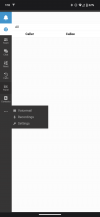
In the webclient where you have the 3 dots, where voicemail, recordings and settings are.
Why are they not just below contacts like the other tabs. This hurts my OCD every time I check voicemail.
See attached image.

Also with the changes to contacts is it in this release or is there any further thought in giving a global group contact list. For example one clients system has a group for Melbourne and a group for Sydney but they have to share the same global contacts. Just seems logical that each group has its own.

Thanks for the update.
 

Attachments

  • Screenshot_20230610-011856.png
    Screenshot_20230610-011856.png
    77.4 KB · Views: 16
Great news!
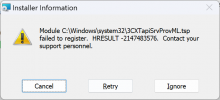
I upgraded our test instance and tried TAPI right away. Unfortunately I get this back:

1686332527461.png

Seems there is some issue on registering Tapi. Windows 11 here.
I gonna test some more, looks promising so far except Tapi ;)
 
Seems there is some issue on registering Tapi. Windows 11 here.
Which reminds me, is Windows 11 supported yet? Last I heard here a few months ago it was not...
 
Which reminds me, is Windows 11 supported yet? Last I heard here a few months ago it was not...
I think you are confusing Windows 11 support for 3CX Server vs. Windows 11 Support for 3CX Phone.
 

Forum statistics

Threads
111,974
Messages
590,081
Members
164,899
Latest member
mazet