Update 8 Alpha - 3CX MS 365 Integration Made Easy!

Great news!
I upgraded our test instance and tried TAPI right away. Unfortunately I get this back:

View attachment 35883

Seems there is some issue on registering Tapi. Windows 11 here.
I gonna test some more, looks promising so far except Tapi ;)
Worked fine on my Win11. Could it be GPOs or something blocking it? It failed to register the TSP (telephony service provider) file.
 
I think you are confusing Windows 11 support for 3CX Server vs. Windows 11 Support for 3CX Phone.
That would be logical but no...this was from November 2022: https://www.3cx.com/community/threads/windows-11-3cx-desktop-app.117741/

At the moment we cannot provide any support for Windows 11 as it is not supported or tested.
Find below the supported operating systems.
https://www.3cx.com/docs/manual/phone-system-installation-windows/
The link did reference 11 as noted in the thread but there was no specific response about the Desktop App.

Edit: I reread what you wrote. I was specifically referring to the Desktop App since the post mentioned TAPI but I wasn't clear in my post above.
There were also other threads around the same time saying the Desktop App did not yet support Win11.
 
TAPI on Windows 10 installed no issue here.
 
  • Like
Reactions: Guillaume Bourgeois
@weimerd looks like something is blocking the installer, did you manage to install it in the end?
 
@Nick Galea has/is there gonna be any work made to the Call Log? Specifically the ability to see which DID was called?

I have a problem at the moment whereby I cannot search for calls made to a certain DID.

It would be helpful if there was an extra column in call log to show "To DID" rather then/in additon to the ext it hits.

I know I can "Add Group, Queue or DID/DDI Names to Caller ID" but Im unable to use call reports to search by letters.
 
@weimerd looks like something is blocking the installer, did you manage to install it in the end?
nope, cannot install it. Tried it with full access admin rights.
It is a Windows 11 on ARM btw. on a Surface 9 Pro 5G. Maybe that's why. I don't know if there is something needed in addition?
 
nope, cannot install it. Tried it with full access admin rights.
It is a Windows 11 on ARM btw. on a Surface 9 Pro 5G. Maybe that's why. I don't know if there is something needed in addition?
The executable is x86 only, so makes sense (ARM windows uses emulation so not native).

Try it on an x86 PC and let us know how it goes.
 
  • Like
Reactions: bitn2
The executable is x86 only, so makes sense.

Try it on an x86 PC and let us know how it goes.
well, usually it works on emulation. But not with this install. As we get more clients that use ARM devices nowerdays it may be worth a thought to adapt.
 
well, usually it works on emulation. But not with this install. As we get more clients that use ARM devices nowerdays it may be worth a thought to adapt.
For what it's worth I had an arm laptop running windows 11 for the ARM to x86. Didn't have a program I could run. It was more speed due to low resources of an ARM device.
 
For what it's worth I had an arm laptop running windows 11 for the ARM to x86. Didn't have a program I could run. It was more speed due to low resources of an ARM device.
I don't think it's a point here to discuss about the useability of Windows ARM devices. They are on the market. They are getting pushed more and more. People are different with different needs. Some may like a device that can run a full office day withour needing to be charged. For them ARM devices may be great.
And actually I see lots of software on the device that runs perfectly even if it's x86 only thanks to the built-in emulator.

Back to the topic:
I guess it is more a driver issue that is not optimized for ARM devices as the electon app as it works just great. It's just TAPI driver that won't install.
 
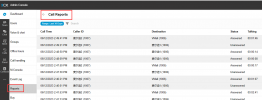
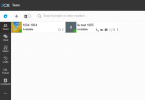
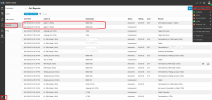
When we open the page call log in the web client, the page just can display for about 5 seconds, after that, it will go back to the team page, is it one issue in the update 8?
 

Attachments

  • call report.png
    call report.png
    58.5 KB · Views: 24
  • team page.png
    team page.png
    20.9 KB · Views: 24
When we open the page call log in the web client, the page just can display for about 5 seconds, after that, it will go back to the team page, is it one issue in the update 8?
Just checked it here and I can't confirm this issue. So it may be a local issue. Checked it on two different PBX I use für testing purpose.
 
When we open the page call log in the web client, the page just can display for about 5 seconds, after that, it will go back to the team page, is it one issue in the update 8?
Try to clear your browser cache, or test again using Chrome Incognito mode to see if this issue goes away.
 
Are the reports going to stay in the management console and the web client on the final release of U8? Thanks.
 
The new features added to Update 8 work very nicely. Although the reports can be accessed by any manager on the PBX irrespective of the queue/group they are in. It's good to restrict accessing the reports to the specific queue a manager is in.
 
@Rifki.Razik No, they can only access the reports they are a manager of. Probably on your install a particular user is part of the default group or indeed of multiple groups. Then he would have access to many reports yes.

@Rhys Haskell The new reports are only available in the webclient. Old style reports will stay in the management console although the management console will itself be replaced with the admin console in the web client in a future version.
 
@Nick Galea
I've tested it before and posted it here. However, I may have missed some steps while testing.
This is what I have done;

Created 2 Ext's: 3000 and 3001
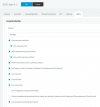
- Ext: 3000 is only a member and manager of Group 1 (attached image 1)
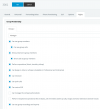
- Ext: 3001 is only a member and manager of Group 2 (attached image 2)
- Made some calls from Ext: 3000
- Logged in to web-client of Ext 3001 (web-client --> admin --> reports) (attached image 3)
Technically, I should not see any call logs/reports of Ext: 3000 through the web-client (web-client --> admin --> reports) of Ext: 3001 as Ext: 3001 is the manager of Group 2.

The problem is that I'm able to see all the call logs of entire PBX regardless of any groups or extensions when login to web reports of Ext: 3001. (attached image 3)

Please correct me if I've missed any configuration.
 

Attachments

  • Image 1.png
    Image 1.png
    49.6 KB · Views: 8
  • Image 2.png
    Image 2.png
    25.4 KB · Views: 8
  • Image 3.png
    Image 3.png
    119.6 KB · Views: 8
Last edited:
  • Like
Reactions: MiraG_3CX
The new features added to Update 8 work very nicely. Although the reports can be accessed by any manager on the PBX irrespective of the queue/group they are in. It's good to restrict accessing the reports to the specific queue a manager is in.
New reporting is based on groups in the user area. Not ring group or queues.
 
Just checked it here and I can't confirm this issue. So it may be a local issue. Checked it on two different PBX I use für testing purpose.
Thanks for your checking.
Try to clear your browser cache, or test again using Chrome Incognito mode to see if this issue goes away.
Yes, after I clear the broswer cache, call log can display all the time, thanks.
 
  • Like
Reactions: JohnS_3CX
New reporting is based on groups in the user area. Not ring group or queues.
@tronic
Of course I created user groups and assigned the extensions in to that, not in ring groups.
 

Forum statistics

Threads
111,974
Messages
590,081
Members
164,899
Latest member
mazet