Update 8A Final

AndreasP_3CX

Staff member
3CX Support
Joined
Feb 15, 2013
Messages
251
Reaction score
168
Update 8A Final is released for production following testing over the last 10 days since our update 8A BETA release. It’s our last update to version 18 including the lockdown of SIP Trunks and system extensions, CFD performance improvements, SMS handling of incoming Alphanumeric Sender IDs, and the ability to turn off RPS for on premise installs....
Continue reading the Original Blog Post.
 
Last edited by a moderator:
update 8 makes provisioning easier for both on premise and cloud installs.

Is it possible to elaborate what "makes provisioning easier" exactly means?
 
Is it possible to elaborate what "makes provisioning easier" exactly means?
Uses RPS to deliver the provisioning URL, so that no option66, pnp, etc is needed.
 
Has anyone else had an issue where there PBX has updated during the day even thou they are set to update overnight and then rebooted kicking all calls off? Have had this happen to 12 PBX's today at 15:50
 
From the release notes, are we supposed to not be able to make/manage any trunks at all with Group owners/admins?

In the web client, I can see that existing trunks are not there when logging in under Group owner/admins, but they can still create trunks and then proceed to manage/manipulate those.

*edit* Cancel that; received clarification that its referring to 'system wide/system owner/admin' created trunks. Trunks made by them [group owner/admins] will be available for the them.
 
Last edited:
@Bith Are they using 3CX hosting or are they self-hosted? I didn't see it in the post but usually 3CX specifies they will update servers under their hosting and IIRC it usually happens very quickly after release.
 
Has anyone else had an issue where there PBX has updated during the day even thou they are set to update overnight and then rebooted kicking all calls off? Have had this happen to 12 PBX's today at 15:50
Did they really update, or did you just get a ton of e-mails telling you that a new update is available as we did around that time of today?
 
Last edited:
  • Like
Reactions: PaulC_3CX
Hi,

Can we get a rough ball-park ETA for the next major release of 3cx, version 20?

Thank you-
 
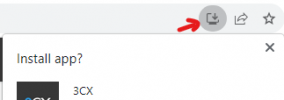
Just updated to 18.0 (Build 935). Now the desktop app option is no longer in the web client when you click the edge or chrome symbol.
In chrome I clicked the chrome button, and it was there. Then clicked the update option up the top and then it was gone and only the PWA option was there.
I can't recall reading anything regarding this. Is this a fault, a new process or worse?
 
Just updated to 18.0 (Build 935). Now the desktop app option is no longer in the web client when you click the edge or chrome symbol.
In chrome I clicked the chrome button, and it was there. Then clicked the update option up the top and then it was gone and only the PWA option was there.
I can't recall reading anything regarding this. Is this a fault, a new process or worse?
The Windows Client has been removed.
3CX added all the features from it to the PWA and now that's all you should need.
 
The Windows Client has been removed.
3CX added all the features from it to the PWA and now that's all you should need.
I get that the windows client has been removed. But it's the desktop app I'm talking about, the one that came in V18.

Personally, and majority of my client prefer the desktop app. There is also clients that have security restrictions on the PC's that the desktop app works better for them.

Its kind a of a personal choice i think and not something you just change without announcements. Hopefully it's just removed from there as they are recommending the PWA and not that its being depreciated.

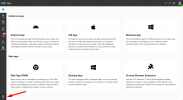
I did find it via the webclient on the bottom left under "Apps" if other have the same issues.
 
  • Like
Reactions: Guillaume Bourgeois
@tronic,@radiio Woo, stop, you do have all clients available.
Login with the /webclient link
Login with the user´s e-mail, reset Password (I can not make this if I´m using the Extension number)

In the Bottom left corner, click on Apps, and you will have all clients listet.

1694066648199.png
 
  • Like
Reactions: N_G and PaulC_3CX
@tronic,@radiio Woo, stop, you do have all clients available.
Login with the /webclient link
Login with the user´s e-mail, reset Password (I can not make this if I´m using the Extension number)

In the Bottom left corner, click on Apps, and you will have all clients listet.

View attachment 37130
Thanks for the reply. I did say that it's in the Apps area of the webclient.

Its more the process we have taught clients since release of version 18, is now wrong. As it's no longer in the edge or chrome icon area of the webclient. Could be a mistake or on purpose not sure.
 
For your (3CX) information, we had around 50 of our 200+ Linux installations which indicated that they were on build 917 (in the web interface) and they offered an update to version 935. When triggering the update (from either the web interface or CLI - apt update && apt install 3cxpbx), this 'failed' saying that these instances were already on update 935. Seems that was correct, because rebooting them made them 'realise' what their actual version was.
 
Before I respond to the private message concerning my above message, I have a more urgent matter.

The latest build (935) is breaking functionality for one of our customers. Group Owners and Administrators can now no longer manage SIP Trunk and System Extension settings, which is fine except for the fact that we have users with several assigned DID's and they can no longer select between these DID's for their outgoing CLI.

Each of these users was within their own group to make sure that they could only configure these settings for themselves.

What rights should I grant them for them to be able to resume this functionality, without giving them rights to other users within the system?
 
Before I respond to the private message concerning my above message, I have a more urgent matter.

The latest build (935) is breaking functionality for one of our customers. Group Owners and Administrators can now no longer manage SIP Trunk and System Extension settings, which is fine except for the fact that we have users with several assigned DID's and they can no longer select between these DID's for their outgoing CLI.

Each of these users was within their own group to make sure that they could only configure these settings for themselves.

What rights should I grant them for them to be able to resume this functionality, without giving them rights to other users within the system?
Have you added the sip trunks and system extension to the group like you would a user but down the bottom?
 
O
Before I respond to the private message concerning my above message, I have a more urgent matter.

The latest build (935) is breaking functionality for one of our customers. Group Owners and Administrators can now no longer manage SIP Trunk and System Extension settings, which is fine except for the fact that we have users with several assigned DID's and they can no longer select between these DID's for their outgoing CLI.

Each of these users was within their own group to make sure that they could only configure these settings for themselves.

What rights should I grant them for them to be able to resume this functionality, without giving them rights to other users within the system?
Oh and add then to group owner
 

Forum statistics

Threads
111,974
Messages
590,081
Members
164,899
Latest member
mazet