Hello guys,
I'll try to answer to all existed questions.
1. Why is this update is so urgent?
The previous 3CX supported firmware version (xx.83.0.20) was provided by the Yealink team with the very major issue.
The problem here was that by mistake the Yealink team added some restriction which was not allowing the phones to download the files bigger than 2MB. This makes the FW update using the HTTP (HTTPS) URLs impossible - you still can download the file and manually upload it to the phone directly, but the firmware update from 3CX was not working.
You need to move to the xx.83.0.55 version which is fixing that problem and allows you to update the Yealink FW versions using the 3CX Management Console (using the HTTP (HTTPS) URLs)
2. How the update works and why do you need to have the custom "patch" files.
To fix the mentioned issue the Yealink team provided us with the "patch" files that will use some scripts to disable the mentioned restriction.
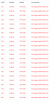
When the user will perform the firmware update on the Yealink phones from the 3CX Management Console, 3CX will provide 2 files to the phone - first the "patch" file to remove the restriction and then the actual firmware file.

In this example the phone will download the "patchT29-46.83.0.55.rom" file, it will remove the restriction, the phone will automatically download the actual "T29-46.83.0.55.rom" file and update.
3. New "Warning Display" feature
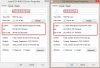
This is the new feature added by Yealink.
For security reasons, all provisioned phones must have a non-default web password.
If you are using the default "admin/admin" login you can be easily hacked. This is why the phone is warning you to change it.
4. @Marari
To manually update the phones you need to use the "T29-46.83.0.55.rom" firmware file (and NOT the "patch" one)
5. @Marari and @cobalit
I can't reproduce your issues. Right now, I'm successfully updated 2 of T29G models (one local and one remote) and 2 of T46G models (one local and one remote). Please check the provisioning settings and try again.
If you still will have the problems, please contact to our Support team so they will help you to understand why you are not able to update these particular phones.