Solved Upgrade Debian 10 - 12 Failing - not enough CPU Cores

Status
Not open for further replies.

colinuk

Silver Partner
Advanced Certified
Joined
Aug 3, 2020
Messages
15
Reaction score
0
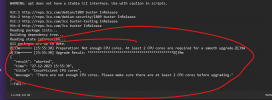
We currently host our customers on Azure - Self Hosted - with a typical Azure standard B1S virtual - 1 x CPU, 1Gb RAM, the update to ver 20 includes the Debian O/S update and is failing as it does not meet the minimum specification 2 x CPU, 2GHb RAM
Can we upgrade to this version with 1 x CPU/ 1Gb RAM, or do we have to increase the server size? If possible, what is the best upgrade process?

Excerpt from upgrade to ver 20:
The Debian OS update script only works for installs based on the 3CX ISO with the minimum suggested specs required (i.e 2 core CPU and 2 GB of RAM)

Error log:1703758075405.png
 
  • Like
Reactions: Evolute IT
I got same problem on few VMs from AWS lightsail, just done a snapshot of running pbx, then stopped running create a new vm based on snapshot with the prerequisite specs and finally migrate to V20.
All this Vms things are less than 15 minutes and between 10-15 minutes more for V20 migration
 
  • Like
Reactions: Evolute IT
I got the above error and I upgraded my VPS on vultr it now has 2 cores but I am getting a server error 504 ok. I have tried rebooting the server etc, but with no success. Update page no longer displays the update and the error comes up when it tries to look for updates.

How can I go about fixing this issue?
 
How can I go about fixing this issue?
I'd say delete your VM , create a new one , install 3CX V18 from iso or marketplace if available, then restore your backup.
then if you want to migrate V20 , do the prerequisite check and other things needed, when ready, apply V20 and let your instance doing update, it takes about 10 minutes.
 
I'd say delete your VM , create a new one , install 3CX V18 from iso or marketplace if available, then restore your backup.
then if you want to migrate V20 , do the prerequisite check and other things needed, when ready, apply V20 and let your instance doing update, it takes about 10 minutes.
The update didnt even take place as I am still on v18 doesnt make much sense to have ot restore to backup. Also the requirement of 2 vcpu's also doesnt make much sense as you can upgrade linux with any number of cores obviously it will be more time consuming.
 
The update didnt even take place as I am still on v18 doesnt make much sense to have ot restore to backup. Also the requirement of 2 vcpu's also doesnt make much sense as you can upgrade linux with any number of cores obviously it will be more time consuming.
Well, you know much your install than me that's obvious so do as it suits to you
 
  • Like
Reactions: Evolute IT
I have checked again today and the upgrade was available when going to the updates and the error didnt happen again. It seems like when an update process fails its like you are prevented from trying again in the same day.Tried today after upgrading my VPS to a 2vcpu machine and update was successful.
 
Glad to know this is resolved ;)
 
Status
Not open for further replies.

Forum statistics

Threads
111,974
Messages
590,081
Members
164,899
Latest member
mazet