Solved "Upgrade" missing on V18

Status
Not open for further replies.

DCB

Bronze Partner
Joined
Oct 5, 2021
Messages
48
Reaction score
5
Hello. Found some old V18s that we need to get upgraded. Following this article there should be an "Upgrade" button/link. I'm not seeing it.
Since we're a bit behind, did they remove it?

Also, it appears that I "MUST" pick a system before I can post this, however only V20s are an option so please ignore

Hosted,
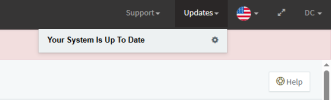
  1. Log in to the V18 Management Console.
  2. As a safety precaution take a full backup configuration by going to Backup and Restore.
  3. Download and save your backup outside of the instance.
  4. Navigate to and select “Upgrade” in the top right corner.
  5. Confirm the upgrade.
  6. You will receive an email informing you when the OS and PBX are upgraded.
1790354771860.png
 
Solution
Before proceeding, please review our V20 Upgrade Checklist & FAQ and complete the applicable preparation steps.

Once ready, take a full backup of your V18 system and download it to a safe location outside the instance. You will then need to perform a fresh V20 installation using the same license key (from the portal) and restore your V18 backup.
What version of v18? It meets all prerequisites?

I don’t think any version 18 can activate anymore (?) so not sure it will see any updates. But if it was at least the latest you can probably install+restore.
 
  • Like
Reactions: KyriacosS_3CX
Before proceeding, please review our V20 Upgrade Checklist & FAQ and complete the applicable preparation steps.

Once ready, take a full backup of your V18 system and download it to a safe location outside the instance. You will then need to perform a fresh V20 installation using the same license key (from the portal) and restore your V18 backup.
 
Solution
Before proceeding, please review our V20 Upgrade Checklist & FAQ and complete the applicable preparation steps.

Once ready, take a full backup of your V18 system and download it to a safe location outside the instance. You will then need to perform a fresh V20 installation using the same license key (from the portal) and restore your V18 backup.
Ba! That's what I was afraid of.
 
@DCB It’s a straightforward procedure, and if you run into any issues, you can always contact our support team or post on the forums for assistance.
 
System has been upgraded and the licensing issues is resolved.
However, it didn't solve another problem, but I'll post in a different thread if I can't find an answer in the forum.
 
  • Like
Reactions: IrinaP_3CX
Status
Not open for further replies.