Upgraded to V20 whitout creating a user with admin rights

FrankD

Gold Partner
Advanced Certified
Joined
Nov 27, 2024
Messages
7
Reaction score
0
Hi,
One of our customers upgraded their system to V20, unfortunatly there was no user with full admin rights (from which we have valid credentials).
What is the procedure to make this system accessible again?

Kind regards,
Frank
 
Last edited:
ouch.
Not sure if you'd be able to edit the XML of a previous backup and then do a restore.
I dont think there's a way to recover from v20
 
You can edit the xml. I did this for a client with an on prem. system. Their IT dept did not allow us to have an extension. It is not the most enjoyable endeavor I think there were 3 places to change things and we almost got blacklisted. Needless to say we charged handsomely for our time on this one. On all our hosted systems the 1st user we add is one for ourselves this practice goes back to 3cx version 8 or 9
 
  • Like
Reactions: jed and CentrexJ
Hi,
One of our customers upgraded their system to V20, unfortunatly there was no user with full admin rights (from which we have valid credentials).
What is the procedure to make this system accessible again?

Kind regards,
Frank

Hi Frank,

How did they perform the upgrade exactly? This is an important detail to share in this case because it should not be possible.


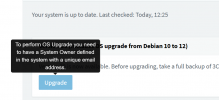
- On debian we do not allow OS upgrade or PBX upgrade unless there is a system owner.
1732790361009.png

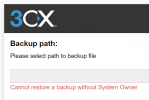
- On Windows which requires a backup restore, we do not allow the restore to proceed without a system owner.
1732790380719.png

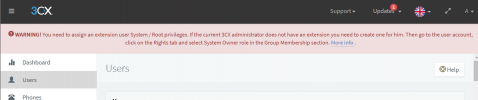
- We also have a big red banner to warn you ahead of time in V18 MC
1732789134678.png
 
  • Like
Reactions: Evolute IT
Hi Frank,

How did they perform the upgrade exactly? This is an important detail to share in this case because it should not be possible.


- On debian we do not allow OS upgrade or PBX upgrade unless there is a system owner.
View attachment 45354

- On Windows which requires a backup restore, we do not allow the restore to proceed without a system owner.
View attachment 45355

- We also have a big red banner to warn you ahead of time in V18 MC
View attachment 45353
Hi John,
Not sure, I'll ask the customer..
 
Hi,
One of our customers upgraded their system to V20, unfortunatly there was no user with full admin rights (from which we have valid credentials).
What is the procedure to make this system accessible again?

Kind regards,
Frank
If the system owners defined on the system have a unique email address on the system, they could click on forgot password and reset their password and log in.
 
  • Like
Reactions: JohnS_3CX
An account with limited access (don't know exactly what level of access) and received an upgrade message in the browser and clicked on it.
Unfortunately, there was a system owner but no e-mail and nobody knew the password.
In the mean time, we reinstalled the system...
 
An account with limited access (don't know exactly what level of access) and received an upgrade message in the browser and clicked on it.
Unfortunately, there was a system owner but no e-mail and nobody knew the password.
In the mean time, we reinstalled the system...
Those accounts are not capable of upgrading the PBX, you need to be in the management console.

I think what you are referring to is the webclient refresh banner which appears after an upgrade has already been completed which is not related.
1732885727156.png


- Is there any remote management / monitoring software on the machine?
- Has anyone SSH'd into the machine recently and installed/updated anything via command line?
 
  • Like
Reactions: Evolute IT
Those accounts are not capable of upgrading the PBX, you need to be in the management console.

I think what you are referring to is the webclient refresh banner which appears after an upgrade has already been completed which is not related.
View attachment 45376


- Is there any remote management / monitoring software on the machine?
- Has anyone SSH'd into the machine recently and installed/updated anything via command line?
Customer indeed had access to the management console.
 
Customer had indeed access to the management console.

Ok that makes it more clear then. They had at least one account as a system owner, and clicking the OS upgrade in the MC was allowed.

After the upgrade, you can find out from a previous backup (in the XML) who the system owner is. And then you can simply reset it and get back in like my colleague @NicholasP_3CX said above.
 
Ok that makes it more clear then. They had at least one account as a system owner, and clicking the OS upgrade in the MC was allowed.

After the upgrade, you can find out from a previous backup (in the XML) who the system owner is. And then you can simply reset it and get back in like my colleague @NicholasP_3CX said above.
I had a support ticket opened for this one: 2153008.
 
Their backup did not have a system owner so they could not have upgraded from the MC at least.

However, that was only true until the time of the backup. They could have added a system owner and then clicked the upgrade.

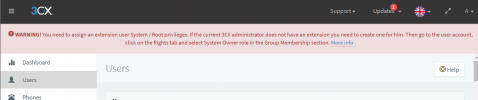
They would have also seen this banner warning them that no system owner exists, so they could have easily set a system owner to make the banner go away, and then it could immediately allow you to click the upgrade button.
1732889608359.png


If you had not rebuilt the system yet, you could also learn who the system owner was from our Audit Log, but that was probably wiped during reinstall unfortunately..
 

Members Online Now

Forum statistics

Threads
111,832
Messages
589,285
Members
164,662
Latest member
DejanMDS