Solved Upgrading from V16 to V18 on AWS Lightsail advice needed

Status
Not open for further replies.

smarti

Free User
Joined
May 22, 2019
Messages
12
Reaction score
0
I've seen some worrying accounts of failures when attempting to upgrade to V18 on Lightsail which has culminated in a period of procrastination and indecision for me. I'm not a 3CX expert, but from what I remember I found the original install quite straightforward. There's nothing special about our small installation, we have 5 small offices in different countires connected via RPI SBC's, a handful of DECT phones and a couple of polycom conference phones.

What I'm not sure about is the correct approach to the upgrade, for example:
  1. Should I just press the upgrade button as described in: Upgrading to V18 under the section 'self managed', bearing in mind the failures I have read about? This post on the 3CX site: Upgrade to v18 and Debian 10 (Buster) seems to suggest that Lightsail installations have been tested with a 97% success rate, which is pretty good I think, what's the experience in the field?
  2. Or, should I create a fresh install as described in: Hosting 3CX PBX in Amazon Lightsail and somehow restore a backup at some point in the process? I would probably have to do this anyway if the outcome of (1) above is failure? There are some unanswered questions for me about this approach like: when do I stop the running old instance, can I keep the same public IP address, what's an 'extension length', the instructions say to press reinstall which implies to me that it would expect to use the existing AWS instance etc.. etc..
Sorry if this seems obvious to you all, for me it is not and I don't wan't to go into the task unplanned and unprepared. So any advice would be very much appreciated, especially if you have been through the same experience on Lightsail.

Many thanks!
 
Hi @smarti,

Provided that your PBX is still in a supported configuration. As a precautionary measure, take a full backup and move the backup off of the server and then use the upgrade from the PBX as per the guide during downtime.

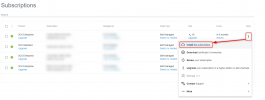
If it fails, you'll have to resort to your plan 2. If you do need to, I'd suggest using the 3CX PBX express deployment tool which you can find under the More button associated to your License Key:

1647014760912.png

The extension length dictates the length the PBX will use for internal extensions: For example: An extension length of 4 would be 0000 - 9999.
 
Last edited:
Hi @smarti,

Provided that your PBX is still in a supported configuration. As a precautionary measure, take a full backup and move the backup off of the server and then use the upgrade from the PBX as per the guide during downtime.

If it fails, you'll have to resort to your plan 2. If you do need to, I'd suggest using the 3CX PBX express deployment tool which you can find under the More button associated to your License Key:

View attachment 28617

The extension length dictates the length the PBX will use for internal extensions: For example: An extension length of 4 would be 0000 - 9999.
Thanks, I'll look at the docs for that.
 
Sure thing @smarti, if you require any further assistance feel free to open a new thread!
 
Status
Not open for further replies.

Forum statistics

Threads
111,974
Messages
590,081
Members
164,899
Latest member
mazet