- Joined
- Jun 18, 2020
- Messages
- 5
- Reaction score
- 0
Hello,
I am still green to 3CX and am currently learning.
We have an FreePBX v13 that i followed the steps here to create the backup, retrieved it, then uploaded to the conversion tool here, the converison completes and I download it.
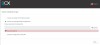
When I go to upload it during the setup of 3CX, i keep getting the below error regarding invalid backup file. It's a .zip and I've even tried uploading the other .zip that is contained inside the .zip that the conversion tool creates. I've tried simpel name, takign out the capital letters of the file name. I've tried three different browsers. Tried uplaodin the .xml that is contain in the .zip and I get an error there, too.
Anyone tips wouls be appreciated. Is this even where I would upload file at?
Thank you
I am still green to 3CX and am currently learning.
We have an FreePBX v13 that i followed the steps here to create the backup, retrieved it, then uploaded to the conversion tool here, the converison completes and I download it.
When I go to upload it during the setup of 3CX, i keep getting the below error regarding invalid backup file. It's a .zip and I've even tried uploading the other .zip that is contained inside the .zip that the conversion tool creates. I've tried simpel name, takign out the capital letters of the file name. I've tried three different browsers. Tried uplaodin the .xml that is contain in the .zip and I get an error there, too.
Anyone tips wouls be appreciated. Is this even where I would upload file at?
Thank you