Use Output value from lookup in ReportCall

Status
Not open for further replies.

hoth

Free User
Joined
Mar 17, 2022
Messages
21
Reaction score
3
I would like to use the information found from a lookup based on the email address and use it in Call Journaling for "ReportCall". I have the following extract from my XML file, which shows the look up done by number and email and also another scenario, which is for "ReportCall", which logs a ticket in my CRM system,
XML:
<Scenario Id="" Type="REST">
      <Request Url="https://login:password@5623-2a01-4b00-e208-dd00-980f-da75-1287-c64d.ngrok-free.app?A=HttpApiQuery&amp;Query=GetCustomerContact&amp;number=[Number]" MessagePasses="0" RequestEncoding="UrlEncoded" RequestType="Get" ResponseType="Json" />
      <Rules>
        <Rule Type="Any">id</Rule>
      </Rules>
      <Variables>
        <Variable Name="ContactID" Path="id">
          <Filter />
        </Variable>
        <Variable Name="FirstName" Path="firstName">
          <Filter />
        </Variable>
        <Variable Name="LastName" Path="lastName">
          <Filter />
        </Variable>
        <Variable Name="Email" Path="email">
          <Filter />
        </Variable>
        <Variable Name="PhoneBusiness" Path="phone">
          <Filter />
        </Variable>
        <Variable Name="ContactUrl" Path="url">
          <Filter />
        </Variable>
      </Variables>
      <Outputs Next="" AllowEmpty="false">
        <Output Type="ContactID" Passes="0" Value="[ContactID]" />
        <Output Type="FirstName" Passes="0" Value="[FirstName]" />
        <Output Type="LastName" Passes="0" Value="[LastName]" />
        <Output Type="Email" Passes="0" Value="[Email]" />
        <Output Type="PhoneBusiness" Passes="0" Value="[PhoneBusiness]" />
        <Output Type="ContactUrl" Passes="0" Value="[ContactUrl]" />
        <Output Type="EntityId" Passes="0" Value="[ContactID]" />
        <Output Type="EntityType" Passes="0" Value="Contacts" />
      </Outputs>
    </Scenario>
<Scenario Id="LookupByEmail" Type="REST">
      <Request SkipIf="" Url="https://login:password@5623-2a01-4b00-e208-dd00-980f-da75-1287-c64d.ngrok-free.app?A=HttpApiQuery&amp;Query=GetCustomerContact&amp;email=[Email]" MessagePasses="0" RequestEncoding="UrlEncoded" RequestType="Get" ResponseType="Json" />
      <Rules>
        <Rule Type="Any">id</Rule>
      </Rules>
      <Variables>
        <Variable Name="ContactID" Path="id">
          <Filter />
        </Variable>
        <Variable Name="FirstName" Path="firstName">
          <Filter />
        </Variable>
        <Variable Name="LastName" Path="lastName">
          <Filter />
        </Variable>
        <Variable Name="Email" Path="email">
          <Filter />
        </Variable>
        <Variable Name="PhoneBusiness" Path="phone">
          <Filter />
        </Variable>
        <Variable Name="ContactUrl" Path="url">
          <Filter />
        </Variable>
      </Variables>
      <Outputs AllowEmpty="false">
        <Output Type="ContactID" Passes="0" Value="[ContactID]" />
        <Output Type="FirstName" Passes="0" Value="[FirstName]" />
        <Output Type="LastName" Passes="0" Value="[LastName]" />
        <Output Type="Email" Passes="0" Value="[Email]" />
        <Output Type="PhoneBusiness" Passes="0" Value="[PhoneBusiness]" />
        <Output Type="ContactUrl" Passes="0" Value="[ContactUrl]" />
        <Output Type="EntityId" Passes="0" Value="[ContactID]" />
        <Output Type="EntityType" Passes="0" Value="Contacts" />
      </Outputs>
    </Scenario>
    <Scenario Id="ReportCall" Type="REST" EntityId="" EntityOrder="">
      <Request SkipIf="[IIf([ReportCallEnabled]!=True,True,[IIf([CallType]!=Inbound,True,False)])]" Url="https://5623-2a01-4b00-e208-dd00-980f-da75-1287-c64d.ngrok-free.app?A=HttpApiSuppdeskWebHook" MessagePasses="0" Message="" RequestContentType="application/json" RequestEncoding="Json" RequestType="Post" ResponseType="Json">
        <PostValues>
          <Value Key="webhookEvent" Passes="1" Type="String">suppdesk</Value>
          <Object Key="call">
            <Value Key="reference" Passes="1" Type="String" />
            <Value Key="folderno" Passes="1" Type="String">1</Value>
            <Value Key="lookupcustfromemail" Passes="1" Type="String">Yes</Value>
            <Value Key="email" Passes="1" Type="String">[Email]</Value>
            <Value Key="phone" Passes="1" Type="String">[PhoneBusiness]</Value>
            <Value Key="status" Passes="1" Type="String">open</Value>
            <Value Key="subject" Passes="2" Type="String">[Subject]</Value>
            <Value Key="description" Passes="1" Type="String">test desc</Value>
          </Object>
        </PostValues>
      </Request>
      <Variables />
      <Outputs Next="ReportCallMissed" AllowEmpty="false" />
    </Scenario>
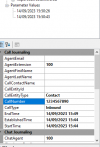
Now the 2 bits of information I need to send to my CRM are the and [PhoneBusiness] and values. I do not have them present when just running "ReportCall", which uses the parameters from here in the CRM Integration application,
[ATTACH type="full"]37278[/ATTACH]
Is it possible to configure something whereby a look up can be done using [CallNumber], which will then return me the Output values that I could then stick into the "PostValues" section of my "ReportCall" request when doing call journaling?
 

Attachments
  • 1694703406295.png
    1694703406295.png
    17.2 KB · Views: 3
Last edited:
The only way to pass data from the contact lookup scenarios to the ReportCall scenario, is through the EntityId and EntityType outputs. These are not used by 3CX internally, so you can set them to any value you want.
 
The only way to pass data from the contact lookup scenarios to the ReportCall scenario, is through the EntityId and EntityType outputs. These are not used by 3CX internally, so you can set them to any value you want.
So on "ReportCall" what would I need to set the EntityId and EntityOrder to be with the XML I sent earlier? I'm not too familiar with doing multiple scenarios unfortunately. Would doing this force the look up to happen first and then run the actual scenario afterwards?
 
No, the ReportCall scenario will not read the EntityId or EntityOrder attributes. You can check the standard templates we provide to better understand how this works. During the contact lookup scenarios, you generate the outputs for EntityId and EntityType, for example:
XML:
<Output Type="EntityId" Value="[ContactId]" />
<Output Type="EntityType" Value="Contact" />

Then in your ReportCall scenario, you can use those values as variables, for example:
XML:
<Value Key="ContactId" Type="String">[EntityId]</Value>
 
No, the ReportCall scenario will not read the EntityId or EntityOrder attributes. You can check the standard templates we provide to better understand how this works. During the contact lookup scenarios, you generate the outputs for EntityId and EntityType, for example:
XML:
<Output Type="EntityId" Value="[ContactId]" />
<Output Type="EntityType" Value="Contact" />

Then in your ReportCall scenario, you can use those values as variables, for example:
XML:
<Value Key="ContactId" Type="String">[EntityId]</Value>
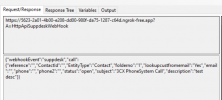
Unfortunately this is not working, I'm referencing some of the outputs from the look up scenario but having checked the JSON being sent out, I can see that the values are blank. This is the extract of the outputs from the look up and the JSON being sent out to my CRM.
XML:
<Outputs Next="" AllowEmpty="false">
        <Output Type="ContactID" Passes="0" Value="[ContactID]" />
        <Output Type="FirstName" Passes="0" Value="[FirstName]" />
        <Output Type="LastName" Passes="0" Value="[LastName]" />
        <Output Type="Email" Passes="0" Value="[Email]" />
        <Output Type="PhoneBusiness" Passes="0" Value="[Phone]" />
        <Output Type="ContactUrl" Passes="0" Value="[ContactUrl]" />
        <Output Type="EntityId" Passes="0" Value="[ContactID]" />
        <Output Type="EntityType" Passes="0" Value="Contacts" />
      </Outputs>
    </Scenario>
    <Scenario Id="ReportCall" Type="REST">
      <Request SkipIf="[IIf([ReportCallEnabled]!=True,True,[IIf([CallType]!=Inbound,True,False)])]" Url="https://5623-2a01-4b00-e208-dd00-980f-da75-1287-c64d.ngrok-free.app?A=HttpApiSuppdeskWebHook" MessagePasses="0" Message="" RequestContentType="application/json" RequestEncoding="Json" RequestType="Post" ResponseType="Json">
        <PostValues>
          <Value Key="webhookEvent" Passes="1" Type="String">suppdesk</Value>
          <Object Key="call">
            <Value Key="reference" Passes="1" Type="String" />
            <Value Key="ContactId" Type="String">[EntityId]</Value>
            <Value Key="EntityType" Type="String">[EntityType]</Value>
            <Value Key="folderno" Passes="1" Type="String">1</Value>
            <Value Key="lookupcustfromemail" Passes="1" Type="String">Yes</Value>
            <Value Key="email" Passes="1" Type="String">[Email]</Value>
            <Value Key="phone" Passes="1" Type="String">[PhoneBusiness]</Value>
            <Value Key="phone2" Passes="1" Type="String">[Phone]</Value>
            <Value Key="status" Passes="1" Type="String">open</Value>
            <Value Key="subject" Passes="2" Type="String">[Subject]</Value>
            <Value Key="description" Passes="1" Type="String">test desc</Value>
          </Object>
        </PostValues>
1694767444898.png
I ran the call journaling test after doing a lookup by number as well so I thought the information would have been held by 3CX before I ran the test on call journaling.

P.S Can you also provide a link for the samples please? I have been handed this project without links to many resources, thank you.
 
When you test Call Journaling from the CRM Tool, you need to specify the values for EntityId and EntityType from the Properties window. The tests you make from here are isolated. If you run a contact lookup and then a call journaling test, the properties are taken from the Properties window, not from the previous test.

Injecting the value from a contact lookup into call journaling is something that will happen when you run this inside 3CX. While testing, set the values you need from the Properties window.

Also, please note that only EntityId and EntityType are passed on. I see that you're trying to use other outputs, like [PhoneBusiness], and that will not work.
 
  • Like
Reactions: hoth and Evolute IT
Status
Not open for further replies.

Latest Posts

Forum statistics

Threads
111,973
Messages
590,074
Members
164,893
Latest member
jbergeon