Solved Users logged out from queue

alainbuehler

Silver Partner
Joined
Nov 29, 2024
Messages
8
Reaction score
1
  • 3CX version: 20.0.995 SP9
  • Deployment: Hosted by 3CX
  • Edition: PRO, 4 simultaneous calls
  • Symptom: users remain assigned to one queue but are shown as logged out
  • Adding the first created admin user makes the affected users appear logged in
  • Removing that user makes them appear logged out again
  • Manual logout and relogin for affected users does not resolve the issue
  • Other queues are unaffected
 
Hello,
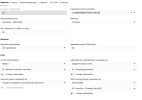
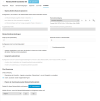
Can you share some details, perhaps anonymized screenshots of your config? Queue, the users, their departments and roles.

Is there any difference that you know in how that queue and the others are set-up?
 
@alainbuehler when you say manual logout and relogin, do you mean from the Q button of the web client for example ?
Of do you go to Panel >> Select the Queue and login/out the agent ?
If an agent is logged out from a specific Queue, then the Q button ( global login / out ) will not login the agent back to this Queue.
So if a user is manually logged out from a Queue, then manually ( from the Panel ) must be logged in again to this Queue.
Please check this as a first step.
 
  • Like
Reactions: KyriacosS_3CX
@alainbuehler when you say manual logout and relogin, do you mean from the Q button of the web client for example ?
Of do you go to Panel >> Select the Queue and login/out the agent ?
If an agent is logged out from a specific Queue, then the Q button ( global login / out ) will not login the agent back to this Queue.
So if a user is manually logged out from a Queue, then manually ( from the Panel ) must be logged in again to this Queue.
Please check this as a first step.
Hi Nikos
Thanks for this comment. The manual logout and relogin was done by the Q button. In the panel I can't logout from this queue. I have another queue and there I could logout the agent. Both queues are configured the same. I have the same issue at another customer. This issue came up all over sudden
 
Sorry it's in German
 
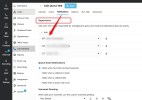
You need to be assigned as queue supervisor to be able to log other agents in/out of queue from panel, under notifications tab of queue.
 
@alainbuehler yes put your extension in the Queue >> Notificatinos >> Supervisors and check again :

1789033085637.png
 
Solution
There is no difference in the setup, but i tlooks like there is a difference, as I can't logout users in the panel for that queue
 
You need to be assigned as queue supervisor to be able to log other agents in/out of queue from panel, under notifications tab of queue.
I'm logged in as owner and can logout users of another queue
 
  • Like
Reactions: KyriacosS_3CX
yeah thanks Nikos <3xD
 
  • Haha
Reactions: NikosT_3CX

Forum statistics

Threads
112,008
Messages
590,279
Members
164,951
Latest member
Saaidha