V16: Linux OS Upgrade from Debian 9 to Debian 10 is now Available

Hi @Nick Galea ,

You want technical feedback? Right...
I also upgraded a demo instance in Ovh CLoud without any problem.
The web maintenance console is great? YOU MADE A GREAT JOB
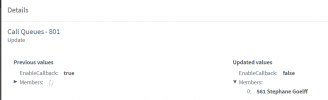
Everything seems to work fine EXCEPTED the members in Queue was not restored...
I had to add it manually without knowing who were present before the upgrade
here the audit log
1622750327794.png

Now, please read my opinion about the new webclient.

how can you say that icons is better?
now we can't dial from the search bar... we have to open the dialer to call an external call.
for a pbx system we are more than ten years before
please take all our information in consideration

I know you will take the good choice, all is not yet done... I hope.
BR
1622750836323.png
 
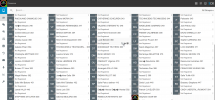
I also want to mention that the very tiny arrow in the history without glasses is very difficult to understand the way of each call
1622751372356.png
 
From the blog post:

"This upgrade is designed for installs made with the 3CX ISO."
Well, now we know what happens to a PBXExpress on OVH when you upgrade it :) To be fair it worked OK for a day or so. It's OK, it's not production per-se, just has a couple of door entry units hanging off the back of it that i'll move to another instance. Looking forward to the helpdesk part of it.
 
@gbrown100 can you ssh to your machine or not at all ?
 
Active user with E3 Subscription. Tried toggling off and on contact synch to no avail. As a side note shared contacts do show up as a choices to populate.
Double-check you selected the correct delegation permissions in 365. Check the screenshot from the 3CX guide - those are the correct permissions.
 
  • Like
Reactions: NickD_3CX
Double-check you selected the correct delegation permissions in 365. Check the screenshot from the 3CX guide - those are the correct permissions.
They all matched perfectly and was working prior to upgrade. Also as I posted I can access shared contacts just fine not personal contact sync we are working with the logs to diagnose.
 
well, I already wrote about my first quick test. I had a new v16 test system hosted in azure (used the 3cx ISO in marketplace to set it up).
I made the update to v18. Everything went well and I could start testing.
After testing I stopped the VM.
Today I restarted it aaaaand .... no 3cx connection anymore.
I'm gonna repeat the steps now (setting up a new instance, installing v16 from market place, performing v18 update) to verify, if there may be an issue during update.

Anyone else with the same issue here after stopping and restarting the VM?
 
well, I already wrote about my first quick test. I had a new v16 test system hosted in azure (used the 3cx ISO in marketplace to set it up).
I made the update to v18. Everything went well and I could start testing.
After testing I stopped the VM.
Today I restarted it aaaaand .... no 3cx connection anymore.
I'm gonna repeat the steps now (setting up a new instance, installing v16 from market place, performing v18 update) to verify, if there may be an issue during update.

Anyone else with the same issue here after stopping and restarting the VM?
You should do a bit more troubleshooting to see what's not working first otherwise you'll end up going round in circles.
 
  • Like
Reactions: NikosT_3CX
@weimerd issue was that 3cx did not come up or that the machine was unreachable totally and not even accessible via ssh ?
 
@weimerd issue was that 3cx did not come up or that the machine was unreachable totally and not even accessible via ssh ?
3cx did not come up anymore. SSH was still possible.
I just restart everything now just to make sure I did not miss something during setup. In about 30 minutes I will know more ;)
 
@weimerd sure no prob :)
Next time do a "service 3CX* status" in order to be sure what is running or not.
I believe that something else it is, but lets see ;)
 
@weimerd sure no prob :)
Next time do a "service 3CX* status" in order to be sure what is running or not.
I believe that something else it is, but lets see ;)
Tested the update again from scratch. First setup a new Azure VM using 3CX v16 iso from marketplace.

Then updated it to v18. Everything worked.

Even after shutting down and rebooting it worked all as expected. I'm keeping an eye on that now. But maybe the previous issue was an azure issue. Who knows...

Will do further tests in the upcoming days and will let you know once an issue occurs again.


EDIT: I tested webmeeting, it looks and feels pretty good. jsut as a short feedback: I could not initiate a poll when using direct webmeeting. I guess poll will only work for planned meetings? Or only for webinars? Couldn't test it further.
 
Last edited:
Is there anything re: ticketing system available to test here?
 
I did two of these upgrades on test environments. The one at home required a reload of the Debian OS from the 3CX ISO, I believe that installation was from the Debian 8 days of 3CX, so I just loaded up the 3CX Deb9 ISO and reinstalled, imported the backup and then did the V18/Deb10 upgrade with no issue. The test system at work I cannot recall if that was also Debian 8 when it was first installed, it looked to be, but it upgraded to V18/Deb10 no issues. All of our newer Debian 9's should all be from ISO's.
 
  • Like
Reactions: N_G and NickD_3CX
I can't find any option to add contacts in the new webclient - can anyone help me?

The user has the "can manage company phonebook" permission, and editing/deleting existing contacts works fine.
 
Last edited:
@DanJem - Thanks for the heads up
@Yannik - Good point, nor can I :)
@luckystrikes - Sorry it got pushed back to update 2. It should be easy to do as its just integrating and existing system but nonetheless we had to focus on v18 first....
 
Hi guys!

I did the upgrade to version number 18.0.1379 in a production system (I am aware that it is Only Recommended for Testing, but I have a full backup and I can afford some minutes of downtime). The upgrade took approximately 15 minutes and both, PBX and Debian were successful upgraded.

BUT...I have a question: I have a SBC running in my LAN on Debian 9. Can I upgrade it to Debian 10, too?
 
Hi guys!

I did the upgrade to version number 18.0.1379 in a production system (I am aware that it is Only Recommended for Testing, but I have a full backup and I can afford some minutes of downtime). The upgrade took approximately 15 minutes and both, PBX and Debian were successful upgraded.

BUT...I have a question: I have a SBC running in my LAN on Debian 9. Can I upgrade it to Debian 10, too?
We need to wait the next upgrade of SBC that will upgrade to Debian 10 same way that 3CX do.
 
  • Like
Reactions: JLSeagull
I have a SBC running in my LAN on Debian 9. Can I upgrade it to Debian 10, too?

Currently, you can operate the SBC still on Deb9, Deb10 and 32bit Pi installations. Consolidation on the Deb based SBC is on the way. Nothing to do right now.
 
Thank you @MidiTélécom and @StefanW for the feedback!

Today is the first day of business after the upgrade. The real test of the new version. So far everything is working fine. I noticed a few small things that can be tweaked in the beta version, such as turning on scheduled backup notification by default.
 

Forum statistics

Threads
111,995
Messages
590,194
Members
164,934
Latest member
bunthoeun.may