Solved V16 to 18 Failed on Raspberry Pi

Status
Not open for further replies.

BrianH34

Free User
Joined
Nov 20, 2021
Messages
4
Reaction score
0
V 18.0.237
Raspberry pi 4

I mistakenly selected the v16 to v18 upgrade after receiving an E-Mail today.
The upgrade procedure hung. After a couple hours I reinstalled from scratch.
The install would not accept the backups from V16.

I then completed as new install. But again non of the version 16 backups are recognized.

Is there a way to fix this or go back to V16?
 
V 18.0.237
Raspberry pi 4

I mistakenly selected the v16 to v18 upgrade after receiving an E-Mail today.
The upgrade procedure hung. After a couple hours I reinstalled from scratch.
The install would not accept the backups from V16.

I then completed as new install. But again non of the version 16 backups are recognized.

Is there a way to fix this or go back to V16?
If your backup doesn't work, you were either wayyyy too late on the updates, or the file itself was corrupted.

Right now you can install v16 manually via APT but no instructions exists.
 
It was on the latest version of 16 when I upgraded. I tried two backup files, the one created that day. And a second one automatically created the week before. The software does not error, it will not even display the file in the list. I have no idea what APT is. I would much rather just get 18 to work if I can get one of those files to work.
 
What version of v16 were you running ?6
 
Just so you know, the installer for Raspberry pi will install v18 but downloading 3CX v16 for a Debian 9 or Windows is actually still possible through the customer portal.

To gather a bit more information on this:

• Confirm the version of you backup by checking the very beginning of the xml file in the backup's root folder, it should say 16.0.8.9. I recommend creating a copy of the backup file before proceeding just to avoid even opening the original.
• How exactly are you trying to restore? Is it during installation or after you've installed the 3CX PBX?
• What do you mean exactly when you say it will not accept the backup. Do you get a specific error message and where?
• Do you have a license key in the backup? If yes, what version is the license key? You can check this in the 3CX customer portal.
 
Confirmed Version of Backup File: 16.0.8.9
First tried the Restore During Installation and It would not accept the file.
Then tried after the install.
There were no errors. 3Cx just would not display the v16 backup files, so I could not select one for install.
Right now the version of the license key shows as 18.1 on the customer portal. The license key is the same in the backup as it is in the running version.
 
Last edited:
After a couple hours I reinstalled from scratch.
Did you follow our guide from the very beginning to do this, re-flash SD and everything?

First tried the Restore During Installation and It would not accept the file.
What error did you get when you tried to upload the file?

3Cx just would not display the v16 backup files, so I could not select one for install.
Did you place them in the default folder
/var/lib/3cxpbx/Instance1/Data/Backups
and made sure the phonesystem user had the appropriate rights to the file?
1637569667612.png
 
  • Like
Reactions: Evolute IT
Did you follow our guide from the very beginning to do this, re-flash SD and everything?
Correct. Reflashed etc. V18.1 is working as expected.
What error did you get when you tried to upload the file?
During the initial setup selected from where it was stored on a local mac.
Did you place them in the default folder
No, I am using a ftp server, I verified that it is working correctly as a backup created under the bare 18.1 shows up in the available restore list. All the files have the same permissions.
and made sure the phonesystem user had the appropriate rights to the file?
View attachment 26016
 
I'll PM you for more information on this.
 
An update on this. Looking closer at the backup archive we've found that it contained extra folders seemingly create via the MacOS. Once these folders were removed @BrianH34 was able to use the backup to restore the configuration.

UPDATE:

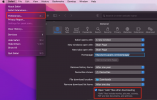
Turns out safari has an option to automatically extract archived files which evidently did the same to the 3CX backup file once it got downloaded. The option can be found and disabled as seen below:
1637590017313.png
 
Status
Not open for further replies.

Forum statistics

Threads
111,974
Messages
590,081
Members
164,899
Latest member
mazet