V16 Update 4 Alpha - adds Client in a Chrome Extension

  • Thread starter Thread starter Constantinos Constantinou
  • Start date Start date
Status
Not open for further replies.
I noticed on the new 3CX Webextension, that when I'm currently talking to another extension it is possible to call the extension I'm talking with again.

After that i do have 2 calls with the same extension that are active.

One on hold and one active.

When I end the active call I have one call remaining that is active on my view but it is still on hold and I can't get it back.

Also I'm not able to answer a call with a Jabra evolve 75 through the integrated button.

Will be taken care of that before release?
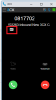
 
I just test incoming calls integration with CRM, but now, it only popup the 3CX Chrome extension, I need to manually press on little address icon, then it will open new tab browser.
Is that part of Beta release? I thought it will be auto open in the same browser on final released?
 

Attachments

  • 3cx not auto popup.png
    3cx not auto popup.png
    10.4 KB · Views: 9
Hello @solusi,

Thank you for informing us on this one.

We are looking at it internally. Stay tuned on our forum for possible updates.
 
  • Like
Reactions: Evolute IT
Does/will the new extension have the option to independently choose Sound output? This is the only thing holding us back from migrating to the web client right now, as we absolutely need a way for our users to be able to hear incoming calls without their headset.

Besides this, all the changes in this alpha seems to be a very good move forward to making the webclient more modern and encouraging the use of it. The mobile UI makes for a very nice touch.

This feature is now available, check it out here https://www.3cx.com/blog/releases/phone-extension-chrome/
 
  • Like
Reactions: VoIPQZ
Hello

We have the same issue as mentioned above with Jabra headsets. Couple of different models, same result. Jabra software versions 3.25 and 4.x. Button will not control the call via the browser extension. Volume and mute work fine once the call is answered.

If a user starts the Windows client while the browser extension is enabled/running, the button on the Jabra will dismiss an incoming call and send it to voice mail.

Jabra button works if the browser extension is disabled, Chrome is "not allowed to run in the background" and Windows client is the default.
 
Jabra headsets are not supported by 3CX. We might support Jabra in the future versions if the web drivers of Jabra are improved but its best to stick with officially supported headsets such as Sennheiser. Meanwhile it should be noted that Plantronics works well with the web client as well.
 
Is it possible to hide the "Install 3CX Chrome extension" option in the webclient? The Jabra headset works fine with the webclient and/or the 3CX windows client. I would prefer it to work with the Chrome extension, because I think it's fantastic, but I guess this is not supported.
I want to prevent users to get the option to install the 3CX chrome extension and therefor hide the option in the webclient. Thanks
 
@Telecomlijn that is not possible i am afraid, the chrome extension will be promoted as one of the main clients pretty much everywhere in the software.
 
  • Like
Reactions: Evolute IT
@Telecomlijn that is not possible i am afraid, the chrome extension will be promoted as one of the main clients pretty much everywhere in the software.
That's what I thought. I think the Chrome extension is fantastic but when using a headset 3CX only fully supports Sennheisser headsets. When using Jabra headsets I cannot pickup incoming calls via the headsetbutton. There's an option to use headset integration in the webclient, with Jabra, which we configured and shows "headset ready". I think it's to bad 3CX only support one brand of headsets (of course I understand it takes two parties to make this work). Any chance this will change in the near future? Can you confirm only Sennheisser headsets are able to answer and end calls via the headsetbutton with the 3CX chrome extension? Thanks for you response!
 
Is it just me or can you no longer manage an audio conference with the chrome extension? Removing participants, ending conference, etc - all can be done in Windows Client, but can't find that screen in the chrome extension.
 
  • Like
Reactions: Evolute IT
Hello @SweetAction and Happy New Year,

Chrome Extension redirects you to the Web Client to create and configure a conference.

Administration screens with reach user interaction will be kept to the Web Client. On of those screens is the Conference administration.
 

Attachments

  • Untitled.png
    Untitled.png
    192.1 KB · Views: 11
Hello @SweetAction and Happy New Year,

Chrome Extension redirects you to the Web Client to create and configure a conference.

Administration screens with reach user interaction will be kept to the Web Client. On of those screens is the Conference administration.
Hi,
I'm referring to this screen - how to manage an active conference call that wasn't pre-scheduled.
13703
 
@Telecomlijn Currently we support Plantronics & Sennheiser. With plantronics being unofficially supported. Jabra we are in contact with, they need to update their drivers and if they do so we have no problem supporting it but we can not guarantee anything. You must pressure Jabra, not 3CX.
@SweetAction - that could be, the chrome extension is just a "few months old". New features will be added.
 
Hello,

I have 3CX Debian based. After the latest updated (now Version Number is ) I encountered the folowing problem, 2 times, first time in 24 Dec (if I restart the PBX, the problem solved). and second time in 3 January (I will restart the PBX tonight). Call Log is empty, Backup and Restore not working and the schleduled reports are not sending. If I try to generate the reports manually, they are inconsistent. The license is Professional Perpetual. The wallboard and the other functions are working.

Any ideas?
 

Attachments

  • backup.JPG
    backup.JPG
    19 KB · Views: 4
  • call log.JPG
    call log.JPG
    36.4 KB · Views: 4
version is

16.0.493
 
I found that if I restarted only the service 3CX PhoneSystem Database Server, the problem solved. Do you know any workaround for this situation? This problem appear only after the latest update.
 
@Telecomlijn Currently we support Plantronics & Sennheiser. With plantronics being unofficially supported. Jabra we are in contact with, they need to update their drivers and if they do so we have no problem supporting it but we can not guarantee anything. You must pressure Jabra, not 3CX.
@SweetAction - that could be, the chrome extension is just a "few months old". New features will be added.
@Nick Galea thanks for confirming that I am not overlooking the option and it may be coming soon. Can you advise if Hotkeys (push F10 to dial highlighted number and similar) are also on the roadmap?

(Example:)
13726
 
@SweetAction - yes this would be something we want to do for sure. But there are some limitations working from within a browser extension (imposed mainly for security reasons). Probably some local installation will be required. So if the technical hurdles can be overcome it will be done!
 
Anyone able to confirm the latest Windows SBC version?
 
  • Like
Reactions: hogan71088
Status
Not open for further replies.

Latest Posts

Forum statistics

Threads
111,991
Messages
590,167
Members
164,929
Latest member
Cloudstar