V18 Alpha 5: New Native Desktop App

Status
Not open for further replies.
It's an MSI file. You can use GPOs or an RMM to deploy it.

Otherwise, it's not worst than when the browser extension had to be installed as well.
We do not manage the IT for any of these clients, and cannot deploy by GPO or RMM. It requires admin rights on alot of our clients machines, so it isnt as easy as 'just installing it'.
 
Hi

I just wanted to give a constructive note.

Click2call from a web page is somthing so used by our customers, and not all webpages implement those protocols for click2call. So it is something that was and will not be ... Neither is the functionality of being able to receive calls without having the webclient open thanks to the CHROME / EDGE extension ... For our clients these are 2 important things ...

Anyway, it is philosophy question. When you manage a PBX with 100-200-300 users and have a large staff turnover, you will have to spend a lot of time installing the desktop applications. The IT technicians of our customers were very happy when the webclient appeared because it saved them a lot of work. Now, from my point of view, we take a step back in that sense.

We prefer better webclient (not worst) and the possibility of Desktop App. But not webclient without some functions of v16.5.
You definitely did not read the blog posts correctly.

The previous Click2Call was simply a regex finding numbers on the page and transforming them to custom links. This caused issues on certain sites as well as finding order numbers as phone too. The new app uses the official RFC tel: protocol. If a website doesn't have phone numbers as tel: links, it's not 3CX problem.

As for "receive call without the webclient opened": try the app. You'll see. It does that very well.
 
We do not manage the IT for any of these clients, and cannot deploy by GPO or RMM. It requires admin rights on alot of our clients machines, so it isnt as easy as 'just installing it'.
I get it, but that's then the IT guy problem to deploy the app. Like he would deploy a network config, a browser extension or anything else.
 
I get it, but that's then the IT guy problem to deploy the app. Like he would deploy a network config, a browser extension or anything else.
Thats the point, for some client this will be chargeable work from an IT company. The user could install the browser extention on there own without any involvement from the IT guy.
 
You definitely did not read the blog posts correctly.

The previous Click2Call was simply a regex finding numbers on the page and transforming them to custom links. This caused issues on certain sites as well as finding order numbers as phone too. The new app uses the official RFC tel: protocol. If a website doesn't have phone numbers as tel: links, it's not 3CX problem.

As for "receive call without the webclient opened": try the app. You'll see. It does that very well.
That is why 3CX gave the option of setting websites to exclude from this or to disable this feature all together if the user wished to. Although its not 3CX's problem if the site doesnt use tel:, from a users point of view it used to work and now it doesnt.
 
  • Like
Reactions: Brandan Hermo
Thats the point, for some client this will be chargeable work from an IT company. The user could install the browser extention on there own without any involvement from the IT guy.
Well, still not your problem but anyway.

You do you. We actually manage the IT for our customers, and they couldn't install a Chrome extension without us allowing it so it's the same for us.
 
I am agree with Rhys Haskell.

We are thinking in the best and more easy for the customers. When webclient appeared in the past was a big step in order to save time for us and the IT technicians.
 
  • Like
Reactions: Christian_B
There will be a chrome extension that recognizes numbers and converts them to a call to that can be used with 3CX. There are some extensions already out there, general that work but for ease of use we will make one.

The desktop app does not require admin rights and can easily be deployed via GPO or else customer can easily install it themselves.
 
we will make one
I'd just reuse the old one... the one there was before the browser extension. It used to support both the Webclient and the Windows client, so it should be able to support easily the new app :)
 
  • Like
Reactions: accentlogic
There will be a chrome extension that recognizes numbers and converts them to a call to that can be used with 3CX. There are some extensions already out there, general that work but for ease of use we will make one.

The desktop app does not require admin rights and can easily be deployed via GPO or else customer can easily install it themselves.

Thanks Nick!!
 
  • Like
Reactions: N_G
There will be a chrome extension that recognizes numbers and converts them to a call to that can be used with 3CX. There are some extensions already out there, general that work but for ease of use we will make one.

The desktop app does not require admin rights and can easily be deployed via GPO or else customer can easily install it themselves.
What about users changing frequently pcs or multiple remote desktop session hosts?

I tried to deploy the app on our rds farm. Users cannot install msi packages by default and gpo user deployment is not working on rdsh.
We enabled msi installation for users and run the msi installation through script. That is working for multiple servers. However some settings are not shared between servers (like wallboard text). No idea, if that will break the autoupdate process of the app.

tldr: An system wide installer would be much better for deployment (like the old app).

Is there a reason, why the user needs to first login to the webapp? The desktop app is prompted after install and it would be fairly forward to just enter the credentials.

Edit: Is there a way to log off from the desktop app??
 
  • Like
Reactions: Christian_B
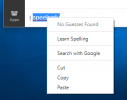
Discovered something interesting today in chat on the new Windows client. It does not honor system search engines. When I clicked to check a misspelled word it offered "Search Google" yet our default was Bing I could not find a settings to enforce this preference. How do we change this behavior?chatsearch.png
 
Discovered something interesting today in chat on the new Windows client. It does not honor system search engines. When I clicked to check a misspelled word it offered "Search Google" yet our default was Bing I could not find a settings to enforce this preference. How do we change this behavior?View attachment 23398
Bing, really? Lol

It's honestly just the default for Electron I believe since VSCode is the same. I guess they could add settings to the app but I think they wanna keep it as simple as possible. :/
 
It could have been any search engine I used Bing for example because that's where I discovered it.
Simple is not always the best path :)
They should just take system default eliminates the confusion for users whom may not like google.
 
  • Like
Reactions: Christian_B
Status
Not open for further replies.

Forum statistics

Threads
111,980
Messages
590,104
Members
164,908
Latest member
FarizQasimov