V18 Desktop App - Don't show Desk Phone

Status
Not open for further replies.

Seppelfrickel

Premier Customer
Joined
Apr 12, 2022
Messages
2
Reaction score
1
softphone.jpg
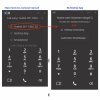
Hello, in my new desktop app and in the web app I can no longer select the desk phone or DECT device to make the call through it.

In the old version this was possible. According to the manual, this should also be possible with the new version.

Installed 3CX version: 18.0 (build 461)
Desktop client 18.8.508
 
  • Like
Reactions: MarcoT67
I see the screenshot shows a T46G but you mention DECT devices, which exact device are you having issues with? If it indeed is a DECT device do bear in mind that they are generally not supported in CSTA/CTI mode so this would be expected.

According to the manual, this should also be possible with the new version.
Which manual are you referring to here? If you mean our User Manual: https://www.3cx.com/user-manual/ then please note that it is indeed possible for devices that support it such as the Yealink T46G as shown in the screenshot.
 
Last edited:
Hello,
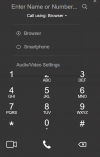
I confirm that Gigaset N870 IP PRO's DECT phones do not appear in "Call using:" list of web client, while correctly listend in the management console. Please see attached pics.

3cx Professional v. 18.0 (Build 461)
Gigaset N870 fw v. 2.44.0
 

Attachments

  • management.png
    management.png
    53.5 KB · Views: 11
  • webphone.png
    webphone.png
    50.1 KB · Views: 11
That would explain it then, the Gigaset N870 is not supported in CSTA mode meaning it cannot be controlled via the 3CX Webclient/Desktop app so what you're experiencing is expected.
 
Well, it seems that Gigaset N870 supports CSTA at present time
Yes well what I meant was it is not supported by 3CX. No DECT devices are supported in CSTA mode for that matter, sorry if I was unclear.

(https://teamwork.gigaset.com/gigawiki/display/GPPPO/FAQ+3CX+-+uaCSTA) so you should reconsider the compatibility ban or, at least, avoid overriding CSTA_USER_AGENTS parameter within product updates, to allow customization to work flawlessly.
Do bear in mind that modifying parameters will render the 3CX PBX subject to these changes an unsupported deployment and that we cannot guarantee normal functionality for such cases.
 
Please add Gigaset Nx70 as CSTA supported. It works since 2019.
 
  • Like
Reactions: Seppelfrickel
For the time being and during our testing, we currently can't support reliably multi-account devices for CSTA, as in devices that have multiple different accounts and register from the same IP/Port.

We don't have an ETA for if and when this will be possible, all I can say is that right now this is not on the roadmap.

We are aware that some devices, like the Gigaset Nx70 have this option, however it has been known to cause issues with our software, hence why I think it is disabled by default in the default template.

Note that if you have problems with your system, I would highly suggest disabling this before attempting to contact our support team.
 
  • Like
Reactions: ChrisC_3CX
Our Yealink 48S are shown in the new 3CX app but our SNOM DECT phones are not. This worked fine in the old version.

According to SNOM website, CSTA is also supported, why has the function been removed?

https://service.snom.com/display/wiki/CSTA+over+HTTP+-+Requests
Yes, as I said here:
For the time being and during our testing, we currently can't support reliably multi-account devices for CSTA, as in devices that have multiple different accounts and register from the same IP/Port.
 
Status
Not open for further replies.

Latest Posts

Forum statistics

Threads
111,964
Messages
590,002
Members
164,869
Latest member
hpgitsupport