Solved V18 Shared screen shown as webcam video

Status
Not open for further replies.

HExSM

Forum User
Joined
Feb 18, 2019
Messages
85
Reaction score
11
If we use the screen sharing feature, the screen seems to be used as webcam video.
1634217000849.png

We are using 3CX version 18.0.232 Enterprise.
The Browser was Google Chrome version 94.0.4606.81.
 
Hi @HExSM,

Can you join with your audio and video enabled from the launch pad, and let me know if sharing still produces the same issue? We are aware that there is an issue, and we're working on a fix for this.
 
  • Like
Reactions: Evolute IT
Same here. I use it EVERY day, multiple times a day. I big problem for me.
 
@VasilisV_3CX,

I can confirm the behaviour. If I start with audio and video enabled, the screen sharing works fine. If I start with audio enabled and video disabled, it uses the shared screen as webcam video.
 
Hi @VoIPTools and @HExSM,

In the interim until this issue has been resolved, you'll need to join the meeting with the audio and video enabled from the launch pad (where you enter your name and such) in order to have it share correctly.

As I mentioned, this is a known issue and is being investigated.
 
Good evening everyone,

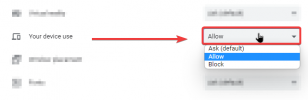
I was able to replecate this issue and identify a possible fix. in your google chrome site settings, please check if the "your device use" setting is set to allow, if it is set to ask or block I noticed that the screen sharing breaks.

chrome_tH3Eri6sZd.png
 
Status
Not open for further replies.

Forum statistics

Threads
111,973
Messages
590,076
Members
164,895
Latest member
jasonkkrause