V18 Update 1 Beta 2: Now with Yealink Headset Integrations

Anyone having issue with outbound calls not working? immediate busy and logs say "unanswered".

UPDATE: seems the issue that's occurring is outline here:

https://www.3cx.com/community/threads/unable-to-make-outbound-calls-since-16-5-update.72723/

Replacing the FQDN with IP address for Flowroute has resolved the issue. Seems this may have caused an issue:

From changelog: "Fixed issue on DNS Resolver in cases where the call manager starts with a disabled network interface."
 
Last edited:
Hi, there is no interaction between the pad yealink w66 and the webclient. Are you sure it is working with webclient? Quite confused ?with windows native app it is interacted but nothing happens with the webclient what i miss?
 
Hello @sofnisys ,

Lets focus on WebClient.

Can you please confirm that on WebClient when you selected Yealink on Headset Integration, you pressed the "Connect headset" button? After you press that button, you will get a window on browser with the devices that are connected on your PC to pair with.

Please verify that you executed the actions above.
 
Hello @sofnisys ,

Lets focus on WebClient.

Can you please confirm that on WebClient when you selected Yealink on Headset Integration, you pressed the "Connect headset" button? After you press that button, you will get a window on browser with the devices that are connected on your PC to pair with.

Please verify that you executed the actions above.
Oh yes just after upgrade yealink WH66 the connect headset appears. Good thank you. Waiting to add others features like be able to dial from the pad. Good job thanks
 
@sofnisys definetely to see it requires an updated version of the PBX :)

As we said, we are working closely with Yealink. Wait for more updates in this area.
 
  • Like
Reactions: Evolute IT
Dear all,
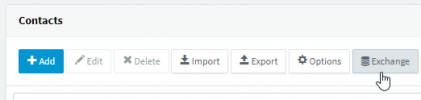
i just intalled this latest 3cx v18 beta with a professional licence, on windows, and i can't see the Exchange button to sync contact like in v16 :
1633945074711.png
Will this be available on the final version ?
Thanks !
 
Dear all,
i just intalled this latest 3cx v18 beta with a professional licence, on windows, and i can't see the Exchange button to sync contact like in v16 :
View attachment 25045
Will this be available on the final version ?
Thanks !
The button is there. Please try this:
  1. Go to Settings --> License
  2. Press the "Refresh License Key Information" button
  3. Check that the Product type does indeed Pro
  4. Refresh the Management Console and clear browser cache.
  5. Check again.
 
  • Like
Reactions: Evolute IT
The button is there. Please try this:
  1. Go to Settings --> License
  2. Press the "Refresh License Key Information" button
  3. Check that the Product type does indeed Pro
  4. Refresh the Management Console and clear browser cache.
  5. Check again.
Gosh it was a cache issue.. my bad ! thanks for your help.
 
  • Like
Reactions: NickD_3CX
Just confirming then, these headsets work with the webclient only? Never used headsets before so curious to see how they work.
 
Just confirming then, these headsets work with the webclient only? Never used headsets before so curious to see how they work.
That's right!

Just plug a Yealink headset in, use Chrome and in the webclient go to Settings --> Audio/Video and in the headset integration select Yealink.
Hit the connect button, select your device and that should be it!
 
headsets work with the webclient only
The Windows/web/desktop app clients will work with any mic and speaker. The "integration" part is call control, meaning answering or hanging up a call by pressing a button on the headset. If that doesn't apply (e.g. webcam mic and desktop speaker) then one can answer the call in the software client. By comparison, Sennheiser/EPOS has a helper program that runs in the background (and updates firmware).
 
  • Like
Reactions: N_G and Evolute IT
I have uninstalled jabra direct and removed "%appdata%/Jabra Direct"
"%appdata%/Jabra SDK" manually.

The headset control works. I will observe if it works permanently.
There is bad news.
unfortunately, the Jabra headsets do not work 100% after all.
After some time, the call control no longer works and the 3CX app must be restarted.
After clicking on Audio/Video settings, the headset works again for some time.
 
@Tyler.Calhoun there is an issue identified internally on our testing in regards to Jabra Headset integration, that most probably will solve this issue.
The fix if everything goes well will be included in the upcoming update.
 
I don't know what going on with my webclient (and the Win 10 client), but I only get Sennheiser headset.
No Yealink, no Jabra and no Plantronics.
My Windows app version is 18.5.26, 3CX is fully patched to the latest version.
My distributor send me a screenshot of his client and he has the four brands mentioned above.
They thought it had to do with the V16->V18 upgrade.

So I did a new V18 install from scratch with the latest ISO (standard license as test), no change.
No other headset available then Sennheiser.

Anybody any idea how to solve this?
 
What is your license. I am guessing is Standard. Correct ?
 
@Tyler.Calhoun there is an issue identified internally on our testing in regards to Jabra Headset integration, that most probably will solve this issue.
The fix if everything goes well will be included in the upcoming update.
thank you very much for your answer.
This is really good news.
We are talking about the Windows app right?
 
I don't know what going on with my webclient (and the Win 10 client), but I only get Sennheiser headset.
No Yealink, no Jabra and no Plantronics.
I have the same issue - only see Sennheiser as option - no others
 
Sennheiser is the headset integration provided as part of Standard license. As a result what you get is the correct list based on your active license.
 

Forum statistics

Threads
111,994
Messages
590,183
Members
164,934
Latest member
bunthoeun.may