V20 build 1340 - the old Management Console from "/deprecated" removed ?

Status
Not open for further replies.

Guillaume Bourgeois

Customer
Advanced Certified
Joined
Aug 20, 2019
Messages
1,131
Reaction score
1,253
  • Like
Reactions: Evolute IT
Can we get clarification what roles get notifications by default in V20 in V18 this was all controlled by Email Settings, Notifications.
It seems that it's not just system owner but also other roles. We would really like to control this like we could in V18 instead of it being hardcoded.
System Owners, System Admins and emails in the field.
 
Thank you @ConceptsWeb for the clarification.
We liked having control over notifications, as it is in V20, if for convenience you want to be SA, you we will now be subjected to notification of mundane things like backups which in V18 we managed in a central MB.

Here's to hoping they will replicate functionality in V20 that we had in V18 where we could choose what we wanted to notify about and even better if it could be per user, which was not an option in V18.
 
  • Like
Reactions: Evolute IT
It's all based on the department now. Assign a DID to a department, make the changes to the department itself.
This is ok apart from the name of the department is not tagged to the Caller ID, so you can't tell which DID has been dialled. On v18 the name of the inbound rule is tagged on to the caller ID which is a must have feature for many of our clients. The setting in v18 is under Contacts > Options > "Add Group, Queue or DID/DDI Names to Caller ID".

Nick Galea confirmed this was a good point and it should make it into V20 Update 2.
 
  • Like
Reactions: Evolute IT
It's all based on the department now. Assign a DID to a department, make the changes to the department itself.
Thanks for the quick reply! I can assign a DID to a department but what I want to do is route inbound calls based on Caller ID. In version 18 under inbound rules you could add DID or CID and route the call accordingly, I don't seem to be able to find the CID option in V20.
 
Thanks for the quick reply! I can assign a DID to a department but what I want to do is route inbound calls based on Caller ID. In version 18 under inbound rules you could add DID or CID and route the call accordingly, I don't seem to be able to find the CID option in V20.
That is currently missing in v20 as far as I know. I don't recall if someone had stated it would come back or not.
Also missing is fax2email per extension (not to the main fax server) and other similar items.

I suspect we will have to wait for more beta's to be released for these features.
 
  • Like
Reactions: N_G
In version 18 under inbound rules you could add DID or CID and route the call accordingly, I don't seem to be able to find the CID option in V20.
We use that to get around MFA that calls a phone number with a code, to bypass the DR, or similar recorded messages, or VIP callers after hours, etc.
 
  • Like
Reactions: illcsales
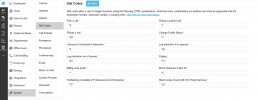
Do you know if dial codes are always there to force PBX IN or OUT, I didn't found.
 
Admin, System, Dial Codes:1701180002538.png
 
Its not a system wide option anymore but a department option, so it has to be done from the webclient menu for the department. If its only one department then you can do it for the default group. A system wide option that forces all departments to out of office will be considered in future
 
Sorry @Waldoppen was thinking you were just looking for the new location of dial codes we don't use that dial code much, though some customers do so probably good to still have...
 
@Nick Galea
do we have to understand that some of the settings will be avaiblable in webclient while another part of them in same category for example "dial codes" will exist also for some in admin console?
If this is it, could it be displayed more like actual V18 location or in both places, in case this is a logic way to go, from webclient and admin console too.
This concept of settings distributed is not so cool to live with, and need to search and for me this create often a doubt on which area it applies and need to switch from places to get in the right setting.
This is why I'm already nostalgic of old style console , I prefer a lot separated things between users and admins, for now V20 organisation confuse me more than it helps me
Perhaps I worry too much and V20 system will be not so hard to learn in details.
Wait end see next Betas
 
There is going to be one console, and one console only, the admin console. Its absolutely clear way to organize 3CX. So yes, you worry too much :)

Edit: In case i misunderstood - do you mean user settings? The webclient also has a place for a user to manage their own settings, this will stay where it is. The admin console is to admin the system or to admin other users.
 
Last edited:
I love your sweet words :)
 
  • Like
Reactions: N_G
I know, i was a diplomat in a previous life :)
 
Edit: In case i misunderstood - do you mean user settings? The webclient also has a place for a user to manage their own settings, this will stay where it is. The admin console is to admin the system or to admin other users.
No my worries was about having same kind (my example was on dial code for IN and OUT status) of settings but one part available in admin console and an other part for same category of settings available only in webclient.
 
No my worries was about having same kind (my example was on dial code for IN and OUT status) of settings but one part available in admin console and an other part for same category of settings available only in webclient.
It's not a setting per-se. In the webclient, in the user menu, you can "override office hours" and choose for which department.
 
  • Like
Reactions: N_G
I quickly understand but you have to explain it to me for a long time ;) :)
Time to bed for France
Bye friends
 
  • Like
Reactions: N_G
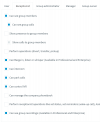
anyone know where we can we get access to these settings in V20
1701255173705.png
 
  • Like
Reactions: Bolz IT
This is not to challenge you, it is just to develop the list :)
I love the new version, but it's missing a lot of things.


Not having the Wireshark ( PCAP Capture from GUI )
Not having the SIP Trunk Inbound Parameters
Not having the SIP Trunk Outound Parameters
Not having the Mass Edit (Extensions)
Not having the Logs files page
Not having the option Bridge 3CX
Not having the option choosing whether or not to backup Voicemails, Custom Templates, Logos, Firmwares , Faxes, License Key Information, FQDN & Conference.
Not having the option determining who receives system notifications. The Owner always receive the emails 3CX notifications.
Not having the option for send Welcome Email without Reset Webclient password
Not having the option to bulk regenerate SIP (and interface) passwords.
The regenerating (individually) does not reset the voicemail password.
It's no longer possible to import Inbound Rules (inbound calls routing) at the same time as the DIDs list.
It's no longer possible to export (CSV) one or some extensions, it exports all the extensions
It's no longer possible to custom the phone interface password (without CSV import)
Not having the Dect/FXS page
Not having the HotDesking page
Cannot schedule auto-restore a backup without enabling FailOver monitoring. ( FailOver managed manually )


This is a list I have been able to make so far.
I'm not saying that bad update, I'm just ask that the /deprecated page should still exist until everything is available please.
I'm sad because.. I was happy to have the best of both worlds.
The new management console V20 and the possibility of using the functions missing in the old console.

These are not criticisms. You haven't seen my list of v20 positive points :p : She is double this one.

I have to go, I have some "reverse engineering" to do on the new V20 version ! :p
V20, what are you hiding from me? LOL


Positively,
"Not having the SIP Trunk Inbound Parameters" this ones causing me a headache right now.
 
  • Sad
Reactions: Guillaume Bourgeois
Status
Not open for further replies.

Forum statistics

Threads
111,974
Messages
590,081
Members
164,899
Latest member
mazet