V20 - Change FQDN

maxihoster

Bronze Partner
Basic Certified
Joined
Jan 24, 2024
Messages
1
Reaction score
0
Hello,

I dont' found anyway to change my fqdn for my 3cx install!
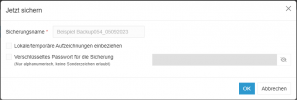
The problem is when creating a backup with V20 we can't select option to create backup without license and FQDN information!

Trying to release FQDN into my 3cx portal console and reinstall a new 3cx importing backup but the license and fqdn are include into backup so the problem persist.

Someone have a solution for that?

Regards
 
You first need to switch the current machine off, then disconnect the current FQDN from your portal logged in with the email used to register the subscription. Bb, be careful not to delete the subscription; use the Disconnect button where the FQDN is listed.
 
  • Like
Reactions: IrinaP_3CX
Hi, for this, you will need to install a new system from scratch without restoring a backup.
Please, I ask everyone involved in this decision to reconsider this

Re-installing fresh new system just to change the FQDN is wasting a lot of time. Surely, there must be an easier way
 
Please, I ask everyone involved in this decision to reconsider this

Re-installing fresh new system just to change the FQDN is wasting a lot of time. Surely, there must be an easier way
Nope, as the FQDN is related to many many things in the backend. Reinstall is the only way.
 
  • Sad
  • Like
Reactions: IrinaP_3CX and Reso
Nope, as the FQDN is related to many many things in the backend. Reinstall is the only way.
We have a on-prem system (Debian v20 now). Is it possible to download v18, re-install it, use an older backup and change FQDN and then upgrade to v20 ?
 
We have a on-prem system (Debian v20 now). Is it possible to download v18, re-install it, use an older backup and change FQDN and then upgrade to v20 ?
Yes, as long as the older backup was taken in v18.
 
Price drastically increases and the backup has fewer features....
Potentially you could manually remove the fqdn and license key from the .xml file in the zip...
 
Price drastically increases and the backup has fewer features....
Potentially you could manually remove the fqdn and license key from the .xml file in the zip...
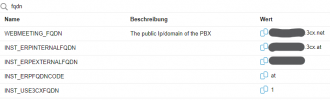
With the latest alpha you can do it without fqdn and licence. There are pramaters do adjust this now.
 
  • Like
Reactions: Evolute IT
Which Parameter would it be?

Backup still looks the same:
1720082123737.png

Do I need to set this parameters?

1720082345094.png
 
Die gibt es bei mir nicht. Version 20.0 Update 2 (Build 711 Beta)
Selbst hinzufügen?

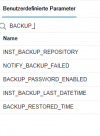
1720082644726.png
 
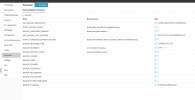
I am on the same version and have this stuff.1720082915327.png
 
does this means Backup_licence and FQDN set to 0 instead of 1 could generate a backup file without these settings?

Did you already tried ?
 
Yes, that works just fine.

EDIT: but just scheduled backups not manual
 
  • Like
Reactions: AWS2P
I 'm trying right now :)
 
Wanted to change the backup filename setting to something else like 3CX-FQDN-BKUP-Vxx.zip but it doesn't work, even the new change is saved in settings, while the scheduled backup runs it change the filename to default name 3CXScheduledBackup.zip
 
Last edited:
Wanted to change the backup filename setting to something else like 3CX-FQDN-BKUP-Vxx.zip but it doesn't work, even the new change is saved in settings, while the scheduled backup runs it change the filename to default name 3CXScheduledBackup.zip
This isnt for you to adjust the name. You can only change the name on manual backups...
 
There's a variable setting so I thought it was something we were able to change as our wish.
IMO It could be more than interesting to get for example FQDN be part of the file name and Release level , no confusion possible when you store a lot of files with same unique name as it is now.
 
Is there any way to move the license I have from one system to the other? We just renewed in January.
 
Is there any way to move the license I have from one system to the other? We just renewed in January.
Depending on the license status, there may be a way to utilize the already-activated PRO/ENT license.
You will need access to the registration email to release the FQDN and transfer license ownership to the new owner.
After the above actions, it may be possible to use the license for a new installation.

To provide you with more detailed guidance, please contact our customer service team and provide the license key number so that they can check and assist based on the license status and requirements of the new system that you want to use it for.
 

Forum statistics

Threads
111,953
Messages
589,910
Members
164,845
Latest member
tdzski5