- Joined
- Mar 8, 2024
- Messages
- 55
- Reaction score
- 7
Good morning,
We are testing Version 20.0 Update 2 (Build 715 Release)
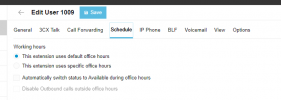
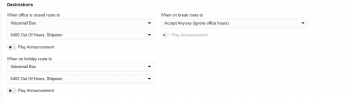
We just have the default department setup and Office hours setup.
The inbound trunk ( "Limit to" Default ) is forwarding to a user extension and always rings regardless of the Office Hours set
The activity log reports
<sip:[email protected]:5060> to <sip:[email protected]:5060>
22/08/2024 07:20:08.541 [CM503012]: Inbound any hours rule (unnamed) for 10000 forwards to DN:1009
22/08/2024 07:20:08.541 Rule matched
22/08/2024 07:20:08.541 Checking inbound rule '': hour type = 1; cond = 4; mask = ''
22/08/2024 07:20:08.541 [Flow] No office hours set, office hours assumed
22/08/2024 07:20:08.541 Current local time is: 7:20:8
22/08/2024 07:20:08.541 [Flow] Looking for inbound target: called=yyyyyyyyyy; caller="44xxxxxxxxxx " <sip: 44xxxxxxxxxx @:0>
22/08/2024 07:20:08.541 CallerNameAddr: "44xxxxxxxxxx "<sip: 44xxxxxxxxxx;nf=e>
22/08/2024 07:20:08.541 No inbound caller ID reformat rule for DN:10000 is defined, or it is disabled (<Rules />)
22/08/2024 07:20:08.541 Incoming Caller ID '44xxxxxxxxxx' can not be transformed to E.164 format
I did read this....https://www.3cx.com/community/threads/out-of-office-routing-not-working-after-v20-upgrade.127849/ and other articles that explain Office Hours functionality in v20.
It's a fresh install, nothing has been restored / migrated into it.
Thank you in advance for any assistance you can give.
We are testing Version 20.0 Update 2 (Build 715 Release)
We just have the default department setup and Office hours setup.
The inbound trunk ( "Limit to" Default ) is forwarding to a user extension and always rings regardless of the Office Hours set
The activity log reports
<sip:[email protected]:5060> to <sip:[email protected]:5060>
22/08/2024 07:20:08.541 [CM503012]: Inbound any hours rule (unnamed) for 10000 forwards to DN:1009
22/08/2024 07:20:08.541 Rule matched
22/08/2024 07:20:08.541 Checking inbound rule '': hour type = 1; cond = 4; mask = ''
22/08/2024 07:20:08.541 [Flow] No office hours set, office hours assumed
22/08/2024 07:20:08.541 Current local time is: 7:20:8
22/08/2024 07:20:08.541 [Flow] Looking for inbound target: called=yyyyyyyyyy; caller="44xxxxxxxxxx " <sip: 44xxxxxxxxxx @:0>
22/08/2024 07:20:08.541 CallerNameAddr: "44xxxxxxxxxx "<sip: 44xxxxxxxxxx;nf=e>
22/08/2024 07:20:08.541 No inbound caller ID reformat rule for DN:10000 is defined, or it is disabled (<Rules />)
22/08/2024 07:20:08.541 Incoming Caller ID '44xxxxxxxxxx' can not be transformed to E.164 format
I did read this....https://www.3cx.com/community/threads/out-of-office-routing-not-working-after-v20-upgrade.127849/ and other articles that explain Office Hours functionality in v20.
It's a fresh install, nothing has been restored / migrated into it.
Thank you in advance for any assistance you can give.